‘SMS performance metrics are higher than email marketing… SMS open rates can be astronomically higher—as high as 98%. The average click-through rate (CTR) for email marketing is 2.5%, while SMS marketing CTR is, on average, around 19%.
These are Shopify’s own words, and they show the picture quite clearly.
Thus Shopify merchants have a unique opportunity in using Email-to-Text or Text-to-Email gateways to leverage either the speed of SMS or the depth of email flows from their email accounts or even Shopify inboxes directly. This is an easy to access setup which unlocks the power of your store's customer phone data and opens up a two-way communication in a more easy to digest manner for both the customer and the shopify store owner.
Email-to-Text vs Text-to-Email
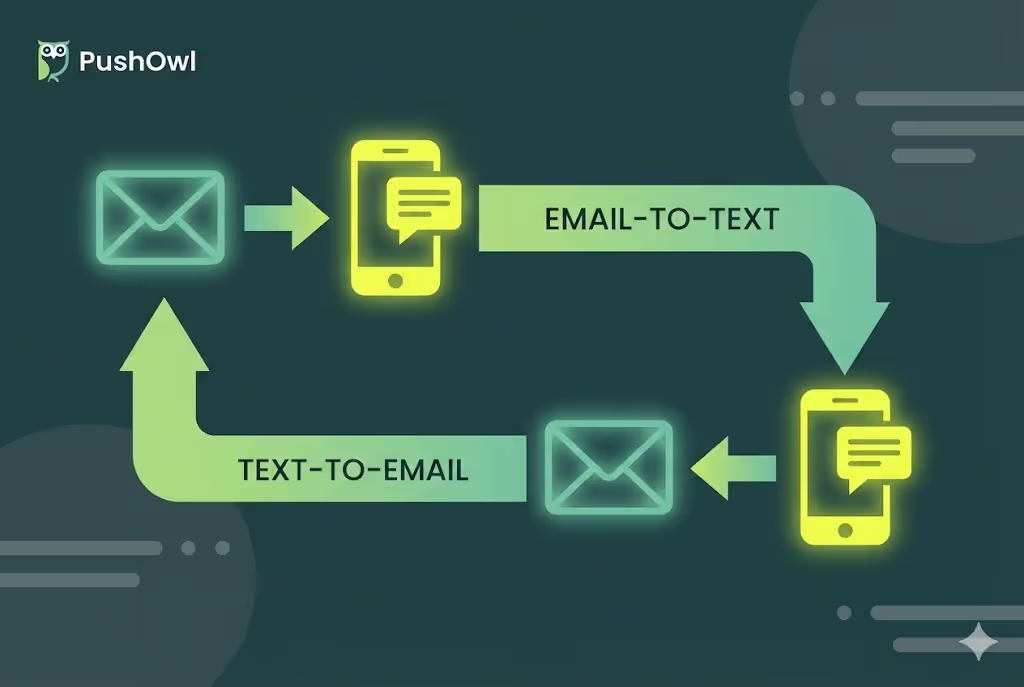
Email-to-text enables a Shopify store owner to compose a standard email in gmail, outlook or any of the other email service providers, and converts that to an SMS which is then sent to the customers phone. It essentially means you can create all your campaigns in email, and automatically send it to a user's SMS messages.
Text-to-Email is the opposite, when customers reply through a text to any of your store alerts, those messages show up in your email inbox or Shopify flows with the entire order history and context. This turns your shop alerts into simple two way conversation threads, and lets users interact with your brand directly from their SMS, and lets you track those conversations directly on your inbox or flows.
This is facilitated through an SMS gateway which handles the protocol translations, SMTP for outbound through your email clients and SMPP for your inbound. This makes both of these directions feel native to Shopify’s ecosystem and thus easy for existing Shopify owners to implement. As a store owner this would mean that you can send campaigns to SMS, and receive inbound replies through threads, without needing to leave your email dashboard.
Why Shopify Merchants Need This Bridge
SMS messages have a far higher open rate as compared to email, making this ideal for high-urgency moments like recovering abandoned carts or updating shipping details where we want the customer's attention quickly. Using Email-to-text makes the life of a Shopify store owner much easier, by being able to create these SMS campaigns directly from their inboxes linked with shopify data, and eliminating the need for a separate SMS dashboards all together.
Text-to-Email then captures replies, like confirmation texts, questions or feedback, directly into your Shopify linked emails or CRMs. This means everything is easy to access, compartmentalise and all in one place. Using these two features together is actually a great strategy when scaling, eliminating the need for multiple channel points, and giving you more of a birdseye view of your entire engagement structure.
Core Gateway Basics for Stores
At its core, SMS gateways are a translator between Shopify’s customer phone lists and mobile network service providers. It makes use of protocols like SMPP which is used to queue and deliver messages reliably throughout the networks. The email client works through a SMTP, where the gateway removes extra information and routes the message outbound, while any inbound messages are converted back to email form with Shopify list matching.
For a merchant, this enables using one setup and solving their entire delivery chain. They can directly pull phone numbers into email templates and make their targeting even more accurate. Thus they have a double sided benefit, with Email-to-Text ensuring precise delivery, and Text-to-Email creating reply threads linked to Shopify profiles.
How Email-to-Text Process Works Step-by-Step
- Send an email to the gateway address created from a Shopify customer's phone number.
- SMTP transmits this email to the gateway
- The message body is parsed and truncated into a SMS-friendly text by removing images, HTML and long signatures.
- This SMS-Friendly text message is then sent to the SMSC of the carrier using SMPP to enable quick, trackable delivery.
- The message arrives as a clean text with your store's sender ID.
Now a customer can reply directly to this which then runs the Text-to-Email flow and creates a thread. The entire process is tracked through order IDs, and Shopify integration allows gateways to sync data for better personalization. This makes the whole process feel more one-to-one for a user.
Shopify-Friendly Address Formats
The standard email address format follows, phonenumber@gateway-domain.com, where the phone numbers are plugged in straight from Shopify customer profiles, and the gateway handles the country lookups behind the scenes automatically. For bulk campaigns, some gateways even let you CC phone lists or use subject-line numbers for quicker deliveries.
This works across various email service providers, from Gmail to Shopify Email, and the Text-to-Email uses the same domain logic to match replies to orders. It is important to test your setup both ways before scaling.
How Text-to-Email Process Works Step-by-Step
- A customer replies/texts your Shopify-linked phone number.
- The gateway then reads the sender's details and matches them to a linked customer profile.
- It then creates an email using this number as the subject line and the message as the email body. Order tags are used for easy context.
- SMTP is then used to receive this converted email into your inbox or Shopify flow.
- This can now be responded to as a normal email.
- The reply again follows the Email-to-Text process, and delivers to the customer's message inbox, thus creating a conversational thread using email and text.
Everything is logged centrally, and this entire flow enables Shopify conversations to be a two-way communication channel in the most convenient space for both the merchant and the customer.
Gateway Types Tailored for Shopify
Cloud gateways: This is the most used in Shopify stores since they have simple Shopify app installs, which sync to customer numbers, handle Email-to-Text and Text-to-Email easily. Since this is not hosted by you, no server management is needed, and downtown concerns are mitigated.
API-hybrid gateways: These are used when a more complex automation needs to be built through Shopify. They offer more flexibility to the merchant but also add a certain degree of infrastructure management, making this a more intensive option
On-premise gateways: These are generally not used by Shopify merchants, only if the nature of data is extremely sensitive ( this is not a natural Shopify usecase ).
No matter which option you pick, as a Shopify store owner, choosing a Shopify-native solution will give you built in compliance and matching making your conversational flow simple to manage.
Setting Up Email-to-Text: Merchant Steps
- Pick the right Shopify-app gateway and sign up.
- Whitelist your designated gmail or shopify email domain to authorize outbound delivery.
- Map your customer phone lists from placed orders
- Create a sample template for testing ( under 160 characters )
- Enable reply routing so the Text-to-Email is enabled.
Setting Up Text-to-Email: Merchant Steps
- In your gateway dashboard, claim a number using the Shopify app.
- Set rules and conditions to forward inbound texts to your store support email, and tag order IDs for instant context.
- Test the flow by sending your number a message and check whether you receive an email with all the relevant information in your inbox.
- Test if a reply to this email lands in your message inbox on the phone.
Email Client Compatibility with Shopify
Gmail, Outlook, Yahoo and Shopify's own Email all send Email-to-Text flawlessly via SMTP, while inbound Text-to-Email lands in these same inboxes for unified handling, without needing any additional plugins or theme edits on Shopify. The gateways whitelist your store's domain to ensure privacy and safety of your two-way flows.
This translates to a seamless experience for your team from within the organisation's designated inbox, and helps them leverage Shopify data in the same dashboard.
Character Limits and Formatting Rules
Standard SMS has a character limit of 160 characters per segment, and gateways automatically split longer Shopify emails but remove extra elements like HTML, attachments, and footers so that the experience for the customer is better, and feel more professional and less like spam. Special characters like emojis use up extra space, so test the flows and make sure the customers receive all the information within one message.
It is beneficial to keep Email-to-Text subjects as sender IDs and the email body the main message to be delivered for better performance.
Enabling Two-Way Threading
A gateway will match replies using phone numbers from the Shopify profiles, routing Email-to-Text responses to the inbox of the sender, and the Text-to-Email inbound messages to the correct order ID and thread. This creates a smooth conversational flow between the sender and customer. So when a customer texts, “yes, send me the guide,” your team receives an email with the context, and can reply straight away, which then goes to the customer's text inbox.
Shopify data actually enhances this, as it also integrates purchase history with the conversational thread, and this makes a merchant's responses more effective.
Prime Use Cases for Email-to-Text
Sending abandoned cart reminders and shipping ETAs from the merchants inbox to the customers phones, are some of the major use cases, where speed and place are important. These alerts are not only sent fast but also seen fast since they arrive where the customer spends most of their time.. It also can create a much more personalized feel, with shopify integrations.
Prime Use Cases for Text-to-Email
Getting customer replies, like confirmations or feedback straight to your Shopify supported emails. A quick and pointed feedback like this is very valuable for a merchant. This also allows the merchant to interact further with their customers, which can deepen their customer understanding and make the customers feel more connected to the merchants brand. This can also act as a post purchase sales channel.
Real-World Shopify Flows
A quick example walk through:
- An alert is sent to the customer using Email-to-Text about the order confirmation and date selection.
- Using Text-to-Email, the user picks the date/time at which they are available for delivery, and this is now rested in the merchants Shopify inbox.
- The merchant now uses Email-To-Text to send a confirmation of the selected order to the customer text, and adds information about other products purchased by users who purchased this product.
- And so on and so forth, this flow can help build trust in the customer and also act as a post purchase upsell channel.
This can even work with a recovery flow, where a simple, “Yes, I want to buy,” can confirm an order.
Breaking Down Pricing Models
This format works on a pay as you use model, and can be upgraded for bulk or high volume email flows. The ROI should be calculated by understanding the open rates, response rates, and actions (cart recoveries, feedback etc). If the messages are sent internationally, separate fees would apply. This is basically the same as the SMS model of pricing and follows a similar structure for both Email-to-Text and Text-to-Email.
Opt-In and Opt-Out Mastery
Use Shopify checkout popups, for example, “Want SMS updates?” to opt-in for Email-to-Text sends. A response on a message can be considered an opt-in for Text-to-Email flows. It is a must for every outbound message to end with a, “ Reply STOP to end” which the gateway should honor instantly and disable future marketing communications on this number.
This also has a very well documented audit trail so compliance becomes much more effective.
There should be caps placed on frequency to avoid becoming marked as a Spam ID. Ideally 4 per month per user.
Future Trends Explained
- RCS, which will upgrade the SMS quality with more media options, so Email-to-Text would be able to send more and have to cut down less.
- Easy Whatsapp Business APIs layer, so merchants can reach SMS and Whatsapp inboxes through Emails.
- AI categorisation and personalisation, so the conversations are recorded correctly, and the responses are tailor made for each customer.
PushOwl uses an Omnichannel approach, so instead of requiring different carries for your Email-to-Text and Text-to-Email, your email, your SMS etc, using an omnichannel approach can actually bring everything together in one place under one umbrella. Using PushOwl will essentially enable merchants to get all the advantages of the Email-to-Text and Text-to-Email functions, except the two way conversations from email to text. So you have two separate inboxes, but the same dashboard. This can make your entire flow smoother and allow you to actually customize your campaigns on email and text with much more channel engagement. Add PushOwl to your Shopify store Today!