Every E-commerce team spends a lot of its time and energy on generating traffic. They use various channels for this purpose, like Ads, Influencers, SEO, Social Media, etc. This is definitely an important step in the purchase journey, but it is not the deciding step. An often overlooked feature responsible for the “buy or bounce” decision a customer makes after landing on a Shopify website is Website Search.
A non-optimised search is a huge contributor to abandoned carts, which are 70% of all cart additions across the industry.
For a customer, search friction is prevalent even after the browsing stage. And often becomes more frustrating as they move further along the funnel. Most users who drop off between cart and checkout do so since they can not rediscover products, compare options, or clarify price levels easily.
This is why the intent behind a search is so important. These shoppers have an idea of what they want, at least the options they want to explore. Now if the search is better optimised and tuned, the impact can be seen immediately. Conversions can be increased just by creating less friction between users and search.
But most Shopify stores still use the default search. This is only adept at handling simple queries, and real-world behaviors might not be accurately taken care of, like types, vague intent, etc. Basically, the default search is only useful if the user makes no mistakes AND knows exactly what they want, which is not the case for most users.
Thus, search becomes a revenue lever and not just a UX fix. And when these insights are used along with re-engagement tools like PushOwl, a brand can unlock intent value even after a user leaves the website. This flow for optimising search can enable a smarter retention, by letting users know about products they have searched for, back in stock items, and relevant collection nudges, all based on the search insights of a user. They get information about products relevant to them, and your Shopify Store gets a better revenue funnel. This blog explores how Search can be optimised for Shopify stores to become a major revenue weapon instead of a revenue leak.
Core Best Practices for Intuitive Search UI/UX
The key to a good search experience is obviousness. The user needs to intuitively know what is to be done, rather than the search experience feeling impressive to them. A user on search is going to type whatever is on their mind, go through the results quickly, and land on a product without even thinking about it. That's what a Shopify store needs to facilitate, keeping in mind that a search-driven user is more likely to convert than a casual browser. Let's go through some UI and UX solutions that can turn the Shopify search experience into a high-converting feature.
Autocomplete & Predictive Typing
Even before they finish typing, a user is expecting the search to start helping them. Using AI and natural language processing, autocomplete and predictive typing give real-time suggestions that are based on frequently asked queries, products, and expected user behaviour. This feature can improve engagement tremendously if implemented well. Guiding users to relevant results, easier and faster click-through rates can be improved, and a smart auto-complete feature enables a user's journey to be much smoother.
Predictive typing and search also help create a great source of data. Every query allows a brand to see what the users search for, where they have hesitations, and what terms do not convert as well as expected. This data will help make product names more effective, improve tagging, and build a better overall merchandise strategy.
This is also where an application like PushOwl can fit in perfectly, since the high intent moments have already been revealed through search. If a user searches for a product but does not buy it, a web push notification can be used to re-engage them with restock alerts or drops in price, recommendations, etc., which extend the overall value for the user beyond just one session.
Faceted Navigation & Filters
The results of any search should be straightforward, so if your search results are feeling overwhelming, filters can help de-clutter.
Faceted Navigation is how shoppers are able to use attributes such as price range, brand, size, color, and more subjective tags to refine their search results. The main objective of this is to provide more clarity to a user's search, rather than limit their choice.
Filters have certain best practices, so on a desktop, having a left-aligned sidebar is most ideal, and on a mobile, a drop-down menu can keep the interface easy to navigate and clean. Filters that allow multiple filters to be selected work best. If we make users re-enter details every time they change a filter, friction, and by association, the number of user-exists would automatically go up. Filters are even more critical for mobile user experience, and most users shop on their mobile devices these days.
Having advanced filters is also a product discovery improvement feature, since shoppers are usually unsure about the exact product they need, but know other constraints like the size, price or color. So these filters help your store fill in this gap and show them the right products.
Apart from these direct benefits, filters give a store more insight into what their users want. This data would also enable apps like PushOwl to segment users more effectively, and send shoppers what they actually want vs what the store offers.
Typo Tolerance & Synonyms
A user will always search without paying much attention to their exact phrasing, spelling or using short forms. They will rarely try to match exact phrasing. Shopify is built to handle basic errors, but will struggle with border variations. It is built to handle a couple of swapped or misplaced letters, and not much more than that.
We need to integrate NLP driven typo tolerance mapping to match users intent, instead of their keywords. This way even if a user searches for “blu jeans” instead of “blue jeans” they will get relevant results or if they type “ tee”, “t-shirt”, or “top” it will be treated as interchangeable by the search.
A better typo tolerance also reduces the zero result searches and thus creates a better downstream performance. If a user is usually finding what they want to, bounce rates remain low, and re-engagement is more efficient.
A/B Testing What Actually Moves Conversions
Search optimization works much better when backed by data, and not just intuition. Structured A/B testing will enable a team to see what is actually driving revenue and sales.
Let's look at what a text matrix might look like, based on real world use cases.
This goal is to understand what works for your specific Shopify Store. The metric to be tracked becomes the most critical element of your AB test, and tracking a wrong ( unimportant ) metric will lead to inaccurate test results, and potentially lost revenue and a worse user experience.
Advanced Features: Visual & Voice Search
These are changing the way users search for products. While they are not a necessity for ALL stores, certain categories and mobile-focused users can see a visible difference by using visual and voice search.
Image Based Product Discovery
A shopper is more likely to know what they like when they see it, vs when they are asked to type it. As the name suggests, this search method allows users to upload photos to find products similar to their image using AI. It can analyze the color, pattern, material, shape and style, to match against the store's product catalog. Some industries this works great in are fashion, furniture, and home decor since this is more of a visual based intent. It is easier to search through what you see than type out what they feel.
Visual Search or Doofinder can integrate this into product search for your Shopify Store without requiring any custom development.
Using visual based search improves engagement at the discovery level by cutting down friction. Users do not need to guess keywords and can use images to see results directly. This also leads to increased average session times, better product clicks, and even more so on mobiles where typing is not super precise.
Conversational AI Chat & Voice Search
Keywords do not need to limit search any longer. Using conversation AI or Voice search creates user interaction using NLQs like, “peppy tees within $30” or “everyday wear green shoes”. So instead of generic product lists, tools can understand the users intent, and show relevant products.
In Shopify, Shopspeak is one such app, which can use conversational AI and integrate it with voice, product comparisons, discovery, and multiple language capabilities.
This sort of an approach is focused more on user experience, and helps reduce effort and refine choice for the users. It enables the search to behave like a shopping assistant for the user. It also works in tandem with customer support. FAQs, alternatives and help and easier for the user to access and without human intervention.
These advanced features are not an alternative to search UX. They work as extensions after the core search UX is already optimised. They are also effective for the right kind of store, so even though they add convenience, the store's product catalog should be studied to understand if the customers need more flexible search or mostly just exact search.
Analytics, Tools & Optimization Checklist
To really get an understanding of how optimised the site search is requires measurement. Without it, it's purely guesswork. Search performance is not constant, so it needs to be constantly updated based on the catalog, trends and user behaviours changes. A consistent framework is required for analyzing search performance is a way that it actually impacts revenue. Let's look at a few key metrics, how to keep track of them, and build a checklist to practically optimize search over time.
Key Metrics: Zero Results Rate & Search CTR
ZRR and Search CTR can tell the entire story of a store's search health.
Zero Results Rate
This is a measure of how frequently a user searches for something, and sees no results. A high ZRR is a signal to the store of either missing products, tagging errors, weak typo coverage, or language issues.
This measures how often users search for something and see no products. A consistently high zero results rate signals problems like missing products, poor tagging, weak synonym coverage, or language mismatch.
For any e-commerce store a decent ZRR is below 5%. Anything more than this signals an issue with the search, and needs a deep dive to fix.
Another advantage of tracking this, is as an opportunity finder. Users are searching for an item, which is not available with the store. This can be an indication of unmet demand, and stocking such an item or a good alternative can drive quick sales.
Search Click Through Rate (CTR)
This is a measure of how many clicks a result gets after performing a search on our store search. A low CTR could indicate that the intent and results are mismatched, even if related products exist. Fixing this would mean a higher conversion percentage, since our search results are now matching the intent of the user.
These two metrics, when tracked together can give a good assessment of search performance, and if it helps users or pushes them out.
Shopify Analytics can be used with GA4, to help brands track:
- Frequent Search Terms
- Count of Results
- Search CTR
- Search page exists and refinements.
With the Google Tag Manager, events like search_term or results_count can be pushed into the data layer, making it easier to flag zero result searches, and analyse these at a larger scale.
Optimization Checklist for Shopify Search
Consistently optimising search is much more streamlined, once data is tracked accurately. The below checklist can be used for high impact improvements to a Shopify store, without over complicating or needing much development.
This, when done together, will have a compounding effect for improvement. This also creates cleaner intent signals, so tools like PushOwl can drive re-engagement much more effectively without needing more ad spend.
Case Study: Improving Shopify Search That Lifted Conversions
Problem
- A shopify merchant saw that users were not finding products earlier through their internal search.
- Basic typos and vague queries were leading to user exits.
Solution
The merchant used Shopify, along with a search optimisation application to improve search relevance by:
- Built in typo tolerance was integrated, so misplaced searched like “tabble” still gave accurate results.
- Autocomplete and predictive suggestions were enabled, so users could easily refine their search even before they finished typing
- Boosting rules were customised, so high-value or seasonal products were ranked higher in search results.
Effect
The merchant saw an improvement in:
- Even typos gave users much more relevant search results.
- Query entries saw much less friction due to suggestions and autocomplete.
Shopify has mentioned that their merchants see up to a 19% growth in search revenue from previous years, when search optimization using these methods are made.
Implementation Roadmap
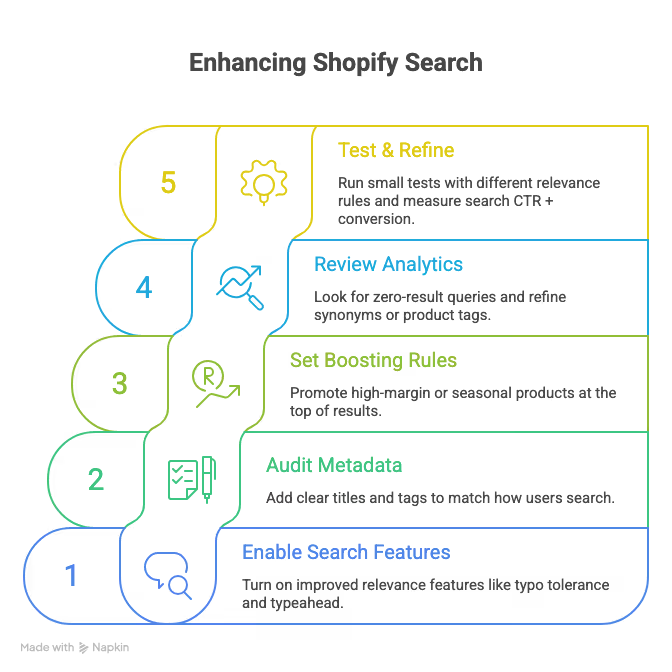
Having a better Shopify search helps boost conversions, reduce friction and build customer trust. Even slight improvements can unlock useful revenue from already existing traffic.
Using PushOwl can extend this impact beyond just one session. The buying intent has already been logged, PushOwl helps a store use that intent to bring back the shopper, with well timed web push notifications or an email or SMS about discounts, restocks or reminders. The key is that the data makes PushOwl personalisation work more effectively.
Thus search optimization is not a UX problem, it is a business problem and solving this is a revenue goldmine.