You built your email list.
You nailed down the offer that perfectly highlights your product’s USP.
After A/B testing subject lines, you have a swipe file of openers you cannot wait to try.
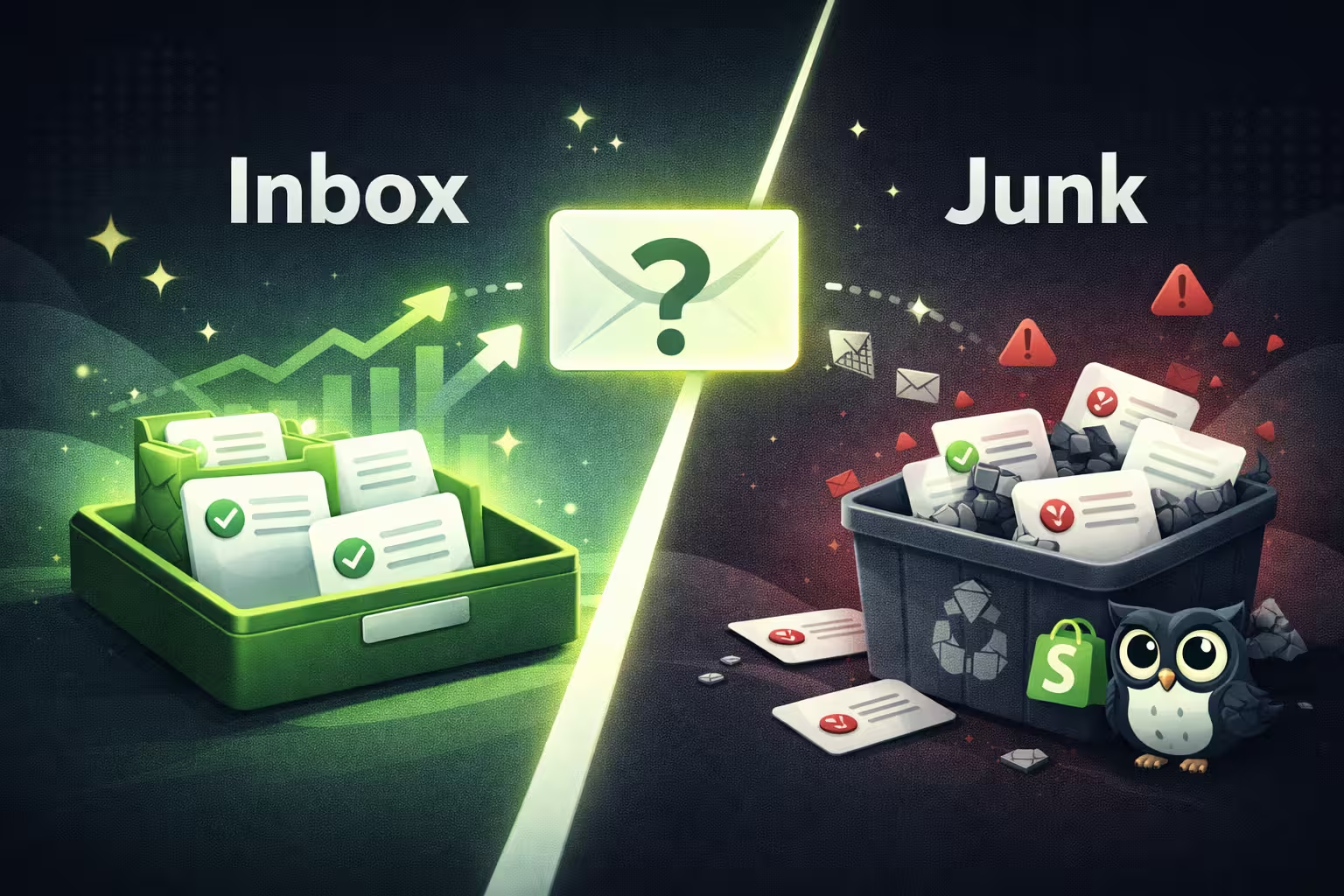
And yet, the digital graveyard of your subscribers’ inboxes, a.k.a. the junk folder, is where most of your marketing emails end up.
That is what happens when you make the most fundamental mistake while planning email marketing campaigns: you forget about the reasons beyond email copy that influence inbox placement.
Spam filters evaluate whether your emails are expected or safe. The expert marketers and Shopify store owners we spoke to break down what spam filters look for.
In this guide, we dive into the real reasons email ends up in junk or spam and how to fix them before they start affecting revenue.
Why Your E-Commerce Emails Go to Junk
If your email open rates are declining or subscribers have alerted you about your emails landing up in their junk folders, investigate the following causes:
Reason 1: Missing or Broken Email Authentication
The first common cause is missing email authentication. Your email domain signals trust when you have the following three authentications set up:
- SPF (Sender Policy Framework): The domain owner (which is you!) provides the verified servers/IPs for sending marketing emails. Email providers look at which IPs are allowed to send emails on your behalf. If SPF is missing or incorrect, your campaigns are more likely to land in spam, regardless of the content of your emails.
- DKIM (DomainKeys Identified Mail): This method involves a digital signature that the email provider assesses to verify whether an email has been altered in transit. If it seems altered, your emails will go to the spam/junk folder or get rejected. DKIM ensures they go through.
- DMARC (Domain-based Message Authentication, Reporting & Conformance): With DMARC, you tell the servers whether to approve, quarantine, or reject emails based on domain authentication failures. This method prevents domain spoofing, which is common in phishing scams.
Email providers review your authentication setup using the three methods above, and if it is not configured properly, your emails may end up in the junk folder.
“A frequent problem arises from a merchant incorrectly setting up or missing SPF, DKIM, and/or DMARC authentication records for their sending domain. Many merchants leave the default configuration in place and believe they have all the necessary configurations in place, which is typically not the case.”
- Sajal Bhadra, Founder of CallingAgency, which helps e-commerce brands with cold calling services
Do not rely on the default minimum settings; ensure that you have amped up the authentication to its maximum.
Reason 2: Poor Sender Reputation
Your sender reputation is your track record as a sender. Once your reputation drops, inbox providers become more cautious. Emails that would normally land in the inbox start getting filtered into spam, even if nothing has changed in your campaigns.
Inbox providers look at signals like bounce rates, spam complaints, and the consistency of your sending patterns.
When bounce rates exceed acceptable thresholds or spam complaints exceed ~0.1%, it signals that your emails are either reaching the wrong audience or being perceived as unwanted.
Sudden spikes in sending volume can have a similar effect, especially if your domain hasn’t built enough history.
Reason 3: Low Engagement Signals
Inbox providers track how recipients interact with your emails. If subscribers are not opening or clicking on your emails, it signals low authority and declining relevance. Such a scenario could also occur even if your newsletter content or promo copy is spot on.
Over time, such behavior will negatively influence the inbox placement of your emails.
Reason 4: Spam Trigger Content
Content alone rarely causes placement in the junk folder, but it can reinforce other risk signals.
“At BirdieBall, we once operated a golf seasonal offer, and the sales remained the same. We had heard that many of those emails were blocked by the spam filter and did not reach those customers, who were warm leads we had already worked hard to win.”
- Katie Breaker, Sales Director at Birdieball Golf, an e-commerce brand
Excessive capitalization, emojis, exclamation points, misleading subject lines, and image-heavy emails with little text are more likely to be filtered, especially if the sender reputation is weak.
Reason 5: Poor List Hygiene
List quality directly impacts email deliverability. Purchased lists and outdated email addresses lead to high bounce rates and spam complaints, both of which affect sender trust over time. Purchased lists are especially risky, since they include recipients who never opted in.
“A small and more active list will always trump a big and unresponsive one.”
- Welly Mulia, Founder of CartMango, an email service provider
To ensure your list includes only high-intent leads, you must clean it frequently, as even organically grown lists degrade over time. Subscribers may lose interest or change their email addresses, so you need to maintain list hygiene to exclude inactive addresses from your campaigns.
Promotions vs. Junk & How Spam Filters Actually Work
A common mistake is treating Promotions and Spam/Junk as the same problem.
They are not.
“Promotions are an algorithmic classification of inbox marketing, while Junk is a signal of a loss of trust in a domain. In the former case, I work on relevance, frequency, and user behavior; in the latter, I work on reputation, complaints, and database quality. Conflating these issues is a common mistake, as their causes are fundamentally different.”
- Shawn Zaripov, independent marketing consultant at SEO Antares
Although emails in the Promotions tab are still considered safe (they are differentiated for being commercial in nature rather than for being spammy), it’s not where you want your emails to end up.
Final Inbox Placement Is a Cumulative Decision
Here is what the inbox providers are looking at:
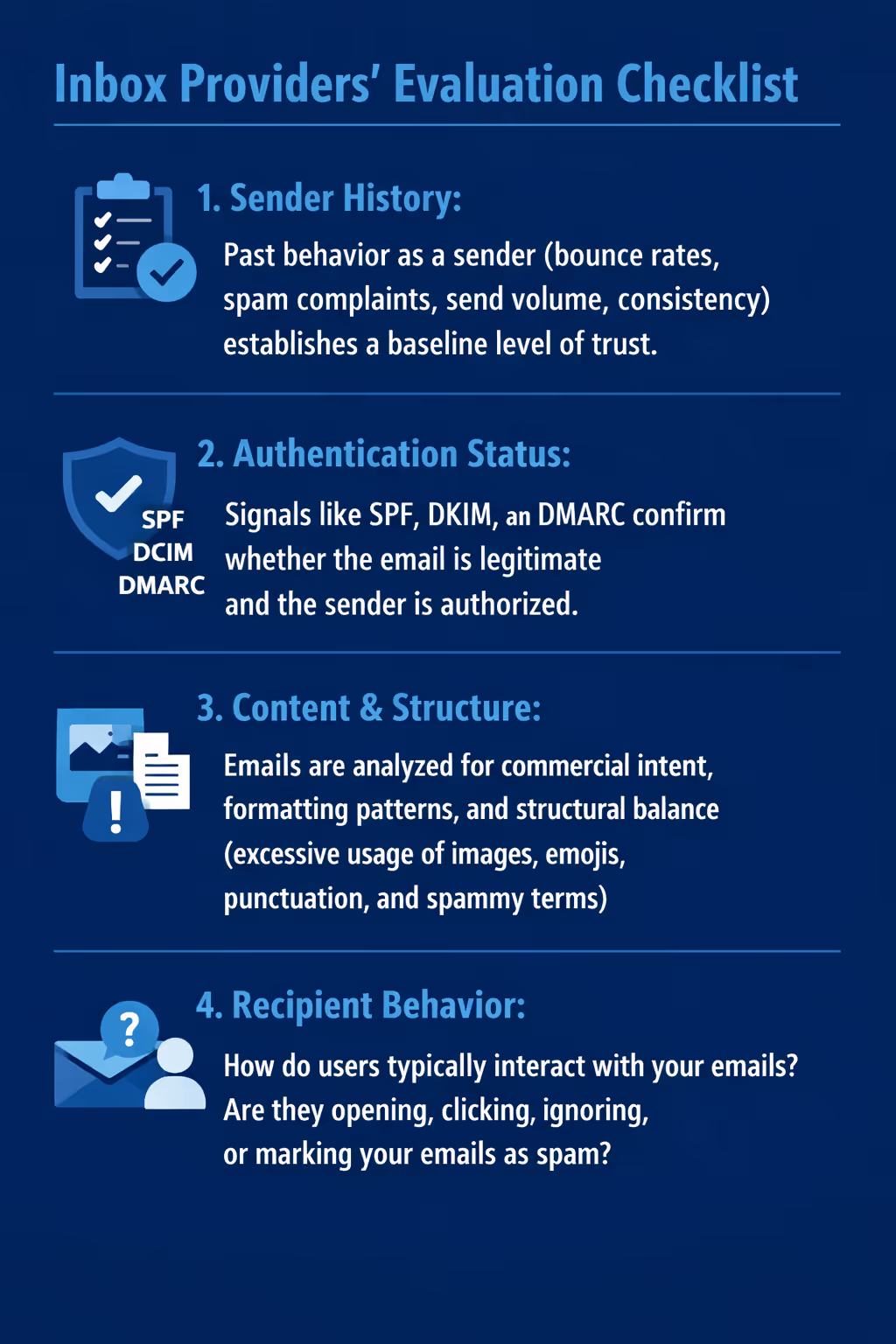
Based on all these inputs, a placement decision is made:
- Primary inbox
- Promotions tab
- Spam/junk folder
And the consequences of this placement can be massive.
According to Mulia, “Brands can realistically lose 20 to 30 percent of their email revenue due to poor inbox placement alone.” He further explains that “most merchants never realize because the dashboard all looks normal, but the money just isn't coming in.”
The fact that it cannot be tracked easily makes it more difficult to fix.
What’s worse is that it’s not just your sales promotional emails that will get hit. Even your email automations, which operate in the background based on customer behavior triggers (and are therefore mostly expected), also suffer.
“You will see the damage is felt the most on post-purchase flows and abandoned cart sequences, the emails that are worth the most per send. A store generating $500,000 in annual email revenue loses $100,000 a year due to a 20 percent gap in authentication, with nothing in the dashboard to explain why.”
- Elvin Zhang, Partner and Brand Marketing Director at PODpartner, a print-on-demand dropshipping platform
Most marketing emails fail because they are not trusted enough to be delivered at all, whether promotional or not.
How Do I Identify Why Emails Are Going to Junk?
With so many variables, it is difficult to determine why your emails are ending up in the junk folder. Multiple reasons could be at play. This Inbox Trust Scoring Matrix will help you organize deliverability factors into three pillars:
- Authentication: Are your emails coming from verified IPs?
- Reputation: Do your emails get flagged often?
- Engagement: How do recipients engage with your emails?
If one pillar is weak, chances of your email landing in the junk folder go up.
The Inbox Trust Score: A Self-Audit Framework
Take a screenshot of this matrix and identify your inbox trust score.
If your emails score above 12, then your deliverability foundation is strong.
Deliverability is at risk and requires optimization if your score falls between 8 and 11. A score below 8 means your deliverability performance might be affecting revenue, and it is worth looking into the gaps.
Which Deliverability Pillar to Fix First?
Authentication is the most important, and also the easiest, pillar to fix.
“Many Shopify brands try to fix low open rates. That’s a symptom of a problem, not the problem itself. If your emails are not authenticated, they won’t be trusted enough to reach the inbox consistently, and your open rates will be low.”
- PushOwl Sales Team
Once you fix authentication, you can move on to reputation and engagement metrics.
Pillar 1: Fix Your Authentication
As Zhang points out, “the fix takes under an hour, but most merchants do not touch it for months because the problem never throws an error. Revenue disappears into some folder nobody is checking.”
Therefore, ensuring that your SPF, DKIM, and DMARC authentications are properly configured will signal to spam filters that your email domain is safe.
Step-by-Step Email Authentication Setup for Shopify Merchants
10.76% of domains have no email authentication at all.
Want to check if you have added the relevant safeguards for your email systems? Follow these steps:
- Step 1: Authenticate your sending domain by telling your email platform which domain you will send from before adding any DNS records. This step matters because inbox providers do not trust generic sending domains. Authentication ties your emails to your brand, so Gmail and Outlook know who is actually sending.
- Step 2: Configure SPF to prevent unauthorized users from impersonating your domain. Your email platform will generate a TXT record to help the provider verify the IP address.
- Step 3: Configure DKIM so that each email is “signed” to prove it has not been altered. Your email provider will give you one or more CNAME/TXT records to add.
- Step 4: DMARC builds on SPF and DKIM. If either of these authentications fails, it tells inbox providers what to do. It can start with p = none, which signals that the inbox provider should monitor activity without taking any action. Then, p = quarantine, which means it should send suspicious emails to spam; if authentications continue to fail, then p = reject, which means it should block the emails completely.
- Step 5: Verify authentication, because once records are added, your email platform will check if everything is configured correctly. Most tools show a “verified” or “authenticated” status inside the dashboard. You can also double-check using tools like MXToolbox.
PushOwl + Brevo help you with the above steps so that not only are you authenticated, but you also have maximum protection against emails being marked as junk.
Without this, your sender reputation can be at risk.
As Mulia explains, “your messages get flagged as suspicious. And over time, that one missing DNS record can bring down your entire sender reputation. I've seen stores go from solid placement in the inbox to landing in spam just because they skipped this one step during setup.”
So while your email list is growing and your customer segmentation is on point, skipping this pillar risks your emails landing in the spam folder.
Pillar 2: Build Your Sender Reputation With List Hygiene
Beyond authentication, there are some best practices related to email lists and sender reputation that you can adopt to ensure your marketing emails go to the subscriber’s inbox and not the junk folder.
Remove Inactive Subscribers
While most Shopify stores know not to use purchased email lists, they hesitate to remove subscribers from their email list because isn’t the point to grow your email list?
“List size feels like an asset. A list in which 30% to 40% of subscribers have zero opens within 90 days pulls the sender's reputation down with each campaign, regardless of content quality.”
- Camille B, Marketing and Operations Manager at Search Party Recruiters, a hiring platform for remote workers
But cleaning out inactive subscribers before a major campaign can improve your inbox placement rate. Do this gut check before removing a subscriber:
- Are they clicking on or even opening your emails?
- Have they engaged with the brand in the past six months?
- Did any of your email automations (especially win-back campaigns) lead to a purchase?
When you review your email list every quarter and remove inactive subscribers, your engagement signals will improve.
“When we cleaned out our inactive subscribers just prior to sending our Tuscany vintage email, our open rates increased by 25% and our click rates by 18%. Both Gmail and Yahoo! saw these robust engagement numbers and rewarded us with better placement in their primary inboxes for the next several weeks.”
- Jeff Patten, Co-Founder of Flatiron Wines and Spirits, an e-commerce brand with an email list of more than 110K subscribers
And of course, eventually, removing dormant contacts from your email list will lead to higher revenue.
“I once worked with a store that cut its list by 40%, and I saw revenue skyrocket within a few weeks. We saw their monthly sales jump by 18% because their messages were no longer being routed to the secondary inbox or junk folder for active buyers.”
- David Toby, Managing Director of Pathfinder Marketing, an Australian marketing agency
So start chopping that email list down before the next quarter begins if you want your emails to avoid the junk folder.
Warm Up New Domains and IPs
When you start sending from a new domain or IP, inbox providers have no history to evaluate. Warming up is the process of gradually building that history, starting with your most engaged subscribers.
At this point, every send becomes a signal, so you need to focus on those that are most likely to engage. Your customer segmentation efforts will come into play here.
“We were able to reclaim 30 to 40 percent of the lost revenue within 2 to 3 months through improvements to the email list segmentation and warming.”
- Ruben Medina, Head of Marketing and Sales at Koalendar, a scheduling platform
Begin with users who have recently opened or clicked your emails. These interactions signal that your emails are not ignored.
A controlled warm-up could look like this:
- Week 1: Send to 500-1,000 highly engaged subscribers (recent clicks or opens in the past 15 to 30 days)
- Week 2: Increase volume gradually, but continue prioritizing engaged users
- Weeks 3-4: Expand to the rest of your email list once positive engagement signals start stacking up.
You can establish a stable sender reputation without triggering risk signals in this manner.
Monitor Your Complaint Rate
Spam complaints are among the strongest negative signals that inbox providers track.
Every time a recipient marks your email as spam, it directly impacts your sender reputation. Unlike low opens or missed clicks, complaints are treated as a clear indication that your emails are unwanted.
A complaint rate above 0.1% is enough to trigger spam filters.
Watch your complaint rates fall with PushOwl
What makes this tricky is that complaints do not scale in a linear fashion. A single poorly targeted campaign can cause a spike that affects future sends. At this point, you should immediately reduce your email send volume and review your recent campaigns to identify the culprit.
You can use Google Postmaster Tools to track your email complaint rates and study spam reports.
Pillar 3: Create Positive Engagement Signals
Once you clean your email lists, the subscribers left are leads who want to hear from you.
You need to send them the right signals. And as with most email marketing strategies, the best way to drive engagement is email segmentation.
Segmentation based on recency, location, AOV, lifecycle stage, and other customer behavior variables ensures you send relevant campaigns, increasing the probability that subscribers will open them.
Target customers and subscribers who have been inactive for more than 90 days with re-engagement campaigns.
Patten and his wine brand achieved significant gains with their win-back campaigns. He follows two steps while emailing dormant users. “We have something quick for the recipient to engage with and offer one wine deal right away. After 90 days of inactivity, we remove no-replies.”
The result? The brand’s list health improved by 18%, and due to positive inbox placement, email revenue increased by 12%.
The subscribers who do not respond to win-back campaigns are the ones you can remove.
After filtering your email list twice, you will have a group of highly segmented customers who are likely to engage with your content.
Content That Passes Filters
Content does not decide placement on its own, but it directly influences how recipients engage with your emails. And engagement is one of the strongest signals inbox providers use to determine future placement.
To drive positive engagement signals:
The above is the foundation for an email that passes filters. To make the email engaging and persuasive, tailor the copy to the purchase behavior of the segment/subscriber you are emailing.
Technical Content Fixes
Technical shortcuts can also affect deliverability and trigger spam filters. Keep an eye on the following:
- HTML structure: Broken or unnecessarily complex code can affect how emails are parsed and rendered across inbox providers, resulting in text and graphics that appear displaced.
- Link consistency: URL shorteners can lead to erroneous links, which can be treated as high risk.
- Unsubscribe option: Ensure that all your emails include a clear unsubscribe option. This option signals a permission-based setup and validates your email list.
- Sender identification: Include a valid business address to reinforce legitimacy.
- Consistent “from” name and address: Frequent changes in sender name or email address introduce confusion. This inconsistency weakens trust signals.
- Reply-to address validity: Emails sent from no-reply addresses for every email (thereby giving the customer no option to reply) can reduce perceived legitimacy.
- Tracking domain consistency: If your click-tracking links route through domains that do not match your sending domain, it can create a mismatch.
- Mobile rendering consistency: Poor rendering across devices (especially mobile) does not directly trigger spam filters, but it leads to lower engagement, which email providers then pick up on.
Together, technical and content fixes can make your emails more trustworthy.
Why Smart Shopify Stores Add Web Push to Their Retention Stack
One of the biggest challenges in organic marketing is data privacy.
Not every visitor is ready to share their email address or phone number the moment they land on your store.
Web push notifications offer an alternative path to reach those visitors.
Instead of asking for personal contact details, push notifications rely on browser permissions. Once a visitor opts in, you can send short alerts directly to their device, even if they are no longer on your website.
Unlock omnichannel marketing with PushOwl
Because the barrier to entry is lower, opt-in rates for push notifications are often 2-3× higher than traditional email sign-ups.
Another advantage is deliverability.
Push notifications bypass email spam filters and inbox algorithms, so your message can appear directly on a subscriber’s screen.
But web push is not a replacement for email marketing.
Breaker warns that “waiting until deliverability breaks to set up another channel means you are already behind when it counts most.”
Push works best as a complement to email, not a substitute. When you layer push notifications into your email and SMS campaigns, you build a powerful omnichannel approach.
With an omnichannel strategy, your automation can reach customers across multiple touchpoints.
For example, if a shopper abandons their cart, the first two reminders might arrive via email. The third can be a push notification.
This approach helps brands:
- Reduce inbox fatigue by distributing reminders across marketing channels
- Increase visibility if emails were missed or filtered
- Grab immediate attention while their purchase intent is still fresh
And when your email deliverability is suffering, an established push-notification architecture will help keep the retention machine running.
How PushOwl Protects Your Email Deliverability
According to ValiMail's ‘The State of DMARC in 2026,’ only 42.06% of domains have a complete DMARC setup.
Which is why Shopify stores rely on PushOwl to handle deliverability.
The goal is to protect email deliverability and sender reputation from the outset, rather than waiting for gaps (proactive instead of reactive). PushOwl and Brevo build safeguards directly into the platform so that Shopify brands can maintain a healthy sender reputation as they scale.
Reliable Sending Infrastructure
Brevo is responsible for email delivery, and it manages IP reputation behind the scenes.
Your campaigns will originate from sending infrastructure that mailbox providers already trust, so the probability of email deliverability issues is low.
Guided Domain Authentication Setup
PushOwl walks merchants through SPF, DKIM, and DMARC during setup.
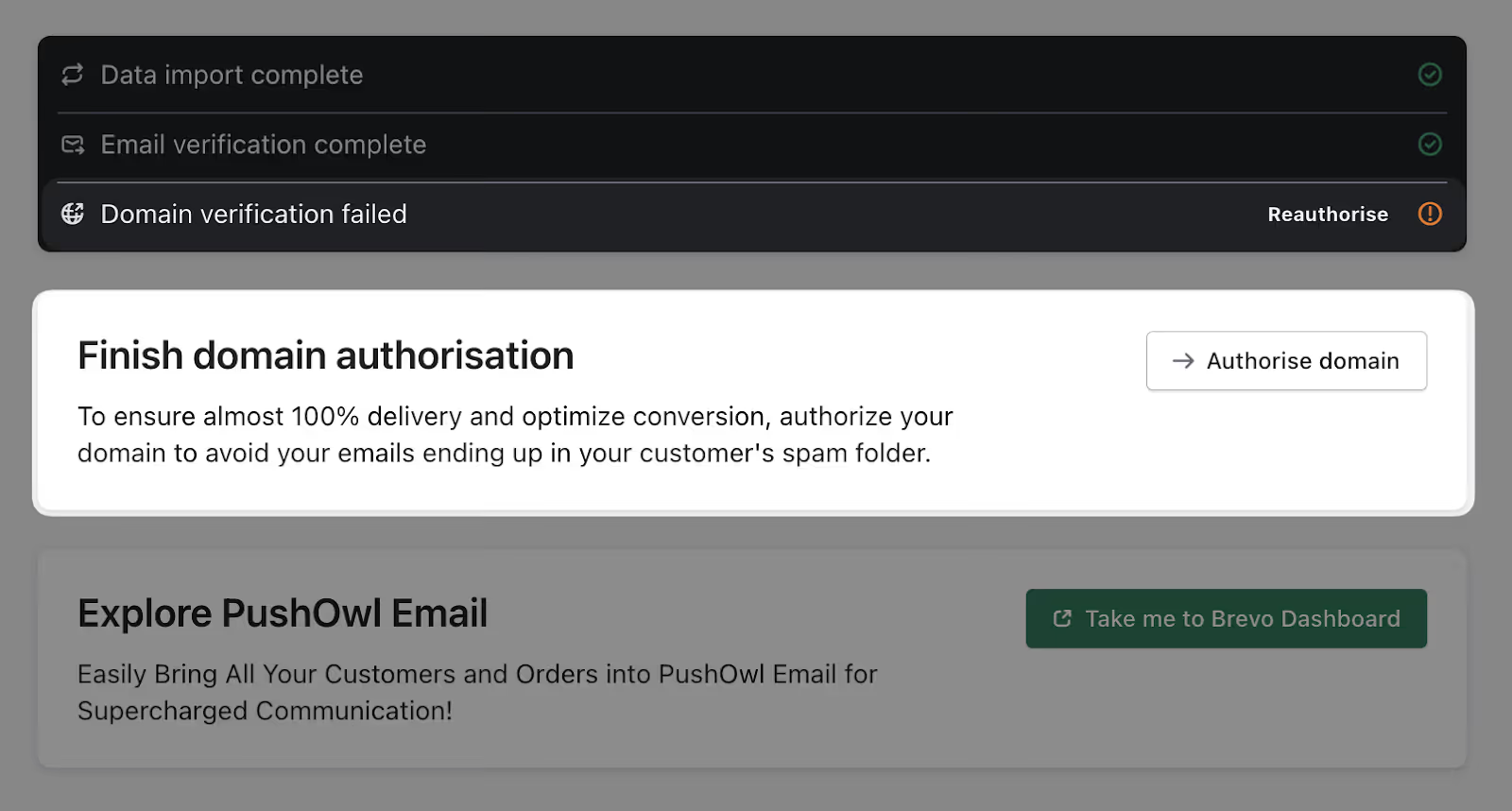
These authentication protocols verify that your domain is authorized to send the email and that the message has not been tampered with.
Engagement-Based Sending To Protect Reputation
We already know that mailbox providers monitor how recipients interact with your emails. If a large portion of your audience ignores or deletes your message, it can signal low-quality sending behavior.

With PushOwl’s advanced segmentation, you can prioritize subscribers based on purchase history and other buyer behavior, rather than just demographic segmentation. Positive engagement signals protect sender reputation.
Web Push as a Complementary Channel
When email deliverability breaks down, your entire campaign cycle should not get derailed. Which is why it is important to nurture your leads through push notifications as well. Relying on a single marketing channel is not ideal.
PushOwl allows brands to distribute reminders across email and web push notifications.
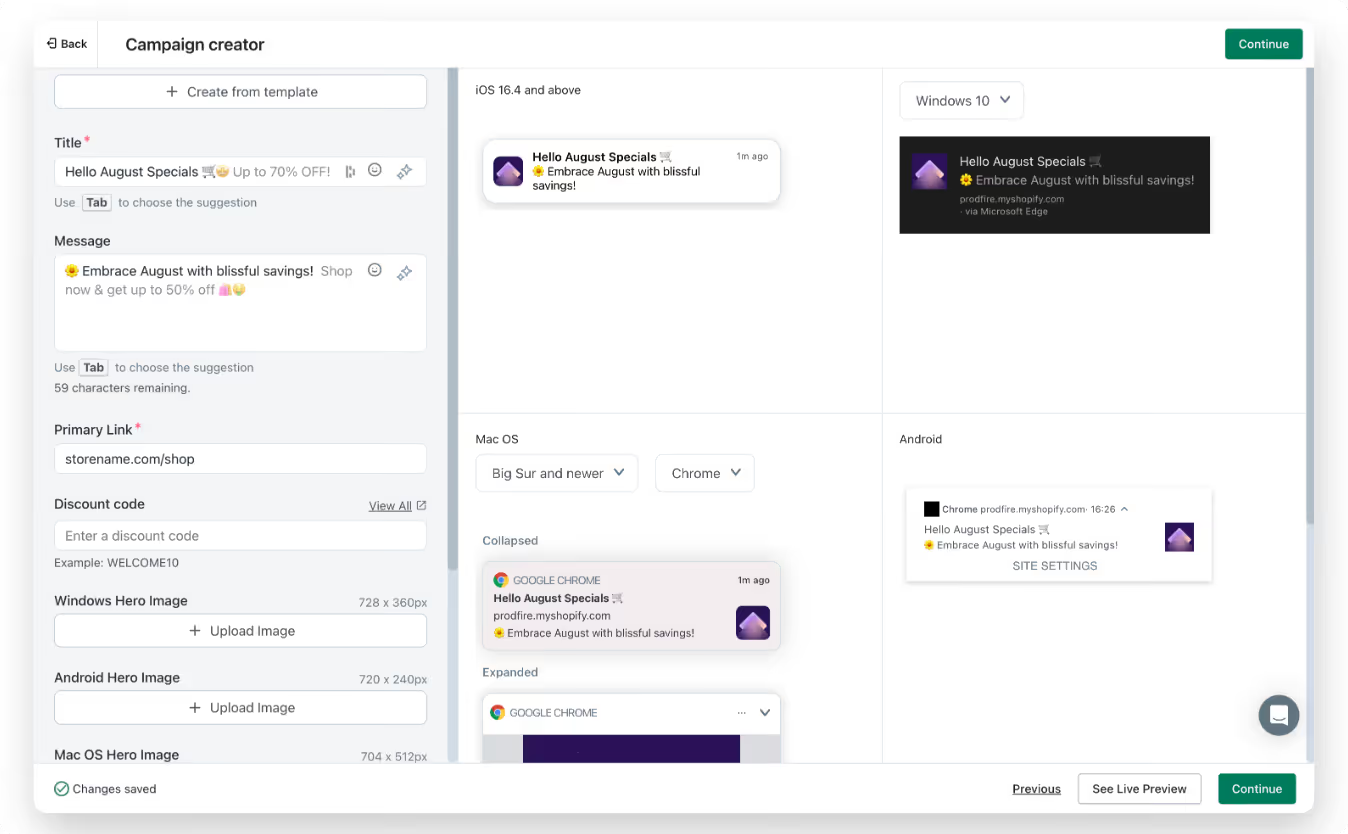
By layering in push notifications, you reduce the number of emails you send to a customer (thus preventing spam). You are also increasing your chances of reaching your customer by adding another channel to the mix.
Push notifications reach anonymous visitors who may not have given their email ID, so you are increasing your overall reach as well.
Suppression Management
PushOwl automatically suppresses bounced addresses, unsubscribes, and those who have reported your emails. They will be excluded from future campaigns.
By preventing repeated sends to problematic contacts, you help maintain sender reputation.
Prevent Emails From Going to Junk With PushOwl
Emails land in the junk folder when trust signals are weak or inconsistent.
Missing authentication, poor list hygiene, low engagement, and technical mishaps weaken your sender reputation over time.
And once this reputation drops, so does trust. After that, every campaign you send must work harder to gain visibility.
Fixing deliverability is more than about tweaking subject lines.
PushOwl helps you build a system that inbox providers trust. From authentication setup to suppression management and engagement-based sending, PushOwl helps you maintain the signals that keep your email in the main inbox.
And when inbox placement becomes unpredictable, web push ensures your campaigns do not break down.