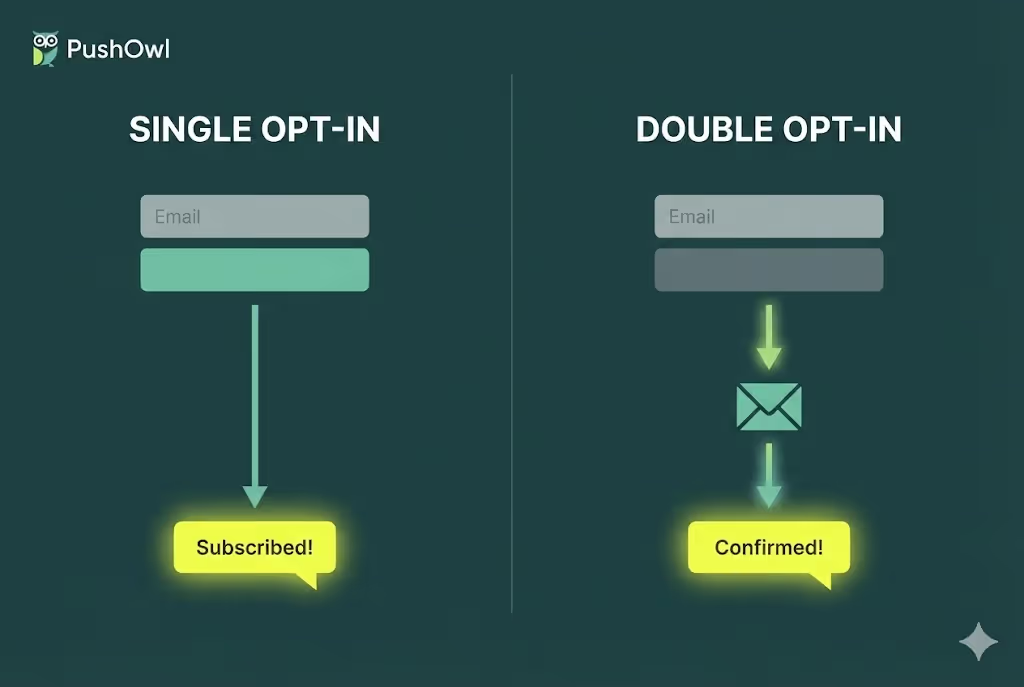
When signing up subscribers in email and SMS marketing, businesses have the option to choose between two primary opt-in methods: single opt-in and double opt-in.
But how do you decide which one to choose?
At the start of my career, I didn’t stress over selecting an opt-in method for my email or SMS campaign. But I was absolutely wrong.
Over time, I’ve realized that it’s absolutely worth losing sleep over deciding which opt-in approach you should be using for your website. This affects important metrics such as your email domain reputation, engagement rates, unsubscribe rates, and even your spam score.
In this article, I will explain single vs double opt-in signup methods to help you decide which method suits your specific business goals.
What is Single Opt-in?
As the simplest subscription method, single opt-in requires users to share only their email address or phone number, and there’s no need to confirm the subscription.
There are two main reasons why marketers choose a single opt-in subscription method:
- It is a one-step subscription method
- It’s a quick way to grow your prospect list since users only need to share their email address or phone number.
Single opt-in does have disadvantages, despite the attractive benefits that make some marketers choose double opt-in.
- Lower deliverability rate, as you can get a list full of invalid email addresses or phone numbers due to the simplicity of this method
- Low-quality prospect list because people haven’t confirmed their desire to be a part of your community
What is Double Opt-in?
A double opt-in adds an extra step to the subscription opt-in process and requires users to verify and confirm their interest.
The double opt-in subscription method has several advantages over single opt-in forms:
- It brings quality leads
- It has a high deliverability rate
- You can use it as extra proof to send legal campaigns
Still, the double opt-in form has some minor disadvantages:
- It results in slow mailing list growth
- It lowers the conversion rate as some users simply give up halfway through this two-step process
Single Opt-in vs Double Opt-In
The primary difference between these two subscription methods lies in the number of steps a user takes to complete the process. Their choice influences the quality of your prospect list size, prospect quality, deliverability rate, and costs.
How to Set Up Double Opt-in on Shopify?
Here's how you can enable double opt-in on Shopify so that new subscribers receive a confirmation email before they get added to your marketing list:
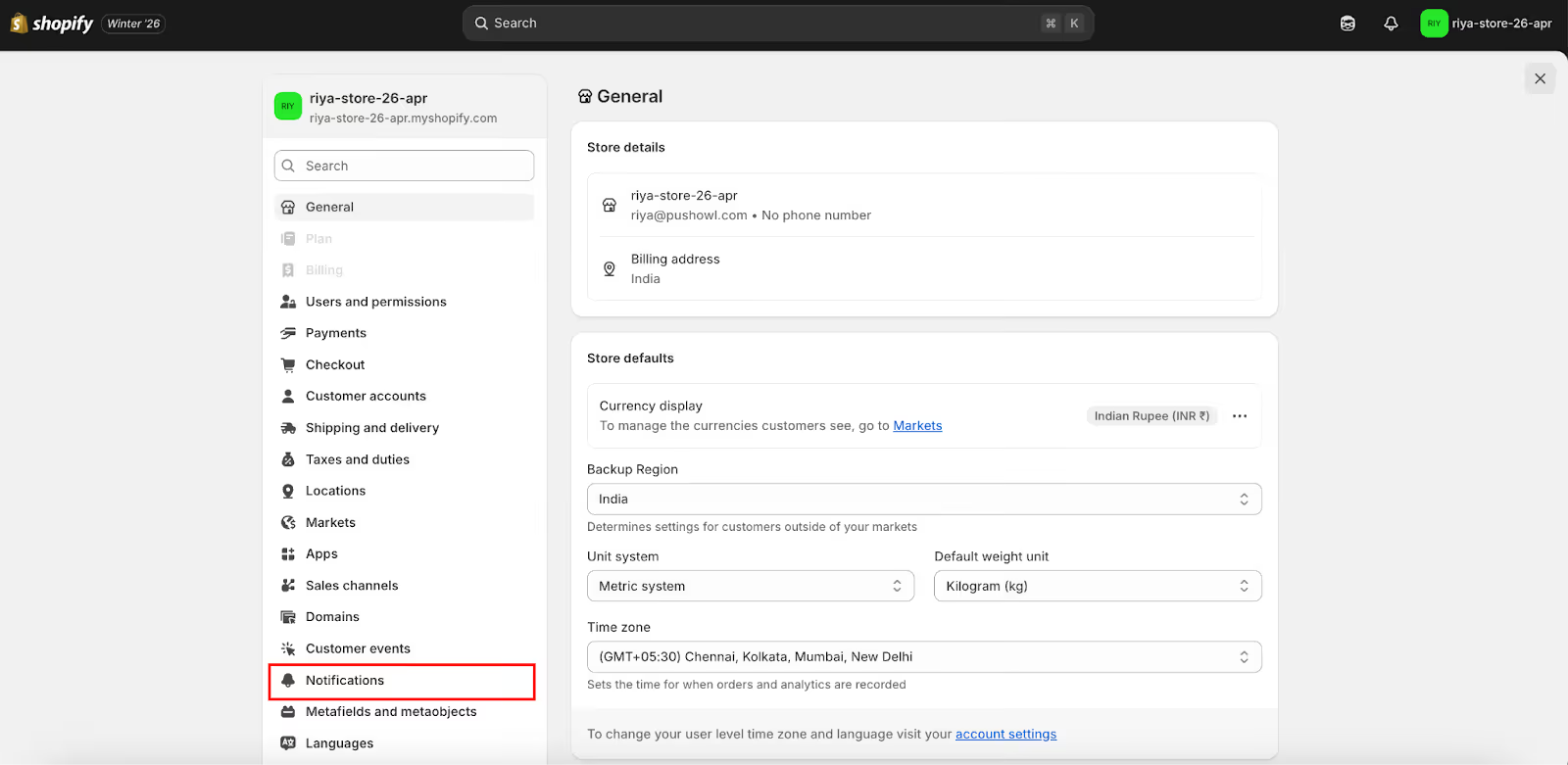
1. Click Settings in the bottom left corner of your Shopify admin dashboard.

2. Select Notifications
3. Click Customer notifications
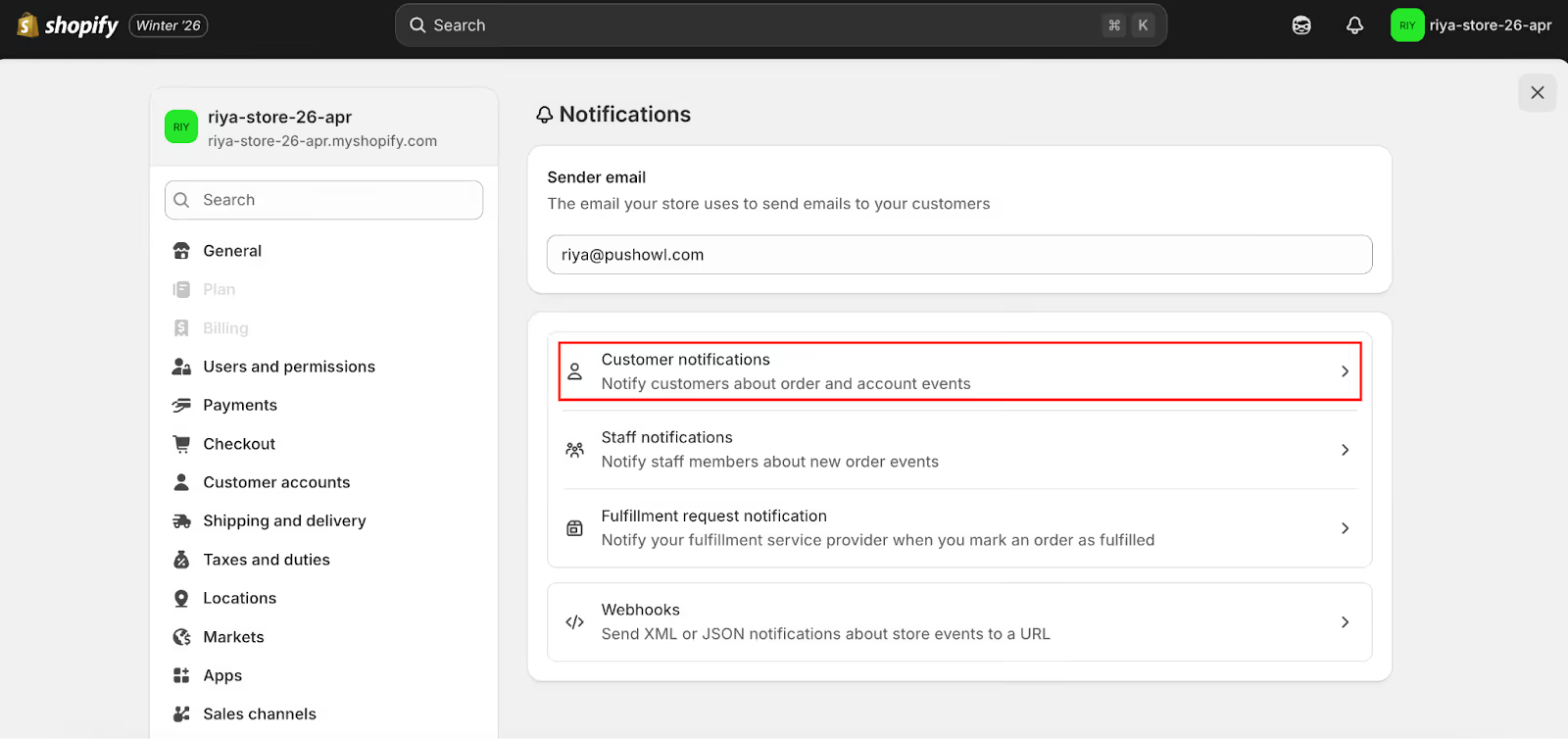
4. In the Marketing double opt-in section, toggle on Customer marketing confirmation to enable double opt-in.
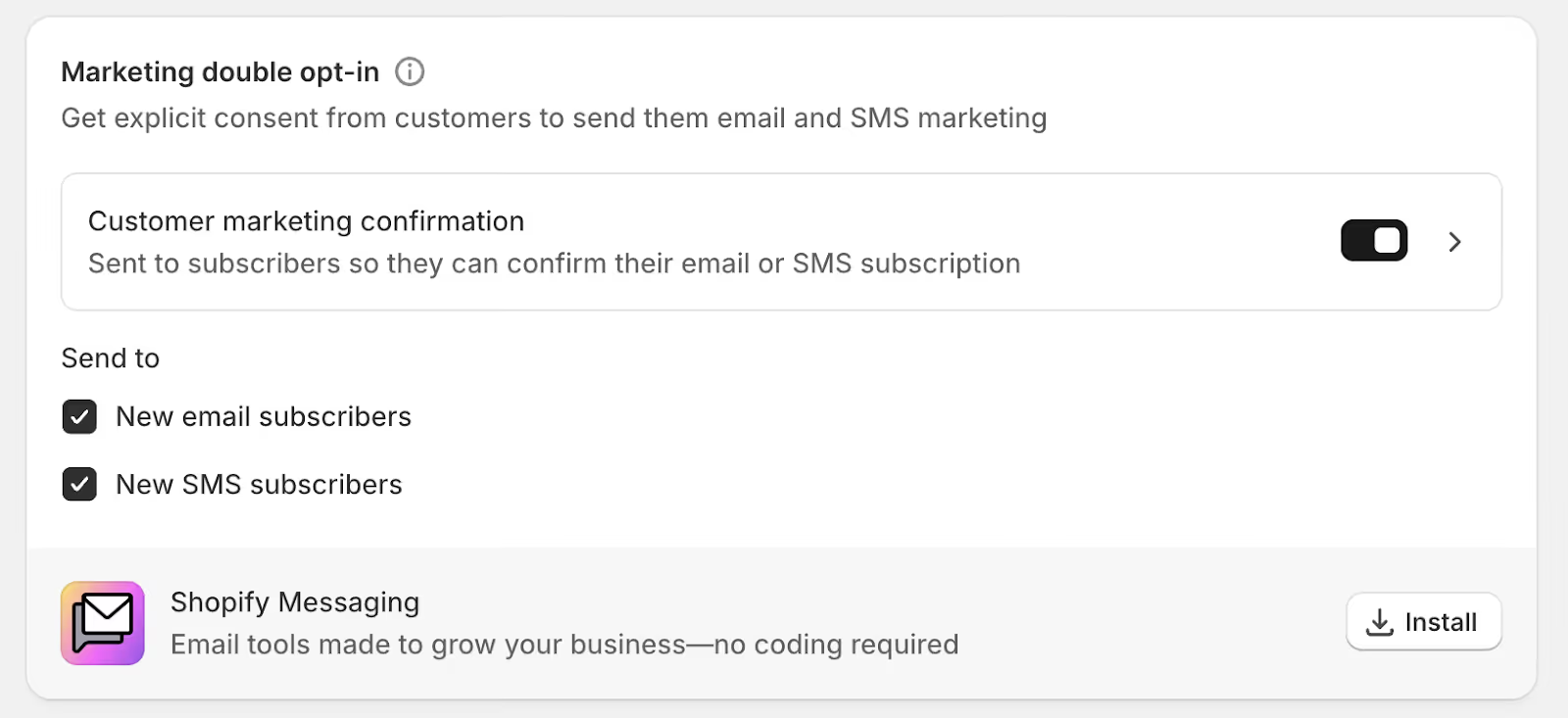
5. Click Customer marketing confirmation to open the template page. Here, you can modify the email by selecting Edit code or Send test to preview it.
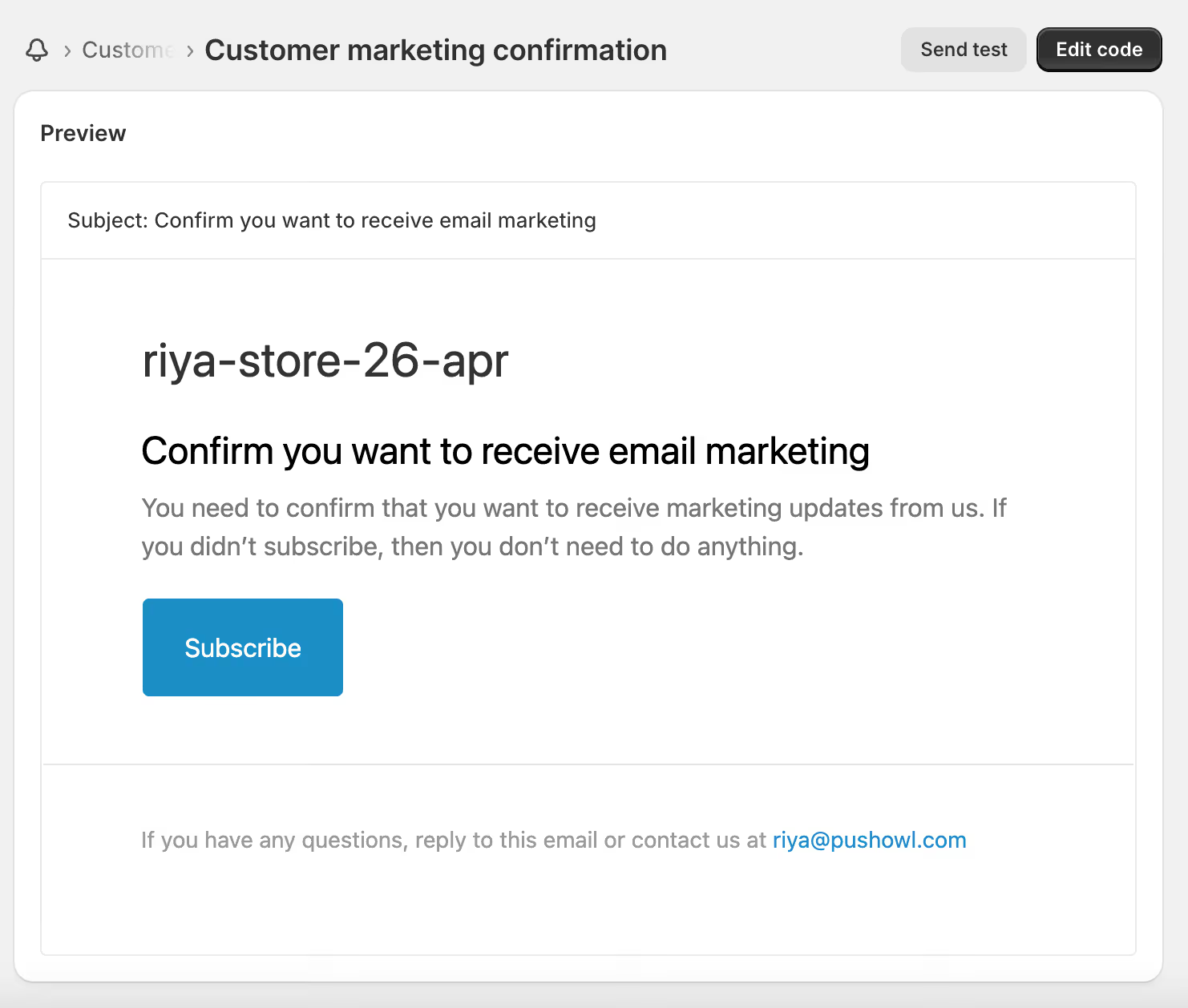
Once you have enabled double opt-in, your new subscribers will not receive marketing emails from you until they confirm from the confirmation link in their verification email.
How to Set Up Single Opt-in on Shopify
1. From your Shopify admin dashboard, click Settings in the bottom left corner.
2. Select Checkout

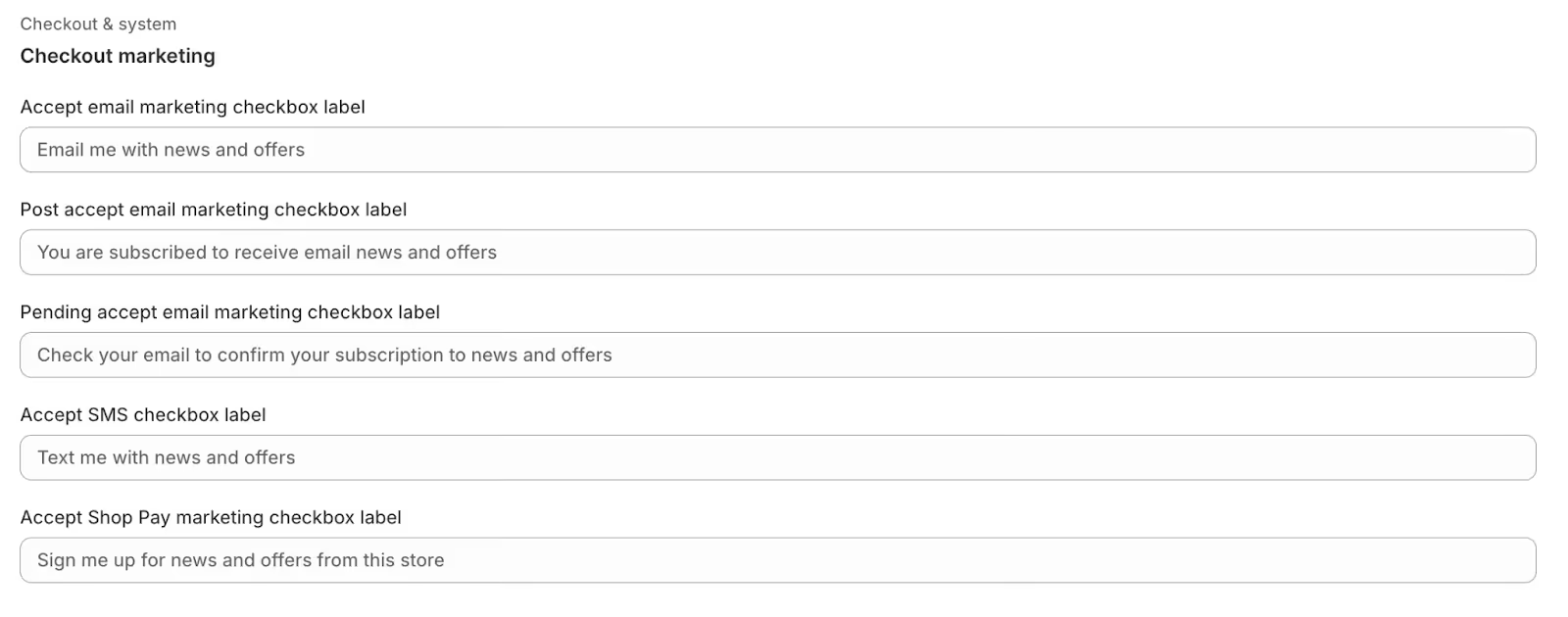
3. In the Marketing options section, toggle on Email and SMS

4. Click Customize labels to edit the marketing default text
Should You Choose Single Opt-in or Double Opt-in?
There’s no ultimate opt-in strategy. You need to customize it for your marketing list as well as follow deliverability best practices, no matter which method you choose. Also, you don’t need to complicate the single opt-in or double opt-in decision.
If you are willing to monitor your deliverability rate more closely in exchange for a larger marketing list, you can opt for the single-opt-in method, as it is all about quantity.
On the other hand, if you are looking for a more curated subscriber list with engaged subscribers, use the double opt-in method. Double opt-in marketing lists are all about quality.
Each method has its potential pros and cons, so you can experiment with a mix of both opt-in methods depending on the signup source. Just know that your opt-in decision alone will not make or break the success of your marketing campaign.
SMS Opt-In vs Email Opt-In
SMS and Email Opt-Ins both ask for consent. But the major differences lie in immediacy, regulation, and content of both these methods.
SMS excels at immediate, short alerts with high open rates, while email is better for detailed, rich content, longer narratives, and formal records by offering depth and design flexibility for nurturing relationships over time.
The best strategy combines both: using SMS for quick attention (like promos, reminders) and follow-up with email for comprehensive info (such as newsletters, case studies).
Compliance for SMS is strict due to the intrusive nature of text messages on a personal device. Email regulations are less strict, focused more on providing recipients control over future communications.
SMS marketing requires explicit, separate "prior express written consent" under the TCPA and CTIA guidelines, with severe penalties for non-compliance, while email marketing is governed by the less stringent CAN-SPAM Act, which allows for a more implied or "opt-out" based consent structure.
Legality scenario of Opt-In methods
Here are the legalities involved in collecting people’s phone numbers and email addresses for sending marketing messages:
- CAN-SPAM (Controlling the Assault of Non-Solicited Pornography And Marketing Act): According to the US CAN-SPAM Act, marketers can use the single opt-in method to collect people’s email addresses without legal issues. But they should include an opt-out (unsubscribe) option in their marketing email. Subscribers' requests to opt out should be processed within ten business days. The act still discourages businesses from sending emails to unknown persons.
- GDPR (General Data Protection Regulation): According to the GDPR Act, businesses should send marketing emails to those who have given explicit permission (through the opt-in process). Some specific countries of the EU, like Germany, have strict rules for marketers to use the double opt-in subscription method.
- TCPA (Telephone Consumer Protection Act): According to the TCPA Act, businesses must get prior written consent. from consumers before sending marketing texts or automated calls. It requires affirmative actions such as replying "YES" or checking an unchecked box and not implied consent or pre-checked boxes. This consent should also include disclosures like business name, purpose, frequency, and opt-out.
- CTIA (Certified Threat Intelligence Analyst): According to the CTIA Act, businesses must follow the voluntary best practices set by the CTIA - The Wireless Association for SMS marketing in the U.S. This way, the consumers receive wanted messages only and are also protected from unwanted ones by requiring clear consent (opt-in), disclosures (your brand name, message frequency, link to your Terms & Privacy Policy), and easy opt-out options (supported by universal keywords like CANCEL, STOP, UNSUBSCRIBE, QUIT, and END).
- CASL (Canada's Anti-Spam Legislation): According to the CASL Act, anyone sending emails or texts to or from Canada must get consent from people before sending CEMs (Commercial Electronic Messages) like emails, texts, and social media messages encouraging commercial activity (sales, promotions, linking to websites, etc.). Messages must clearly state who sent them and include your valid physical address and contact info. It should also offer an easy way to unsubscribe, and requests must be processed quickly (within 10 business days).
CCPA (California Consumer Privacy Act): A for-profit company doing business in California must comply with the CCPA if its annual gross revenue is over $25 million, it buys, sells, or shares personal data of 100,000+ California residents/households/devices annually, or derives 50% or more of its annual revenue from selling or sharing personal data. It gives California residents rights over their personal data, such as the right to know what data is being collected, delete it, and opt out of its sale or sharing. Businesses must provide mechanisms for consumers to know what data is collected, used, and sold, request deletion of their personal information, and opt out of the sale or sharing of their data. They must obtain opt-in consent for selling or sharing data for minors (for ages 13-16 and parents for under 13).
How to Measure the Performance of Single Opt-In Method?
Single opt-in (SOI) metrics focus on rapid marketing list growth but require careful monitoring of engagement and quality of the list. The key performance indicators are high sign-up or subscriber rates due to ease of signup, but also potentially higher bounce rates (owing to invalid emails/phone numbers). It also results in lower open or click-through rates because of less engaged subscribers, as well as a high spam complaint rate. This necessitates strong marketing list hygiene and deliverability checks to maintain your sender reputation.
How to Measure the Performance of Double Opt-In Method?
Here are the double opt-in (DOI) metrics, which focus on list quality, engagement, and deliverability:
- Sign-Up to Confirmation Rate (Conversion Rate): The number of initial form submitters who completed the verification. A higher rate shows a high interest level and a higher quality list.
- Confirmation Rate (or Completion Rate): The number of subscribers who receive the confirmation message and click the link to confirm. It directly measures how many people truly want your marketing messages.
- Open Rate & Click-Through Rate (CTR): It measures how often confirmed subscribers open and click links in your marketing messages. DOI lists generally have higher open and click through rate because they are pre-qualified.
- Spam Complaint Rate & Bounce Rate: Spam complaint rate measures how often users mark your message as spam, or if emails bounce back as undeliverable. Bounce rate is the number of messages that fail to reach their destination and return to the sender. DOI drastically reduces these two metrics by filtering out bad emails, typos, and bots to protect your sender reputation.
- List Growth Rate (Net Subscribers): It measures the overall growth of your confirmed marketing list over time and shows sustained list building to balance initial drop-offs with higher quality long-term.
PushOwl Opt-In Management
Powered by Brevo, PushOwl's opt-in management system helps Shopify merchants collect and manage subscribers across web push, email, and SMS through a unified workflow.
Visitors can subscribe to multiple channels (like Email first, then SMS, then Push) in a single sequence.
With its drag-and-drop interface, Shopify merchants can customize text, images, colors, and button styles to match brand aesthetics. They can also control when and where opt-ins appear using rules such as:
- Exit Intent: Displays a pop-up when a user moves to leave the site.
- Time on Page / Scroll Depth: Triggers after a specific duration or amount of scrolling.
- URL Targeting: Include or exclude specific pages (e.g., showing only on landing pages).
You can also sync email and SMS data directly to the Shopify "Customers" tab and Brevo for targeted campaigns.
The Opt-in dashboard provides real-time metrics, including:
- Total Viewers: Number of times a form was displayed.
- Total Subscribers: Number of users who successfully submitted a form.
- Conversion Rate: The ratio of subscribers to viewers per flow.
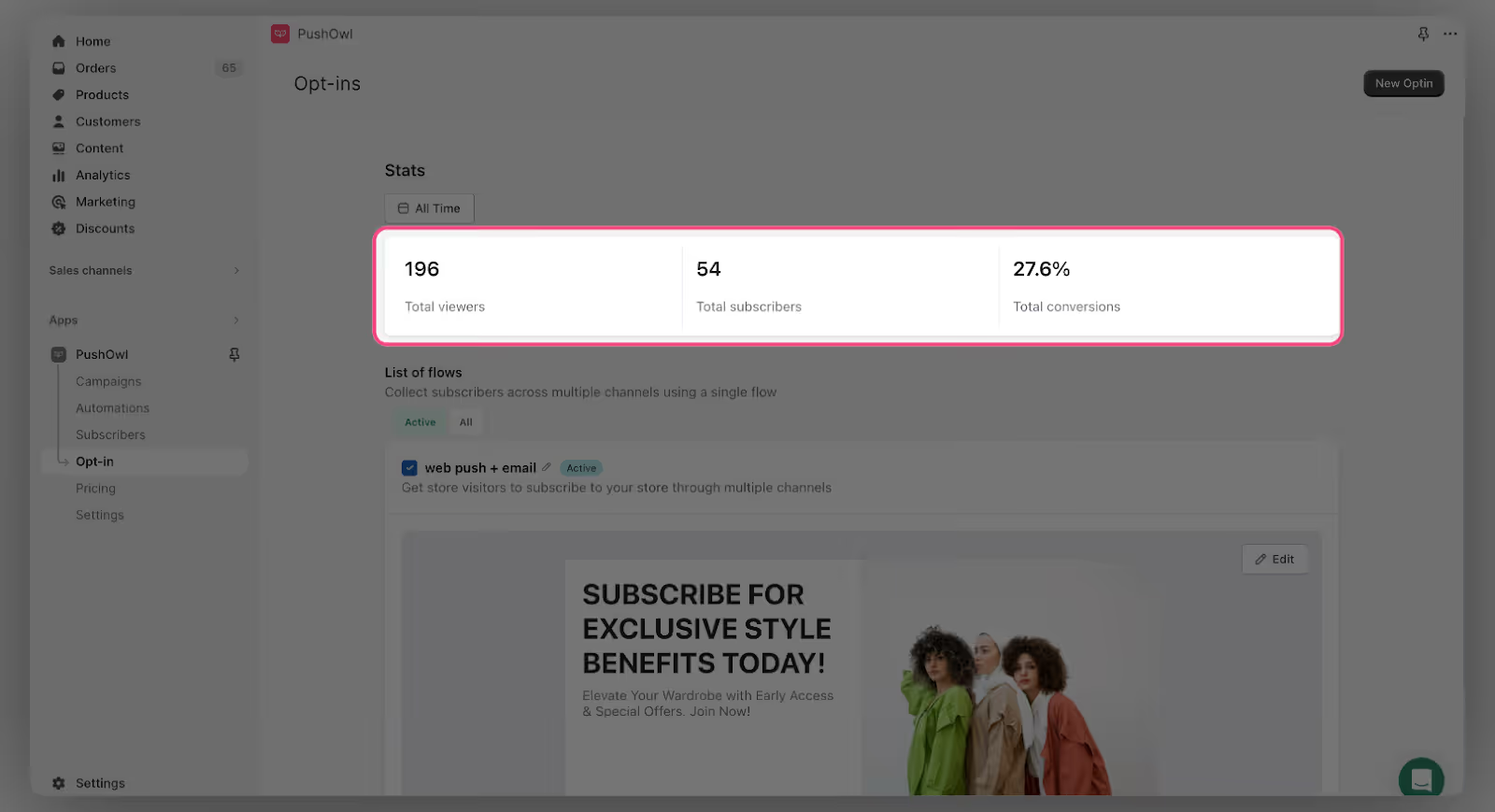
You can access these metrics under the "Opt-ins" section of your PushOwl Dashboard.
Wrapping Up
Now, you have a clear opinion and adequate information on single vs double opt-in subscription methods.
Single opt-in is useful if you are just starting out and can’t afford to miss short-term leads. Whereas double opt-in is good for long-term, and if you are struggling with a high bounce rate. Your choice will depend on your campaign’s specific goals.
Building a quality prospect list is far more helpful than building a big list. A large list can actually hurt your efforts if it consists of leads who are inactive and unengaged.
No matter which approach you prefer to choose, a highly-engaged list remains one of the strongest assets in your digital marketing efforts.