Email Blasts Without Spamming Your Audience in Shopify
Most marketers think an email blast is a numbers game. They fire off messages to a large list of emails without a clear strategy and hope some will convert. More often, their emails just end up in the spam folder, which leads to high spam complaints, high bounce rates, and a damaged domain reputation. Even worse, it turns your loyal subscribers into frustrated readers.
But, you can make your email blasts achieve the results you want by opting for a strategic approach and drive real engagement.
In this guide, I will walk you through what email blasts mean, why most marketers get it wrong, and how you can send email blasts that get you the desired results.
What is an Email Blast?
When one email is sent to a group of recipients at once, it is called an email blast. It is primarily used for promotions, marketing, and announcements. Email blasts lack audience segmentation and personalization, unlike targeted campaigns.
While an email blast sends a single message to a large group with minimal segmentation, personalized broadcasts use subscriber data (such as their behavior, history, and preferences) to tailor content, offers, or recommendations to specific groups or segments of recipients.
This personalization improves engagement (6x transaction rates) and results in better conversion.
Why Do Email Blasts Get a Bad Reputation?
- Low Personalization: They lack the tailored touch that connects with individual recipients.
- Risk of Being Marked as Spam: Bulk and non-targeted emails are often perceived as intrusive and trigger spam complaints.
- Waste of Resources: Fails to engage your audience if the offering isn’t relevant.
- Lower Engagement: Generic messages lead to lower click-through rates.
The Psychology of Email Overload
Email overload has converted the digital inbox into a battlefield for attention, which leads to recipient fatigue and attention scarcity. The volume of emails often exceeds an recipient's capacity to process them, which causes a cognitive strain and influences how emails are perceived and managed.
In a world of constant notifications and limited time, an individual's attention has become a scarce resource. This scarcity means recipients are highly selective about which emails they engage with, prioritizing relevant and timely content while quickly dismissing or deleting others.
The sheer volume of emails results in fatigue. Users develop coping mechanisms, such as batch processing, skimming messages, or simply ignoring emails they deem non-essential. This often means legitimate and important messages get lost in the noise.
A clear indicator of this struggle for relevance is user intolerance for irrelevant communication. According to research, a significant number of recipients will take decisive action against irrelevant content. This statistic highlights the need for senders to respect the recipient's attention and make sure that all email communications are targeted, valuable, and relevant. Failing to do so risks not only individual message failure but permanent removal from the recipient's inbox through the spam filter.
Segmentation: The Secret to Non-Spammy Bulk Campaigns
Segmenting your email list is one of the best ways to increase the success of your email blast campaigns. While a structured email list lays the foundation for personalized communication, segmentation makes sure that you deliver emails to the right audience at the right time.
According to Campaign Monitor, segmented campaigns can deliver a 760% increase in revenue, underscoring the business impact of getting it right.
Follow these best practices to align your email marketing efforts with the needs and behaviours of your subscribers:
- Build a high-quality email list by collecting email addresses from your social media channels, website, and other touchpoints
- Encourage sign-ups by offering incentives such as early access to features, free resources, or discount codes
- After building your email list, segment it based on the subscriber’s behavior, interests, purchase history, or demographics
- Use data from previous interactions to write email content that feels customized.
Shopify's Segments, Tags, and PushOwl's advanced filters work together for organizing customers to create highly personalized and automated marketing campaigns.
Segments are dynamic, rule-based lists of customers who meet specific criteria defined by using filters and conditions. They are used to group customers based on shared characteristics such as purchase history, demographics, behavior, or location for targeted communication.
Tags are simple and customizable labels you can manually or automatically assign to various items within Shopify, such as products, customers, orders, and blog posts. They are used for internal organization and filtering within the Shopify admin.
PushOwl is a third-party Shopify application for web push notifications that uses its own advanced filters and segmentation features to target subscribers based on their interaction with push notifications and Shopify store data. They are used to send highly relevant and timely web push notifications to specific subscriber groups in order to maximize engagement and conversions.
You can use Shopify tags to label customers based on specific criteria (e.g., "signed-up-newsletter", "VIP", "wholesale"). Then, you can build a sophisticated Shopify customer segment such as "Customers who have the 'VIP' tag AND live in California AND have ordered more than 3 times".
The resulting segments can be synced with PushOwl to target those precise groups with customized push notification campaigns, so that the right message reaches the right person at the right time. This approach will not only eliminate generic messaging but also improve conversion rates.
Crafting High-Performance Email Blasts
A well-crafted email blast is visually appealing and rich in valuable content. Here are our top tips for writing compelling emails:
- Subject lines: Use attention-grabbing, relevant, and compelling subject lines for your audience. It is your first chance to earn a click. 47% of recipients decide whether to open an email based solely on the subject line. Use urgency, curiosity, or a benefit-driven hook, but never be misleading. Make your subject lines short, specific, and emotional.
- Personalized content: Personalize your email content (wherever possible). Address subscribers by name and tailor the email messages based on their past interactions or preferences. Personalized emails deliver transaction rates 6 times higher than non-personalized ones.
- Email copy and visuals: Keep email copy clear, concise, and focused on delivering value. Improve the appeal of your emails by including eye-catching visuals, like images or videos.
- CTAs: Use strong, clear calls to action (CTAs) to prompt your subscribers to take desired actions, like signing up for an event, downloading a resource, or making a purchase.
- Optimization: Optimize the email design for mobile for a seamless experience across all devices.
Set Up Relevant Protocols & Records
Remember that you need to set up protocols and records in order to ensure the successful delivery of your emails.
The most important records are SPF and DKIM. While the former indicates which IP addresses are allowed to send emails from your domain, the latter is used to authenticate the message and ensure that it isn’t modified during delivery.
Leveraging Shopify + PushOwl for Smart Broadcasts
Shopify Email makes it easy to create a one-time email campaign. Here’s how you can not just set up a one-time email campaign but also maximize the chances of it reaching inboxes instead of spam folders:
Technical Setup (Prerequisite)
Ensure your domain is properly authenticated, which tells email providers (like Gmail and Yahoo) that you are a legitimate sender.
- Set up SPF, DKIM, and DMARC records: This is crucial. You'll need to add specific CNAME and TXT records in your domain provider's DNS settings (e.g., GoDaddy, Namecheap).
- Use a custom sender email address: Avoid using a generic @gmail.com or @outlook.com address. Use a professional, branded email address like hello@yourstore.com or support@yourstore.com.
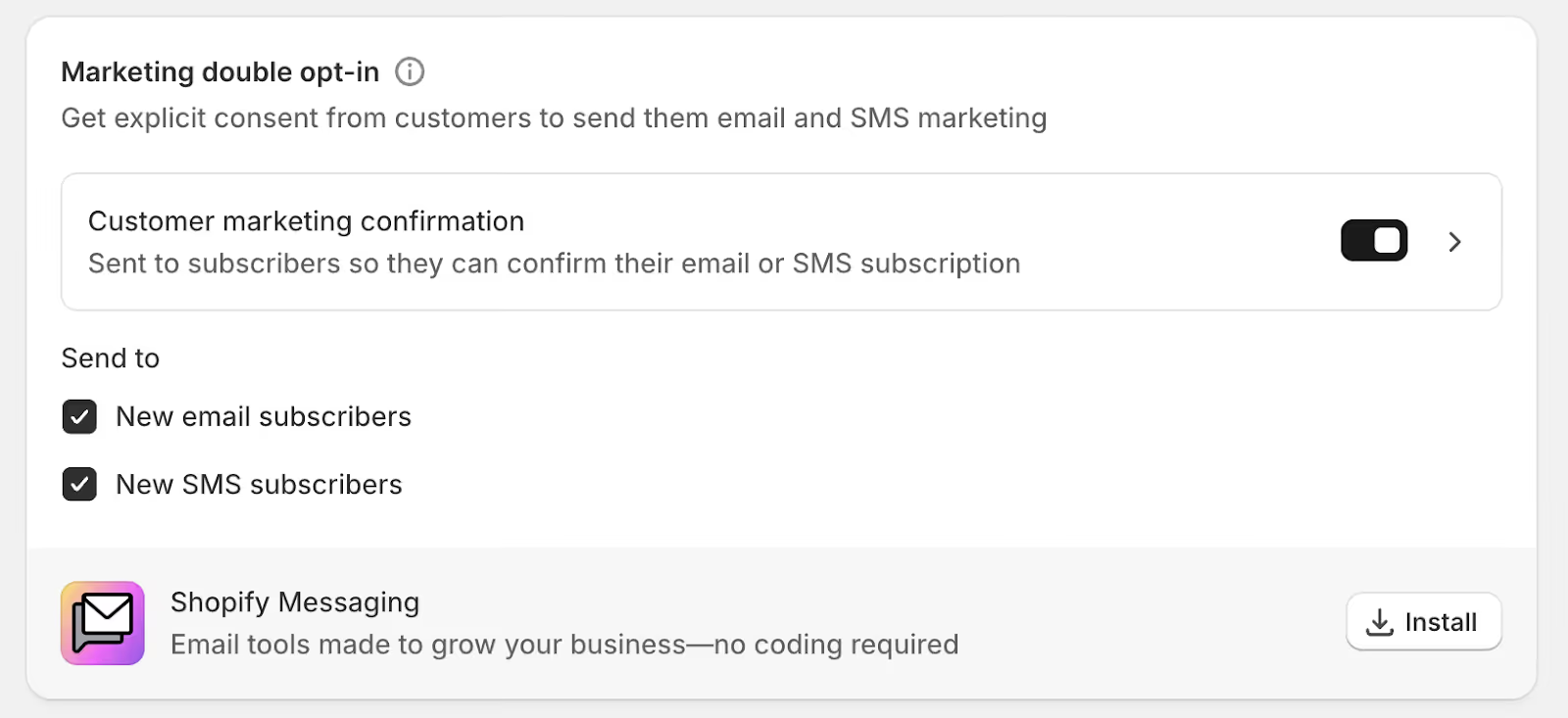
- Set up double opt-in: This ensures that all subscribers have explicitly confirmed their consent to receive emails, significantly improving list quality and engagement. You can enable this in your Shopify admin under Settings > Notifications > Customer notifications. In the Marketing double opt-in section, toggle on Customer marketing confirmation to enable double opt-in.
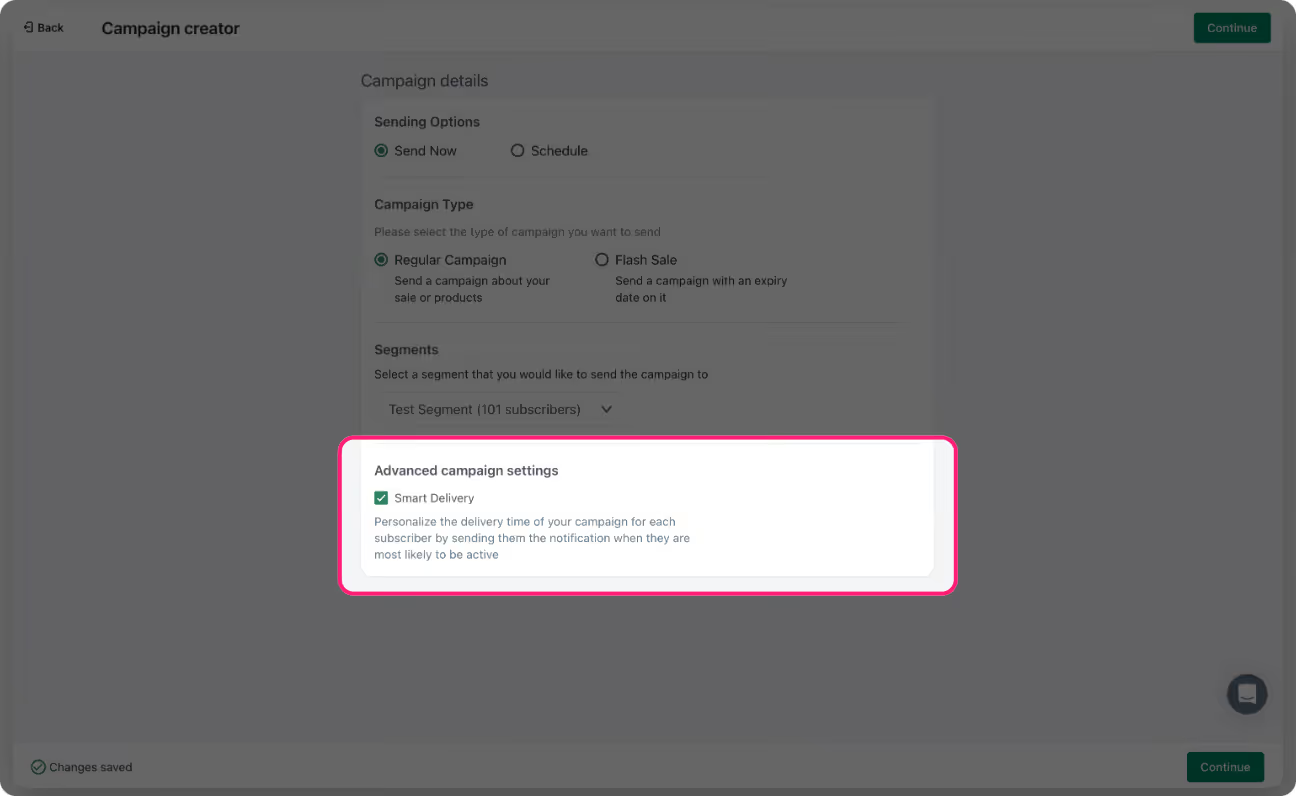
PushOwl, an omnichannel marketing platform powered by Brevo, offers a Smart Delivery feature to optimize message timing. This feature uses machine learning to determine the optimal time to send web push notifications to each individual subscriber based on their activity patterns. This ensures that messages are sent when a user is most likely to be active on their device, which naturally paces out delivery and increases engagement.
Brevo's email infrastructure includes a proprietary, automated system that dynamically manages sending rates to comply with the specific requirements and limits of different Internet Service Providers (ISPs) like Gmail and Yahoo.
Brevo's system communicates with ISPs and adjust email sending speeds in real-time. If an ISP starts to defer (soft bounce) emails because it is receiving too many at once, Brevo's system automatically slows down the sending rate to that specific domain until the ISP can process more.
The goal of this automated management is to build and maintain a strong sender reputation with ISPs. Brevo helps prevent emails from being marked as spam by adhering to ISP limits.
Compliance and Legal Requirements
Over the years, I’ve seen businesses blacklisted, flagged, or fined simply for failing to comply with basic email regulations.
If you are sending email blasts, you should comply with applicable laws, such as CASL (Canada), CAN-SPAM Act, and GDPR (EU).
Here are the main rules you should follow to keep your emails from landing in spam and avoid penalties:
- Get The Recepients’ Permission Before Sending Emails: You can’t just add recipients to your email list & start blasting them with emails. They need to opt-in!
- Use a Real Email Address & ‘From’ Name: Avoid using “no-reply” addresses or misleading sender names, which makes it hard for users to contact you.
- Include a Clear Way to Unsubscribe: If someone opts out, you must honor their request promptly (CAN-SPAM requires this within 10 days).
Even if you are not an email law expert, you should stick to basic compliance rules to improve deliverability in the long run and protect your business.
Shopify provides built-in tools that automate the management and logging of customer consent for subscribers and data collection. This helps merchants comply with global privacy laws.
Shopify can automatically adjust the consent settings (e.g., whether a marketing opt-in checkbox is preselected or not) based on the customer's geographical region to align with local laws like GDPR in the EU where explicit consent is required.
Shopify automatically provides a data sharing opt-out page for regions that require it (e.g., under CCPA in the US).
Measuring Email Blast Success
You need to ensure you are tracking performance metrics to determine whether the campaign was successful. The numbers will help you understand exactly what’s working & what needs improvement.
Your email marketing platform will provide detailed analytics on every campaign you send. But the trick is in understanding the data and using it to make smarter decisions for the next campaign.
If you want to improve your email engagement and conversions, pay close attention to the core metrics below:
- Open Rate: The number of recipients who actually opened your email.
- Conversion Rate: The number of subscribers who completed a desired action (such as making a purchase).
- Click-Through Rate (CTR): The number of recipients who clicked on a link in your email.
- Unsubscribe Rate: The number of subscribers who opt out after receiving your email.
- Bounce Rate: Tracks emails that never reached the inbox (due to soft or hard bounces).
Conclusion
Email blasts have a bad reputation, but you can make them more successful. Your work doesn’t just stop after pressing the send button. You must ensure that the time, effort, and resources you invest in creating a strategic email blast deliver results.
Track email marketing metrics and use the data to generate actionable insights. You can then use these insights to improve future email blasts.