AI email marketing in Shopify stores is often introduced as a way to improve performance, but some e-commerce brands replace their workflows all at once and use AI as a strategy rather than a tool.
In practice, AI works within existing systems.
It influences how decisions are made, who receives an email (and when), and what it contains, rather than replacing the workflow itself.
This guide explores the AI email features Shopify stores actually use (and how) and the constraints that affect their performance. We also cover how not to use AI in email marketing so you do not end up with generic marketing content or, worse, campaigns with a shaky foundation.
What Is AI Email Marketing for Shopify Stores?
AI email marketing is the use of machine learning and generative AI tools in your Shopify campaigns to automate marketing tasks.
AI email marketing tools can be used for a range of tasks, from creating subject lines to advanced applications, such as determining the ideal customer segment to target with a specific product recommendation.
Marketers can feed the AI tool the right prompts and customer data and ask it to identify engagement patterns. These patterns can help predict customer behavior and personalize campaigns at a mass scale.
Most AI email marketing processes fall under two buckets:
- Predictive AI: Use cases include analyzing historical data (browsing behavior, purchase data, and other customer patterns) for segmentation, churn prevention, personalized offers, and tailored email sends.
- Generative AI: Use cases include creating hyper-personalized content assets (written and visual, so all the content in your marketing emails, SMS alerts, and push notifications), interactive marketing, generative SEO for blogs, and social listening for ideation.
According to Jasper, 91% of marketers used AI for their tasks in 2025 (up from 63% in 2024), across the following use cases:
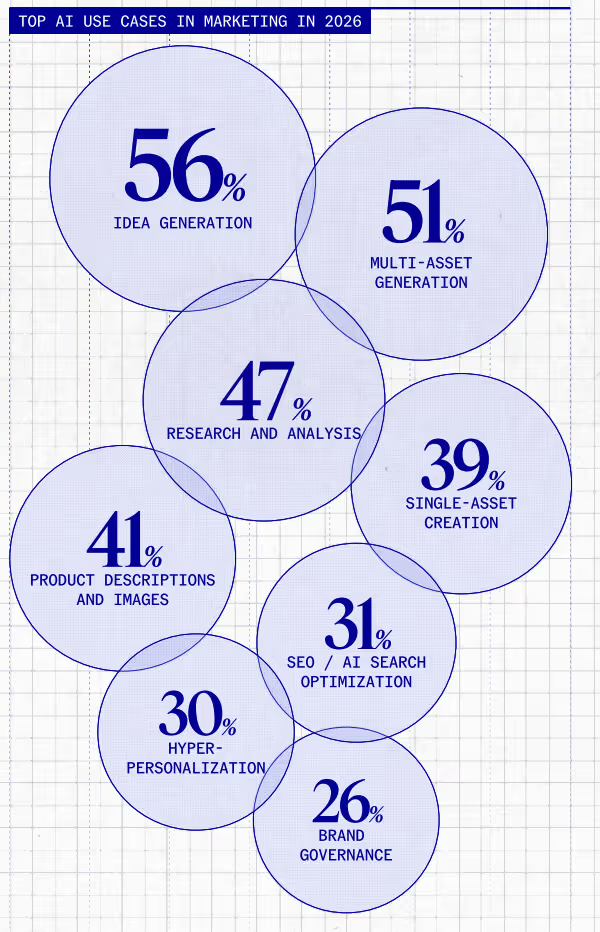
When used correctly (more on that in the subsequent sections), you can use AI in email marketing campaigns to handle the entire customer lifecycle and target each subscriber based on their behavior.
So if you want to add another layer of personalization to your e-commerce automations, consider folding in AI models into your marketing strategy.
What Most Shopify Stores Get Wrong About AI Email Marketing
AI email marketing tools can execute a strategy, but when you ask them to create one for you, or you adopt them without a foundation in place, chances are you will receive a plan based on the following:
- Faulty assumptions
- AI Hallucinations
- Generic advice
When Shopify stores forget that AI email marketing cannot replace a well-thought-out strategy, they make the following cardinal mistakes:
Skipping Validation and Testing
The first mistake Shopify brands make is introducing AI systems into their processes without first determining whether they are even needed.
“Merchants jump to AI too quickly and skip the validation phase of their email strategy.”
- Rafael Sarim Oezdemir, Head of Growth at EZContacts, a US-based eyewear brand
In practice, this could mean replacing parts of the email workflow with AI without measuring its performance relative to the systems you already have.
You are introducing an unknown variable into your email marketing campaigns.
Instead, you need to validate the strategy first. Oezdemir suggests the following two steps:
The existing control refers to the systems you are currently using. They act as the baseline.
Use AI features at a small scale during the testing phase. This limited application could mean:
- Testing AI subject lines for one campaign
- Using AI recommendations for one segment
- Running one or two popups with AI content and design
When you do this, you gain insight into AI’s efficacy without it affecting your overall performance. You will be able to identify the gaps AI is filling and where it is better to just stick to your existing systems.
Using AI To Fix Weak Offers/Bad Market Fit
In the section on AI email marketing features to use, you will notice that none of the capabilities are related to the product itself. That’s because AI cannot make an unappealing offer perform.
It can optimize how you market it with the right words or also time your campaigns for you, but everything it can improve is within the constraints of the offer itself.
If the discount given is not compelling, or if the product is considered generic because you haven’t done market segmentation correctly, there is not much AI email marketing can do.
How do you know it’s not the processes but your offer?
Look for these signs cumulatively to gauge whether it is worth revisiting the product fit or offer.
Incorporating AI With Limited/Outdated Customer Data
Not all Shopify stores are ready to incorporate AI into their marketing campaigns, and customer data is the biggest limiting factor. If you are considering AI email marketing, check whether your data meets these three criteria:
- Volume
- Density
- Recency
- Data structure and accuracy
AI models rely on customer data to distill patterns. With small lists, there is not enough data or sufficient behavioral variation for the AI model to analyze.
“Deploying an email feature in the email sequence with just 500 subscribers means throwing away money on an uneducated guess. At such a sample size, merchants could see greater ROI from carefully testing manually written sequences with A/B testing.” - Oezdemir
Oezdemir recommends a minimum of 5,000 email subscribers and 1,000 completed purchases before introducing AI email features into the system. At that stage, the system has enough data points to begin identifying patterns.
But it is not just about volume. You need clean profiles with accurate data about your leads and customers.
Oezdemir hints that many Shopify stores are not prepared to use AI effectively due to messy customer data.
“Duplicate profiles, lack of purchase history, and inconsistencies in tagging products can affect the accuracy of the AI’s decision negatively, even if it doesn’t show it at once.”
He recalls the following case:
“A mid-size apparel brand’s database contained thousands of customers with inaccurate tags for product categories following a change of platform. AI-driven segments generated recommendations for customers who never bought products from those categories, and the click-through rate in these segments fell below 0.5%, causing the unsubscribe rate to rise.”
Even if early results are not as dramatic, eventually you will spot gaps in segmentation and recommendations if the base data is not properly organized.
You also need to ensure recency.
“Recent data prevents AI from overestimating interest. For example, during a tool migration, we also tried to move as much activity data as possible. Sadly, it then showed that many contacts had been recently active, which wasn't true. It led to more people receiving more emails, becoming overwhelmed, and unsubscribing.”
- Heinz Klemann, Marketing and Data Expert at BeastBI GmbH, a B2B marketing agency
When outdated activity is treated as current, AI misclassifies engagement levels. You will end up targeting the wrong people, and it will eventually cause email fatigue.
With manual workflows, these issues can sometimes be caught and corrected because there is some extent of human control. With AI, if you are scaling quickly, you may not spot these gaps in customer data.
Before introducing AI features, ensure that customer data is not only sufficient in volume but also accurate, structured, and up to date.
Trying To Use AI for Everything or Over-Using AI
Shopify stores that see AI as a silver bullet and plug it into every workflow will not see a rise in their email metrics.
“Trying to let AI do everything from product selection to texting, or the illusion that it can create a good newsletter just on its own. Sadly, we are not there yet.” - Klemann
When you use AI for use cases that it is not fit for, or you apply it across the board all at once (subject lines, body copy, send times, product recommendations, and more), you are:
- Replacing manual processes that would have worked better
- Removing a clear point of comparison, and therefore making it harder to assign attribution
Another side effect is convergence. When you fully automate the creative process with AI, know that your competitors are also relying on similar AI models.
“All AI-driven campaigns tend to converge to similar voice and language styles, which leads to all companies sounding alike when writing emails; the customer’s inbox becomes nothing but pure noise.” - Oezdemir
When marketing content starts to look and sound alike, your unique positioning or product strengths will get buried under AI slop.
How High-Performing Shopify Stores Use AI for Email Marketing
The smartest Shopify stores do not use AI for everything. Most use cases for AI fall under content creation for email campaigns, but there are some other uses as well:
AI-Powered Customer Segmentation
What it does: Machine learning models build behavioral cohorts and customer segments based on purchase history and other behavioral data points, along with static data (demographic segmentation)
Where it is most useful: Behavioral segments are dynamic, depending on a customer’s engagement and real-time buying behavior. Manual changes take time and effort; AI models can quickly update segments instead.
Where it works vs. where it doesn’t: Works well when there is enough behavioral data to distinguish meaningful buying patterns (repeat purchases, varied browsing activity, and consistent engagement signals).
Stores with smaller lists, where most subscribers look similar due to limited data, will end up with broader groups that do little to help with targeting.
Impact: Targeting becomes more precise.
“With AI becoming more accurate, sending fewer emails to non-active subscribers reduces unsubscribe rates and therefore protects future revenue potential without sacrificing much current campaign revenue.” - Klemann
You will no longer end up sending too many emails to subscribers who do not want to hear from you that often.
AI-Led Product Recommendations
What it does: Uses past purchase and browsing behavior to generate a personalized set of products for each subscriber, which is then inserted as dynamic product blocks into email automations.
Where it is most useful: When you want to soft-sell and reiterate products the subscriber has already shown interest in, i.e., there is some level of pre-existing context or intent.
Post-purchase emails, win-back campaigns, and browse abandonment emails are the ideal places for AI-led product recommendations.
Where it works vs. where it doesn’t: Works well for stores with repeat purchase behavior and clear category affinity (based on browsing data).
The AI model won’t provide accurate recommendations if there isn't sufficient data to identify patterns in customer browsing behavior.
Impact: Instead of pushing the same products to everyone, each email reflects what the subscriber is more likely to engage with (which can lead to higher CTRs), thus making emails more relevant at the individual level.
AI Email Subject Line Content Generator + A/B Testing
What it does: Generates multiple variants of an email subject line based on a defined campaign brief and A/B tests them across your subscriber base. You no longer have to write each subject line manually.
Where it is most useful: Campaign-heavy workflows that require you to communicate the same promo and messaging in various ways, which can feel repetitive when done manually (creative fatigue is real!).
“You still have the human element of control, but at the same time, and after some time, it will speed up the daily work.” - Klemann
This happens because the tool will learn your style over time (as you continue to feed it more data) and suggest subject line variations that better align with your brand voice.
Where it works vs. where it doesn’t: Works well when you have a clear offer and a defined audience. The more precise the prompt, the more usable the output. If you give generic instructions, the variations it gives will also be generic.
Impact: Can support an increase in email open rates without manual effort by testing and identifying higher-performing subject line variations.
AI-Controlled Behavioral Automation Triggers
What it does: Analyzes behavior signals, such as adding a product to the cart or signing up for the newsletter, to determine when an automated email should be triggered.
Where it is most useful: Most visible in browse abandonment and cart abandonment automations, when you need to activate an automation sequence at a precise time after a customer shows specific behavior.
According to Oezdemir, EZContacts has had a positive experience with AI-powered predictive replenishment emails. The tool analyzes customer behavior to trigger emails when a customer is about to run out of a specific product, which makes these emails more likely to convert.
“For EZContacts, predicting reorders by analyzing purchasing behavior instead of relying on a fixed schedule of emails completely changed the game in terms of ROI per subscriber.” - Oezdemir
This approach replaced sending batch and blast campaigns for products reordered regularly.
Where it works vs. where it doesn’t: Becomes less effective when most users follow a linear customer journey (for example, a single product view, add to cart, and then checkout), with limited repeat interactions or variations.
In these cases, basic automations will suffice. When there are clear differences in how users behave before converting, these AI filters can help distinguish stronger intent from casual activity.
Impact: Your email campaigns will be based on stronger intent signals, making them more persuasive and potentially increasing CTR and conversion rates.
Smart Send-Time AI Optimization
What it does: Instead of sending an email to your entire list or segment at a fixed time, AI analyzes each subscriber’s past engagement patterns and tailors the delivery time accordingly.
Where it is most useful: Newsletters and product drops need to land in the inbox when the subscriber is most primed to buy, and automations need to hit right when the intent is high.
Tailoring send times based on data ensures that someone who checks email at night receives it then, while others who skim marketing emails during the day receive them when they are most active, even if the two customers share demographics or other parameters.
At EZContacts, as per Oezdemir, optimizing individual send times rather than using fixed email delivery schedules resulted in a 23% lift in open rates over 60 days.
Where it works vs. where it doesn’t: Works well for larger lists with consistent engagement history. If you have a smaller list or a mostly inactive subscriber base, you won’t have enough data to determine the ideal send time.
This AI feature is also not suited for time-sensitive campaigns, such as short-duration flash sales, where coordinated delivery matters more than individual timing.
Impact: Since you are focusing on the individual subscriber and their specific high-intent windows, rather than the segment or list overall, you can increase the likelihood that emails are opened and read.
AI Popup Builder
What it does: Generates popup copy and an appropriate layout based on the offer type and segment. You won’t have to create these forms and popups manually.
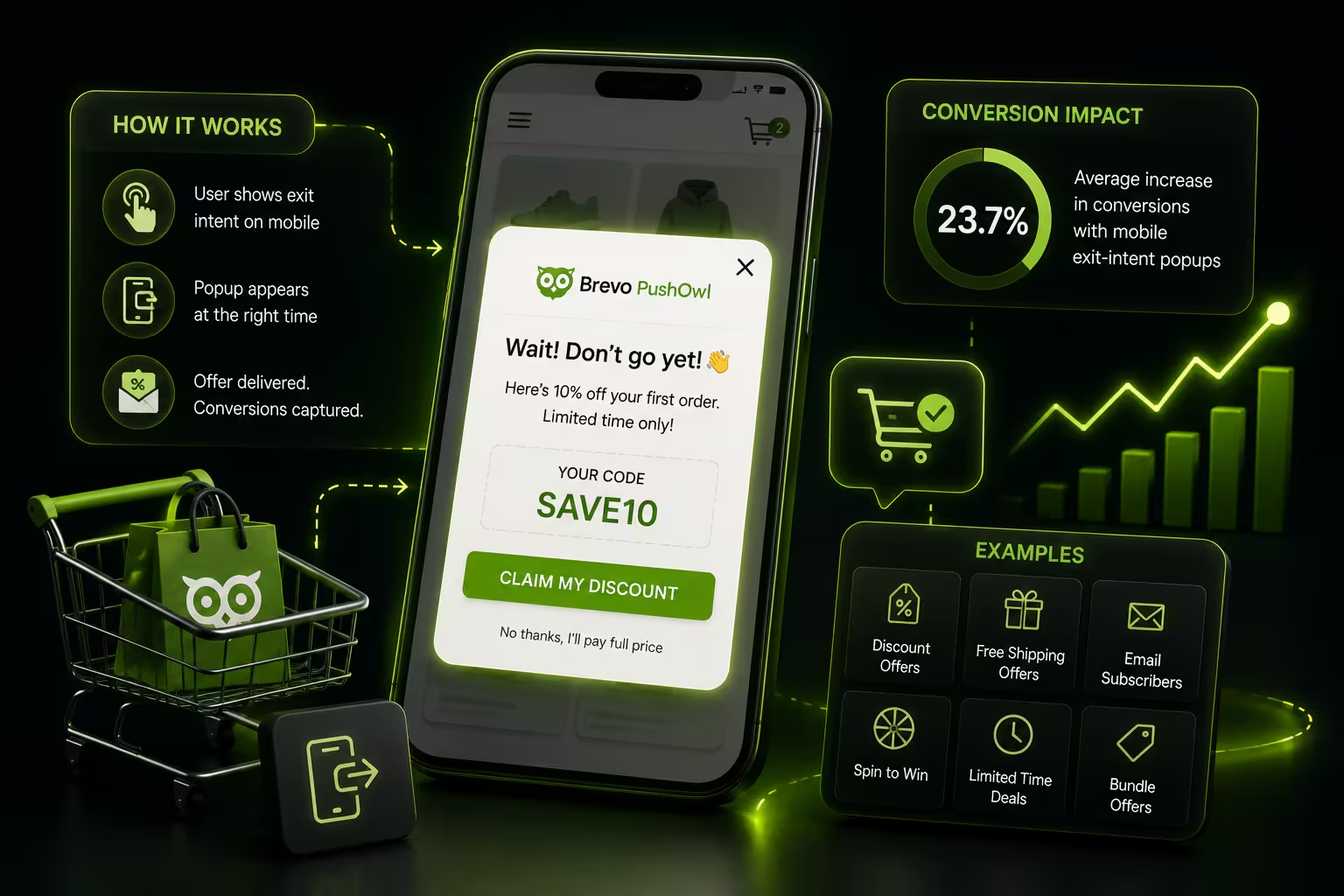
Where it is most useful: Most useful during setup or iteration of list growth workflows, especially for standard use cases like discount popups or exit-intent popups.
Where it works vs. where it doesn’t: Less effective for brands that rely on more specific positioning with non-standard offers rather than common popup formats, which are standard in the e-commerce context.
Impact: Reduces the time and effort required to launch and iterate on popups, potentially improving email signup rates over time.
What AI Email Marketing Looks Like Inside PushOwl
In practice, the six AI features you should include in your workflows are not used in isolation.
If you were to use these as part of your automation workflow within PushOwl’s (powered by Brevo) system, here are the six simple steps to follow:
Step 1: Connect Your Shopify Store
Data sync begins, and purchase history, product data, and customer profiles begin to populate once the store is connected. This behavioral data will be fed into the AI tools.
Step 2: Identify High-Intent Customer Segments and Define Trigger Conditions
Based on the data it processes from Step 1, PushOwl’s unified customer data platform builds behavioral segments. You can also use the pre-built segments to get started immediately.
You can then define conditions for when a flow should trigger based on these segments.
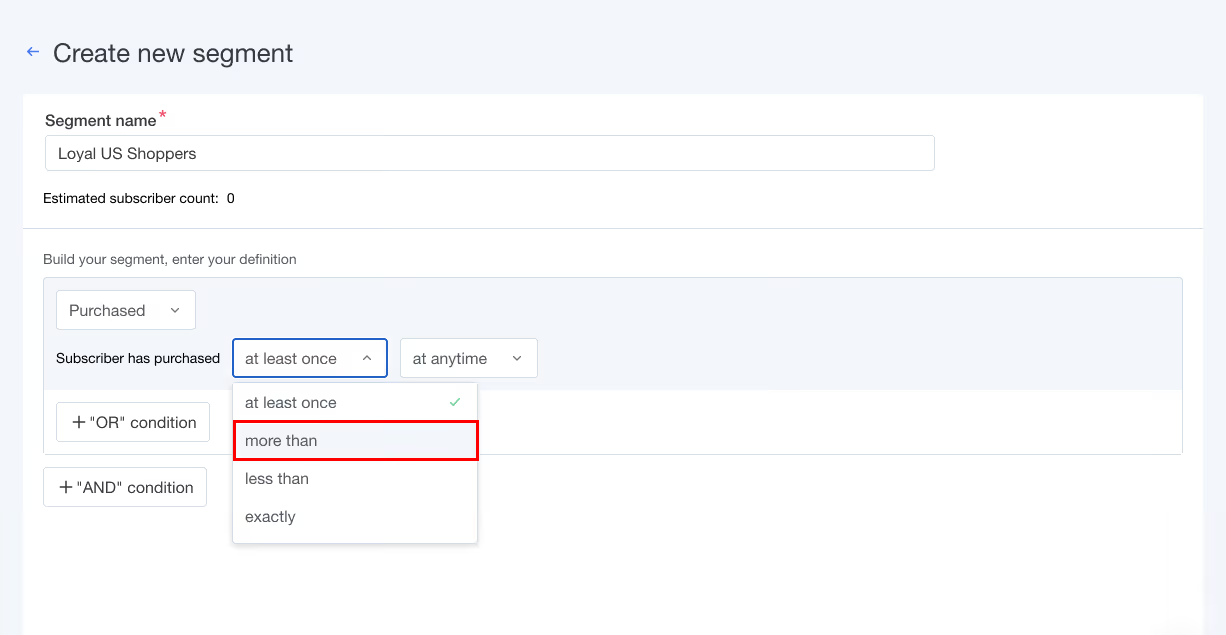
For example, you can trigger a browse abandonment only if the product has been viewed more than once or activate a discount code as part of the abandoned cart recovery flow if the cart value crosses a certain threshold.
Step 3: Let AI Determine the Best Send Time
The campaign builder tool includes a Smart Delivery functionality for marketing campaigns.
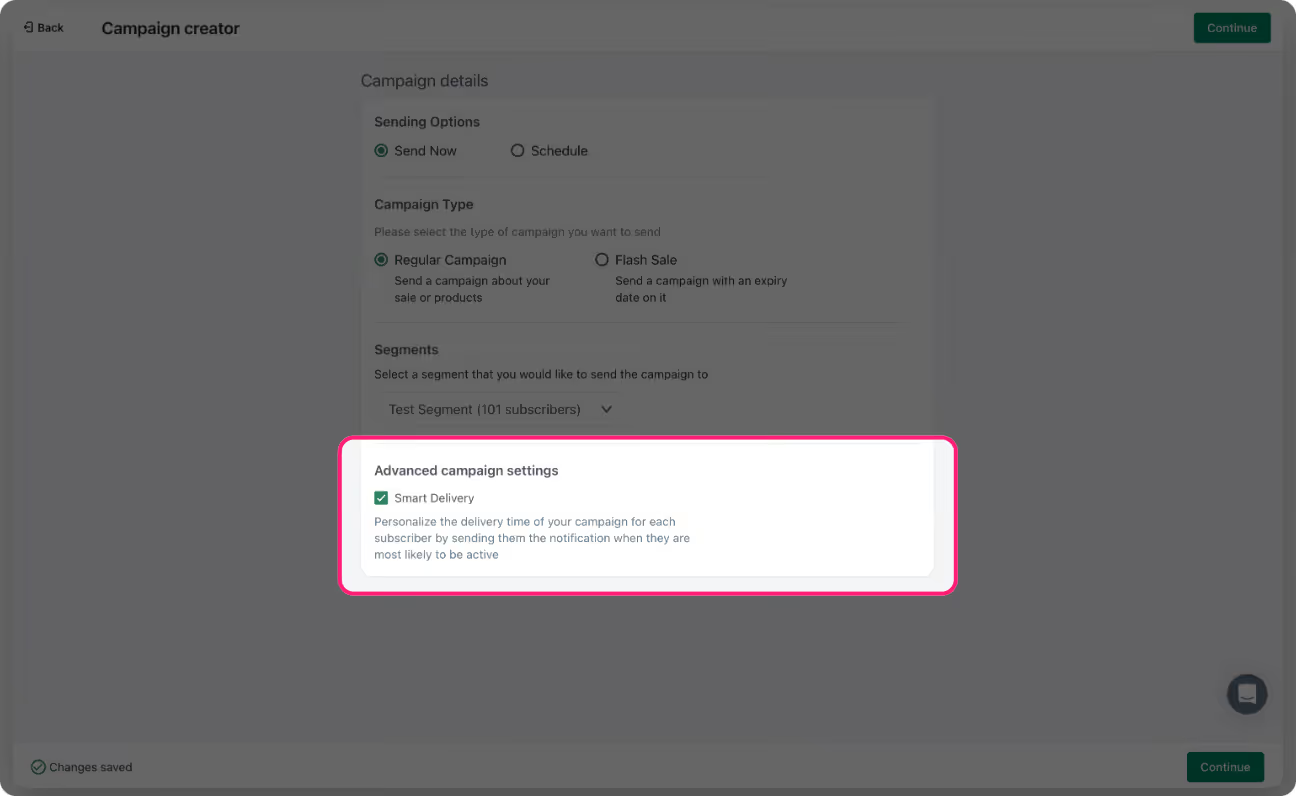
This machine learning tool studies engagement data (such as when subscribers opened past emails and push notifications) to determine individual send windows. It then tailors the send time for each subscriber.
Step 4: Layer in Product Recommendations
Add dynamic product blocks to automation emails, such as post-purchase or browse-abandonment flows, via the email editor. You can set recommendations based on purchase history or what they have recently viewed.
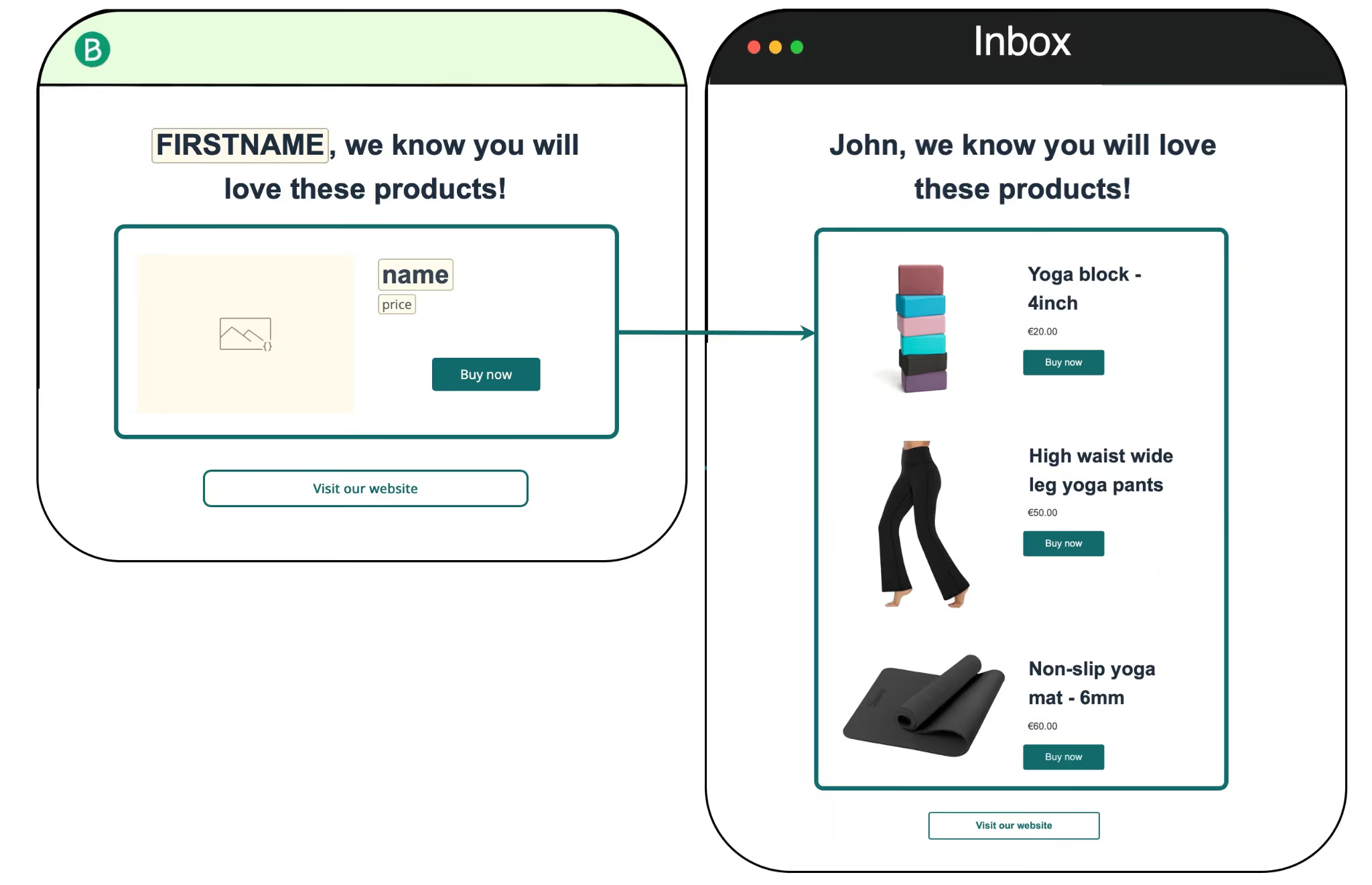
At the scheduled send time, the block will automatically reflect what the subscriber has already shown interest in (but not purchased) from your live Shopify catalog.
Step 5: Generate and Validate Subject Line Options
Subject line variants can be generated by using the AI copy assistant in the email composer.

When you describe your campaign in a single line, the tool will provide multiple variants. Pick which ones to test on your next send, or tweak them before sending, and use the analytics dashboard to gauge which subject line worked better.
Step 6: Capture New Users With AI-Optimized Popups
Using the AI popup builder, you can generate a template based on the offer type and any specific targeting rules you input, such as basic brand context.
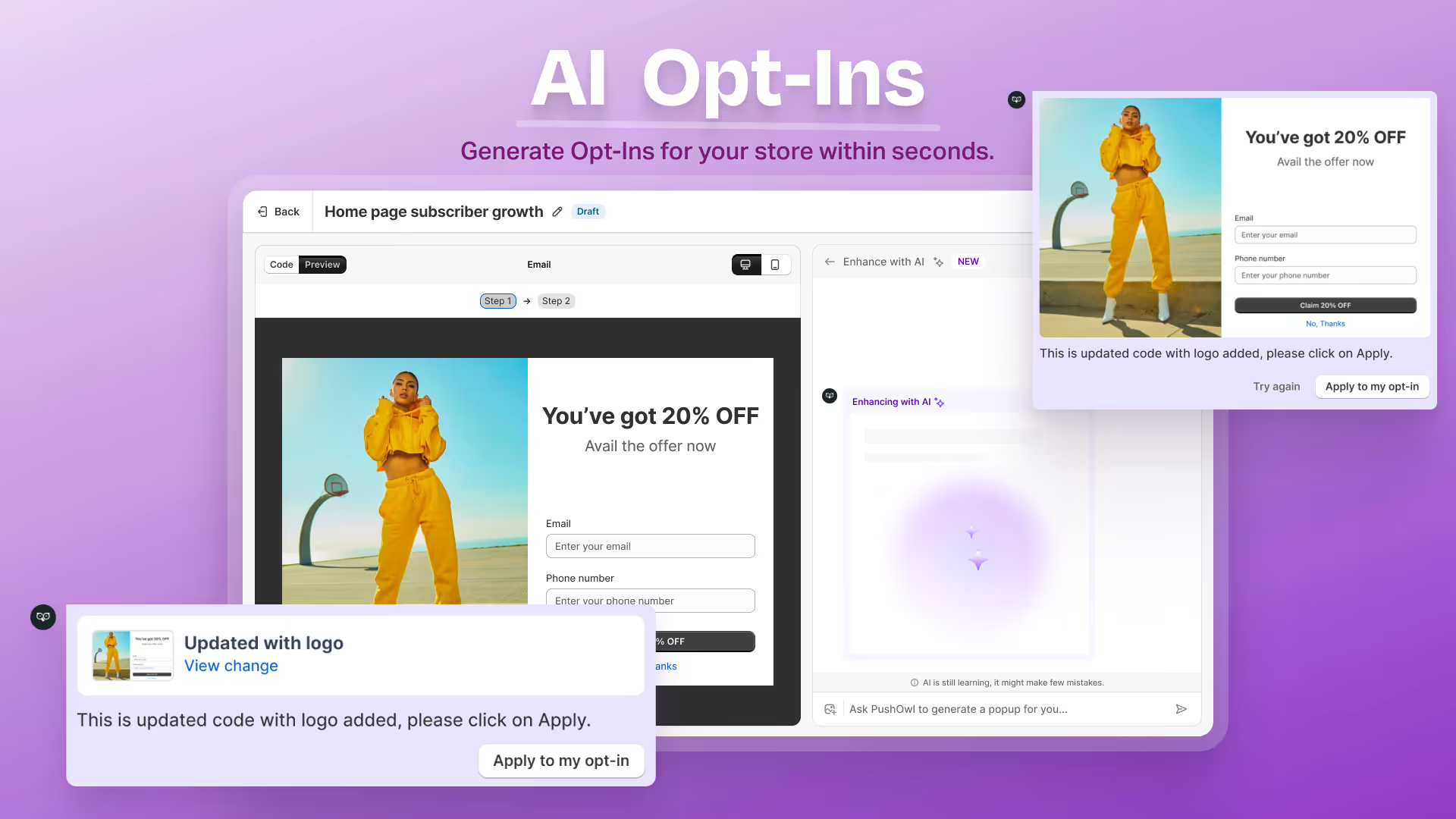
To grow your email list, just review the template, adjust it as needed, and publish!
Each of the above features is available within existing PushOwl workflows, so you do not need separate tools for each use case.
Save Time, Scale Faster With AI in Email Marketing
AI and email marketing work well together when you provide well-defined prompts and sufficient guardrails.
Your existing setup also determines the extent to which AI can improve your workflows.
It can improve your content, your segments, and campaign timing.
But keep in mind that it cannot compensate for unstructured workflows and weak offers.
Most Shopify stores see better results when these features are introduced gradually and tested against what is already working. If you want to evaluate this within your own Shopify store setup, you can test these AI email features with PushOwl’s free plan.