Using the email automation builder, which connects to Shopify's company and price lists native data, Shopify Plus B2B merchants can automate account-specific pricing confirmation messages, bulk order status update emails, and net terms payment reminder notifications. Building out these eight flows eliminates the need for manual order confirmation, bulk update processes, or overdue invoice communication. This means zero custom development and no need for a standalone wholesale platform.
Wholesale buyer behavior is different from DTC shoppers and, as such, should not be treated the same. A retailer buying 300 units for replenishment typically has four things on their mind: Is the negotiated price correct, where will the goods arrive, when will they arrive, and when precisely is the invoice due.
.avif)
These users have no interest in abandoned-cart, welcome, or brand story emails. They just want to know the exact status of their order linked to their account. If the customer cannot access this information accurately, quickly, and without friction, they will email the salesperson associated with their account. The salesperson's time costs considerably more money than any email that is sent out. Shopify Plus announced its own natively run B2B suite to bridge the gap between selling through a Shopify storefront and selling to an enterprise account.
However, a storefront is not enough. The remaining piece is communication. These emails inform shoppers of the pricing confirmed in their company pricing structure and ensure payment is received promptly through order tracking.
The PushOwl team built this solution on top of Shopify Plus, accessing that data and enabling PushOwl to automatically take over communication with all customers on a per-order and per-account basis.
This guide will show precisely how to do it: the sequence of emails actual wholesale buyers expect, how wholesale buyer pricing affects what is printed on confirmation emails, and the net terms reminder series designed to help account managers move paid wholesale customer payment issues out of their inboxes.
What is Shopify Plus B2B and How Does it Change Email Marketing?
Shopify Plus B2B is essentially native infrastructure built on the Shopify Plus account plan that organizes wholesale customers around one entity: a "company." A company account is the overarching group positioned above individual wholesale customer accounts and stores all wholesale customer-related settings, such as negotiated custom price list assignments, net payment terms, special shipping terms, order minimums, and allowed contact people for accounts.
A single company can have multiple locations, such as a head office and a regional distribution centre, and multiple contacts, such as a buyer, a finance manager, and a warehouse manager, each with different portal access levels. One company account might have five contacts, and each contact might need to receive a different email category.
This changes email marketing in four major ways.

- Account pricing is linked to the company record, not the product: This means that when an end-buyer logs into their company account and makes a purchase, the system applies their price list automatically. Their order automatically saves the applied price and notes the name of the price list. When an order confirmation email uses a "generic" MRP instead of the contracted rate, the end-buyer raises a support ticket. PushOwl Email reads the line items from the Shopify order record with the applied pricing included. To summarise in simpler terms, what the end-buyer actually sees in their email is exactly what they are going to get billed for.
- Payment terms are a first-class field in every B2B order: In B2B, every order relies first and foremost on the payment terms of the customer, whether they are Net 15, Net 30, Net 60, or Net 90, set directly on a Shopify Plus company profile. That due date is calculated and saved in the order automatically the moment the company clicks to purchase, so PushOwl can pull the date for email notifications. PushOwl Email Automation is already aware of the Shopify Plus date field, letting retailers send out email reminders tied directly to the due date rather than a set delay from the purchase date.
- Order volumes are larger, which means more communication milestones are expected: Large B2B orders mean multiple checkpoints in a shipment journey. For a customer buying 200 items across 15 SKUs, the expected touchpoints go beyond confirmation and delivery. The customer expects to hear when the order moves into picking, wants a dispatch email with the invoice, and also expects a payment reminder before the invoice is due. Right now, a standard DTC email cycle only accounts for the confirmation email and dispatch notification email, whereas PushOwl's email automation can handle all kinds of nuances in an order journey.
- Repurchase cycles are predictable: It is not only predictable, but also a key part of customer success, with DTC companies tracking usage habits and predicting repurchase dates from customer behavior to encourage purchases, while retailers replenish stock based on how often it depletes on shelves, typically over a 30, 60, or 90-day cycle, allowing order dates to be predicted with great accuracy.
How Does Shopify Plus B2B Account Pricing Work, and What Must Your Confirmation Email Show?
Shopify Plus B2B uses price lists on either the company level or the location level. A price list can set 30% off all public retail product prices, while SKU-1001 could be fixed at $50 per unit, even if the public retail price is a $200 MSRP. A store could have a different list for a large distributor versus a top-tier key account.
Once an order is placed in the company portal, Shopify Plus applies the price list and saves that unit price and list on the order in Shopify. If a customer receives ₹440 on an order confirmation email instead of the ₹600 MSRP because of a list-specific discount, the accounts payable team will likely receive a screenshot with the message, "Fix it!" before the items are shipped. They are probably calling the success manager 40 minutes later.
PushOwl Email reads all the same pricing information Shopify does: line-item contracted unit prices, applied discounts, and the context of that price list ID. This means it always tells the customer exactly what price they agreed to.
What other B2B order confirmations often lack is the name of the company and billing location. Buyers typically file order confirmations in their own systems, so they need to match your company name to theirs. They also need the PO number, since accounts payable reconciliation is done against PO numbers. An invoice without an associated PO number can mean delayed payment.
Contracted pricing per unit should be broken down by line item rather than showing only one subtotal. Payment terms and due dates must also be included. An email should clearly state "Net 30, due Nov. 8, 2021," not just display it on the invoice.
Dispatch and delivery windows are also important because inbound warehouses need slots reserved. A named account contact person should also be included so buyers know who to call if something goes wrong. None of these details are fluff. Every field matters because somebody in the buyer's organization needs it. If that information is missing on their side, it means another phone call.
What Are the 8 B2B Email Flows Every Shopify Plus Merchant Should Automate?
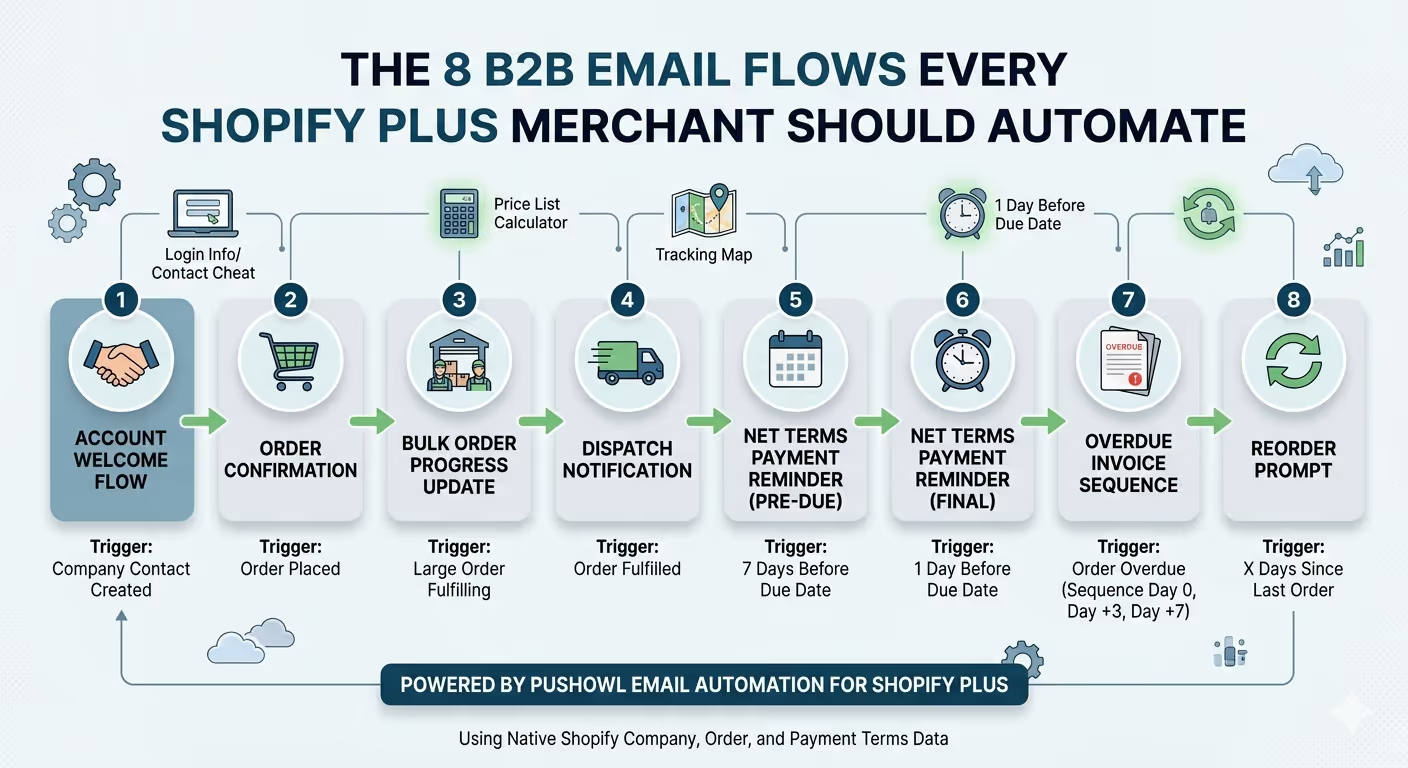
These eight flows show the end-to-end B2B account life cycle, from welcoming new buyers through to prompting reorders. PushOwl Email Automation users on Shopify Plus can set up all eight of these flows using native Shopify company, order, and payment terms data.
1. Account Welcome Flow
Flow Trigger: Company contact is created in Shopify Plus B2B.
Description: Welcomes buyers to the platform, provides information on how to log into the buyer portal, links to their price list, and sets expectations around order communication.
Timing: Immediately when a contact is created.
2. Order Confirmation
Flow Trigger: An order is placed under a company account.
Description: Shows the contracted pricing the customer sees, along with the PO number, payment terms, due date, and company contact details.
Timing: Within 2 minutes of an order being placed.
3. Bulk Order Progress Update
Flow Trigger: A large order, over a line item limit you define, enters the order fulfilment queue.
Description: Confirms that the order is being picked at the warehouse and provides an estimated despatch time.
Timing: 24 hours after order confirmation.
4. Dispatch Notification
Flow Trigger: The order has been fulfilled or shipped in Shopify.
Description: Gives tracking information, the company dispatching, and a copy of the packlist to the warehouse.
Timing: As soon as the order has been fulfilled or shipped.
5. Net Terms Payment Reminder, Pre-Due
Flow Trigger: 7 days before the payment due date on an order that has been given Net Terms.
Description: Includes invoice total, the payment due date, and a link to pay/details on where to send funds.
Timing: This is not a marketing email; it is a factual update business people would provide each other.
6. Net Terms Payment Reminder, Final
Flow Trigger: 1 day before due date.
Description: Gives the same information as above, just with a slightly shorter email subject. Example: "Payment due tomorrow, [Company Name] Order #XXXX."
7. Overdue Invoice Sequence
Flow Trigger: Date has come and gone, with no payment made on the order.
Sequence: First email on the due date (Day 0). Another email three days later (Day +3). And another one on Day +7. After 7 days, the account moves to manual follow-up.
8. Reorder Prompt
Flow Trigger: X days since an account last ordered an item with no active order running.
Customisation: The cadence is set per business depending on when your accounts usually reorder items.
Description: Gives the most recent order, offers suggestions for what to reorder, and includes a back to the portal button.
How to Set Up Net Terms Email Reminders in PushOwl Email
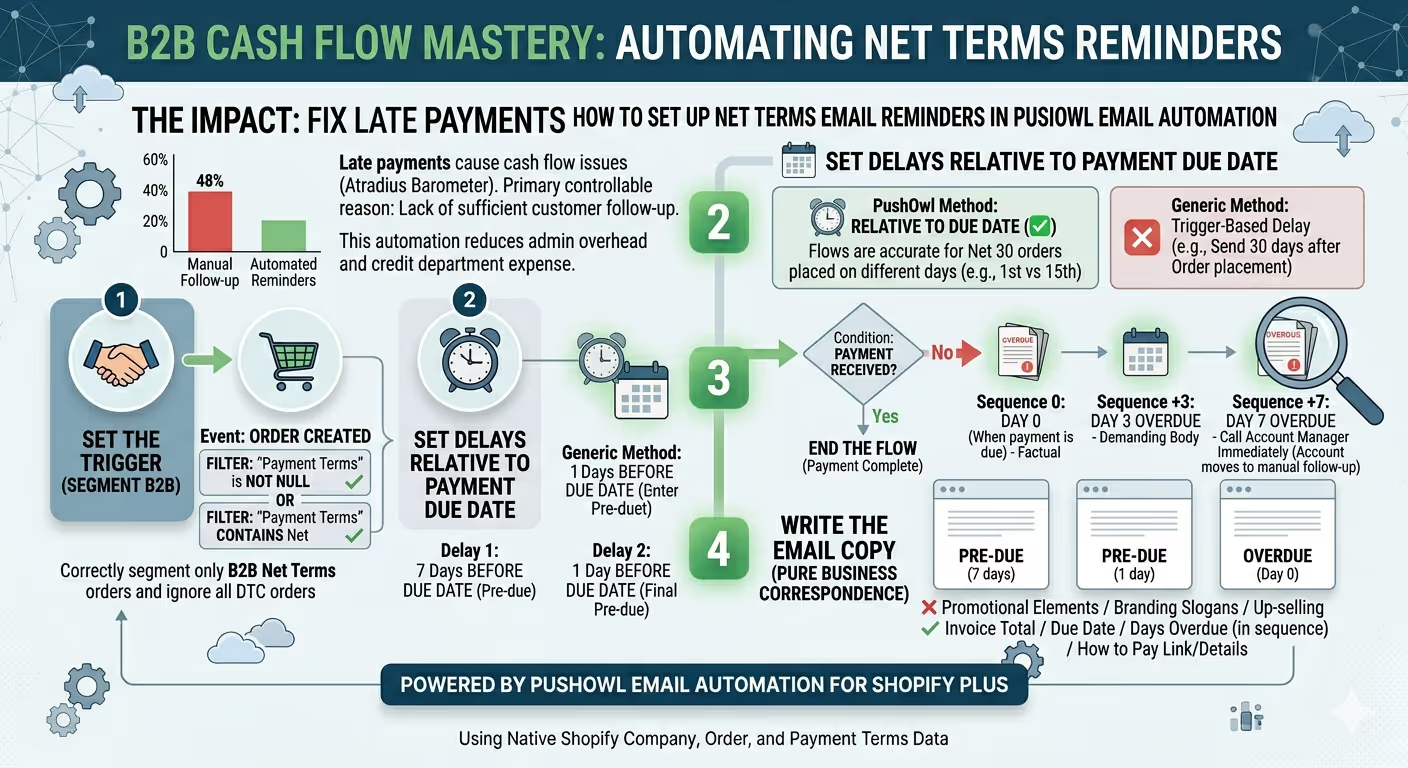
The most impactful automation a Shopify Plus B2B merchant can carry out is Net Terms Payment Reminders, automating payments that would otherwise cost 30 days past due and reduce the cost of cash flow and administrative overhead as well as the expense of dealing with credit departments. By default, Asia Pacific has the world's highest rate of late payments.
According to the Atradius Payment Practices Barometer (2023), 48% of the B2B invoices were paid late. One primary controllable reason is the customers not having enough follow-up, whereas the total value is the biggest problem in APAC.
Follow the next steps to build Net Terms Email reminders in the PushOwl Email Automation tool:
Step 1: Set the Trigger
Set the event as Order Created and use a filter condition, "payment terms is not null" or "payment terms contains Net." Both will allow the flow to correctly segment only B2B orders with Payment terms and ignore DTC orders placed without them.
Step 2: Set Delays Relative to the Due Date, Not the Order Date
While many automation platforms will only allow delays to be set from the trigger, i. e. Send 30 days after order placement. PushOwl Email Automation will let delays be set relative to the Payment Due Date field of the order. For Net Terms automation, this is because a Net 30 placed on the 1st of the month and a Net 30 order placed on the 15th of the month will both eventually have different due dates. If you set a trigger date-based delay for a generic automation, in at least one case, the reminders will be off by days.
- Set Delay 1: 7 days before due date.
- Set Delay 2: 1 day before due date.
Step 3: Build the Overdue Branch
Add a condition that says "payment received" or "Order payment status is paid," after the second-to-last reminder, or in this case, right before the reminder. If Yes, end the flow. If No, enter the sequence Day 0, exactly when payment is due, Day +3, and Day +7. Reminders on this sequence grow more and more direct. First on Day 0, we will stay factual. Day +3 reminders should still be mostly factual, but a bit more demanding in the body. Day +7 reminders become explicit: Please call us right away and connect with your Account Manager.
Step 4: Write the Email Copy
When building your email reminders for net terms, you will want this to be purely business correspondence, not a promotional marketing email. It should be completely white, including only your company logo and plain typography, with no marketing elements whatsoever.
Subject line structure that works best for transactional emails for B2B businesses: Pre-due (7 days): Payment due [Date], [Company Name] Order #[Number] Pre-due (1 day): Payment due tomorrow, [Company Name] Order #[Number] Overdue (Day 0): Invoice overdue, [Company Name] Order #[Number] Within the body, you will want to Clearly state: your invoice total, due date, number of days overdue (for overdue reminder series) and how to pay: linking to a payment page, bank account details or a combination of both. Do not add anything else, such as a branding slogan or promotion of other products, such as "while you are here." Upsell.
What is the Difference Between B2B Transactional Email and B2B Marketing Email on Shopify Plus?
Most Shopify Plus B2B brands make mistakes in one of two major areas: sending transactional information through campaign automation tools or, in a more severe case, using the same template as their marketing newsletter.
If a payment reminder looks like a sales email, account managers will simply ignore it. Similarly, if an order confirmation is packed with bold images and promotional discount codes inside a standard marketing newsletter template, the accounts payable team will not know what to do with it or may not even be able to find it.
PushOwl Email separates the two email workflows. PushOwl Email Automation handles everything transactional. Order confirmations, fulfilment emails, payment reminder sequences, and Net Terms workflows all exist here with minimal branding templates optimized for business correspondence.

PushOwl Email Campaigns handles everything that needs the visual impact of the brand, including new products sent to B2B clients, quarterly or seasonal sales and promotions, and restocking alerts for products sold out to retail buyers, all using the full PushOwl branded template builder.
How Should You Segment B2B Email for Shopify Plus?

Effective B2B email segmentation within Shopify Plus works across four core levels.
- Company-level segmentation breaks B2B customers down based on account tier, distributor status, key account status, or regional retailer level, usually connected to the Shopify Plus company price list associated with each B2B customer. This ensures a distributor paying through the distributor price list receives emails about distributor-only volume promotions, early access to select new SKUs, and quarterly performance reviews. Meanwhile, a retail customer qualifying for the standard wholesale price list receives different messages.
- Contact-role segmentation within a company targets individual roles inside a company with specialized emails. For example, the buyer receives confirmation or reorder reminder emails. The accounting contact receives payment reminder emails and invoices. The warehouse manager receives dispatch notifications or picking lists for shipments. In PushOwl Email, this is managed through contact tags already added in the Shopify Plus Admin. Using tags, automation emails can easily be mapped so each email reaches the correct contact person within the specific B2B account.
- Order-volume segmentation ensures different fulfilment notices are sent depending on the total order value. A B2B company that consistently places orders with over 500 line items could receive a bulk order progression email that a smaller retail partner would not receive. PushOwl Email Automation allows order line item counts or total order value to be set as trigger points for automation emails.
- Lifecycle-stage segmentation allows segmentation based on how long ago an account placed its last order or its usual reorder cadence. A B2B account whose last purchase was 45 days ago, despite normally ordering every 30 days, can be considered a lapsed client and may receive a reorder prompt rather than another standard newsletter. Similarly, a client that completed its first order with the company last week may deserve a B2B onboarding sequence rather than sales reminders for volume-based discounts.
How Does PushOwl Email Compare to Other B2B Email Tools for Shopify Plus?
Klaviyo is king in terms of email reach for DTC Shopify stores and is also well known within wholesale communities. What Klaviyo lacks, however, is native wholesale B2B data that goes beyond basic order processing. It handles Shopify order data reasonably well but does not natively expose Shopify Plus B2B data fields such as company records, assigned price lists, or payment terms due dates without custom event setup.
For merchants who want to trigger Net Terms reminders by date rather than based on a preset time after purchase, the custom metric setup required in Klaviyo often means hiring a developer. In contrast, PushOwl Email surfaces these fields directly inside the native Automation Builder without requiring any special development work.
7 Shopify Plus B2B Email Subject Lines That Get Read by Wholesale Buyers

Subject lines in wholesale, unlike DTC, must follow a different logic. Retailers deal with inboxes shared across multiple email addresses belonging to different people. These can include a buyer, a finance manager, or even someone in the warehouse, all receiving communication from the same merchant. In these situations, the subject line must clearly communicate what the email contains. A buyer expecting an order status update who instead opens a promotional email will likely permanently unsubscribe that email address from future communication.
In practice, the following seven subject line formats consistently perform well for B2B transactional and marketing emails:
- Order confirmed: [Company Name], PO# [Number]
Used for order confirmations. The PO number allows the retailer's AP team to file the email without even opening it.
- Your order is on its way, [Company Name] #[Order Number]
Used for despatch confirmations. Plain, direct, and factual.
- Payment due [Date], Invoice #[Number]
Used for pre-due Net Terms reminders. Clearly states the payment deadline with no unnecessary language.
- Invoice overdue: [Company Name], [Amount] due [Date]
Used for Day 0 overdue emails. The subject line must include the word "overdue."
- New products added to your price list, [Season/Category]
Used for new SKU announcements to B2B accounts. It references the relevant price list directly.
- Time to reorder? Your last order was [X] days ago
Used for reorder prompts. It uses order data to show clear relevance to the recipient.
- Your Q[X] account review is ready, [Company Name]
Used for quarterly performance reviews or account summaries. It positions the sender as an actively engaged business partner.
How Does Shopify Plus B2B Email Marketing Affect Deliverability?
The main factor affecting B2B deliverability, compared with DTC deliverability, is that recipients use corporate email domains with much stricter filtering systems.
An email promoting products or services to an address such as someone@gmail.com passes through a single level of spam filtering. If that same email is sent to buyer@largeretailer.com, it goes through a corporate email gateway, usually Google Workspace or Microsoft 365 with advanced filtering, domain-level rules imposed by the retailer's IT department, and potentially an additional anti-spam system.
Deliverability rates for B2B marketing emails sent to corporate domains are consistently around 8 to 12 % lower than DTC marketing emails sent to consumers, even when both use the same message and have identical sender reputations, according to the Validity Benchmark Report 2024.
The following three practices should be used to maintain B2B deliverability in PushOwl Email:
- Send transactional and marketing emails from separate subdomains.
Transactional communication, including order confirmations and payment reminders, should be sent from a dedicated subdomain such as orders@yourdomain.com or wholesale@yourdomain.com. Marketing campaigns should come from another subdomain, such as hello@yourdomain.com or news@yourdomain.com. This prevents a marketing campaign issue, such as spam complaints, from affecting the delivery of payment-related reminders.
- Use a plain-text-dominant format for transactional B2B emails.
Corporate mail servers are more likely to send image-heavy HTML emails into spam folders than simple text-based emails. PushOwl Email's straightforward transactional emails, featuring mostly text with only a logo and a simple call-to-action button, are far more likely to pass corporate filtering than heavily designed templates filled with large promotional images.
- Keep B2B contact lists accurate.
Corporate contacts frequently move to different roles or entirely different companies far more often than personal email addresses change. A B2B email list that is 15% inaccurate will quickly accumulate hard bounces, damaging sender reputation within weeks. PushOwl Email identifies hard bounces and removes them from the active customer list, but overall list hygiene still depends on the company's onboarding process. Company contact emails should always be validated when first created in Shopify Plus B2B.
What Does a Complete Shopify Plus B2B Email Marketing Setup Look Like?
For a merchant that is part of Shopify Plus and currently has an operational wholesale programme, a comprehensive setup of PushOwl Email covers three tiers.
Layer 1: Transactional automation (continuous, triggered by Shopify orders)
This category is composed of all eight previously mentioned automated workflows, comprising account welcome messages, order confirmation, progress updates for bulk orders, dispatch confirmation emails, Net Terms pre-due date reminders, Net Terms overdue payment sequences, and reorder reminders. After configuring these workflows in PushOwl Email Automation, they run continuously and do not require constant monitoring. Each order activates the correct automation sequence. Every payment due date triggers the necessary reminder. Every customer who does not engage automatically prompts the appropriate reorder message to be sent.
Layer 2: Segmented campaigns (scheduled, for sending to specific Company segments)
These comprise various marketing campaigns sent to B2B customers, such as new seasonal product catalogues, price list amendments, updates on restocked inventory categories, and promotions targeted at particular accounts. These campaigns are transmitted from PushOwl Email Campaigns to segments crafted using B2B Company and order data from Shopify Plus. Distributors are likely to receive marketing messages different from those sent to VIP retailers. The pace of these campaigns differs according to the type of account. Nonetheless, most wholesale programmes launch between 2 and 4 campaigns each month.
Layer 3: Account management correspondence (triggered by account-level occurrences, not order-related actions)
These emails include notices of price list adjustments whenever a Company's assigned price list is modified in Shopify Plus, updates on credit limitations, and summaries of account reviews. These messages have a lower sending frequency but carry greater significance. Most B2B merchants tend to handle these messages manually. Developing them as PushOwl Email Automations that respond to metafield alterations in Shopify or administrator actions effectively removes the burden of manual effort.
Build a Reliable B2B Communication System on Shopify Plus
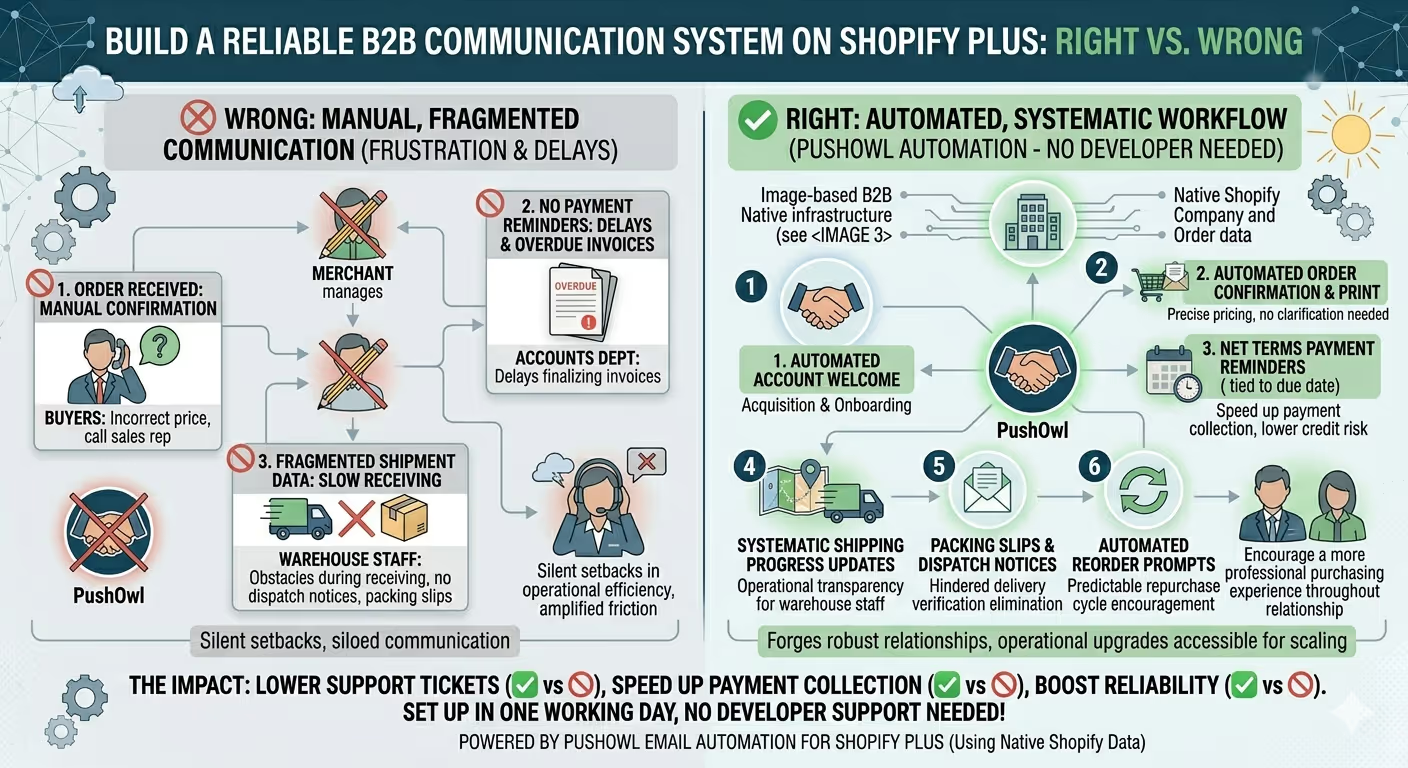
The element of communication often represents the point where Shopify Plus B2B programs either forge more robust relationships with clients or suffer silent setbacks in operational efficiency. Buyers who do not receive a correct price confirmation feel compelled to reach out to a sales representative for clarification.
On the other hand, accounts departments that fail to receive payment reminders create delays in finalizing invoices. Additionally, warehouse staff without appropriate dispatch notices or packing slips create obstacles during receiving, hindering delivery verification and unnecessarily prolonging payment cycles. Seemingly trivial communication oversights become amplified quickly with higher order volumes.
Shopify merchants utilizing PushOwl Email Automation have the capacity to eliminate these sources of frustration by implementing systematic workflows designed to operate automatically once set up.
Starting from customer acquisition and purchase confirmations to reminders about payment deadlines, shipping progress updates, and reorder prompts, automation ensures that all participants in the supply chain receive the precise information they need at the appropriate moment, without the need for ongoing manual follow-up.
The set of eight automated flows discussed in this guide forms the foundation of a consistent and reliable system of B2B communications on Shopify Plus. When taken together, they improve operational transparency, lower the amount of support your customer service department requires, speed up payment collection, and encourage a more professional purchasing experience throughout the entire lifespan of your relationship with a customer.
For the most part, Shopify merchants can set up all eight of these workflows within a single working day, with no developer support needed. As such, these are among the most impactful operational upgrades readily accessible to businesses focused on scaling B2B ecommerce.