Order confirmations.
Shipping updates.
Delivery notifications.
Password reset alerts.
Transactional emails like these see open rates between 80 and 85%.
Despite this, many Shopify merchants still rely on the platform’s default notification templates with minimal customization and personalization.
This guide breaks down:
- The various kinds of Shopify email notifications after a customer makes a purchase
- Transactional emails vs. marketing emails
- How Shopify transactional emails work and their limitations
We also spoke to Shopify email marketing experts who go over how to customize transactional emails to make the most out of the high open rates.
What Are Transactional Emails?
Transactional emails are automated messages your customers receive after specific actions that are part of the buying process (placing an order, resetting a password, or creating an account) that are not directly related to marketing.
Shopify Transactional Emails vs. Shopify Marketing Emails
When customers…
That is the key difference between transactional emails and marketing emails.
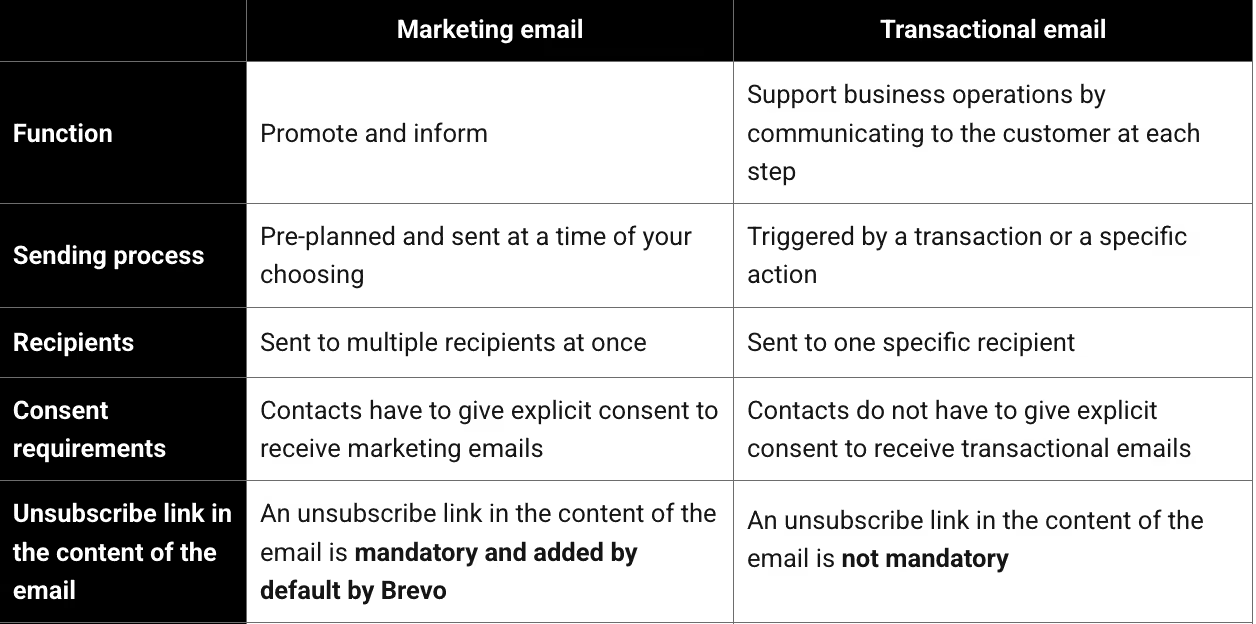
Customers know they will receive these emails and are more likely to open them because they contain vital information (refund updates, shipping timelines, password instructions, etc.) they may need to act on.
They are not a part of your promos or email marketing campaigns.
Why Do E-Commerce Customers Actually Open Transactional Emails
A customer is likely to skip a generic promo or your weekly newsletter, but they want to be in the loop about when their refund will arrive or how many days until their order arrives.
And this is why they outperform marketing emails, with an average open rate of 80-85%.
But will they look beyond the order confirmation number and other administrative details? Yes, which is why you need to optimize them beyond basic updates.
And yet, despite this expectation, Shopify stores ignore them.
Not just your order confirmation emails, but optimizing the following eight categories of transactional emails will help Shopify stores increase customer retention:
8 Transactional Emails Every Shopify Store Should Optimize
Transactional emails do not have to be generic updates.
Here are 8 types of transactional emails Shopify stores commonly send as part of their email marketing process:
Purchase-Related Emails
Purchase-related communication includes emails from product checkout through final delivery, as well as a refund email if the customer chooses to return the product. Any email that is central to their purchase comes under this category.
Order Confirmation Email
When is an order confirmation triggered? When a customer places an order
The order confirmation email must include standard information, such as the order summary (including the names and images of the products) and the total amount paid.
Also mention the expected delivery window or a tentative delivery date, if possible. Here are all the elements you should include:
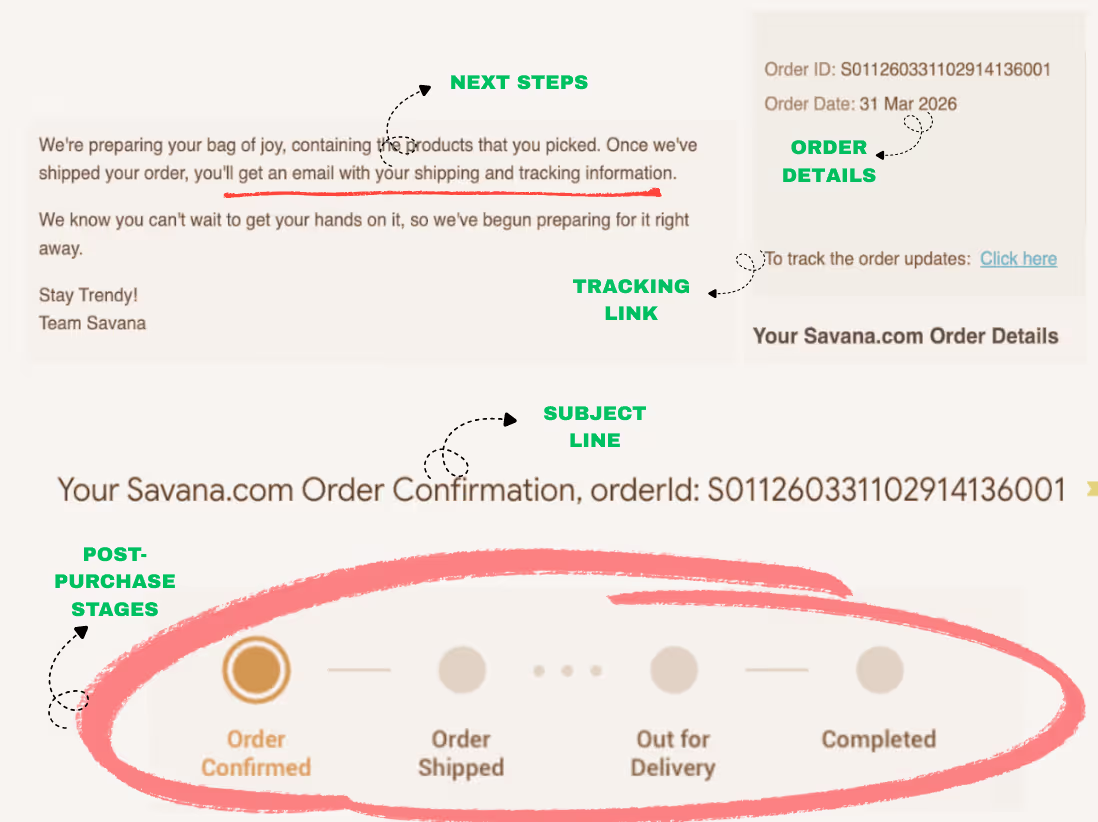
The email above also contains a list of the items ordered, along with their images and prices.
If your email has all these elements, the fundamentals are sorted. But you can take it a step further to nudge the customer towards future purchases. How?
Related Reading: Alternatives to Shopify Email for Order Confirmations
Include dynamic product blocks with cross-sells, such as complementary/frequently bought-together items.
The suggestions should be based on the specific customer’s browsing history.
PushOwl automatically excludes products the customer has purchased, so you are not recommending something they already have.
In Toby’s case, including product recommendation blocks (and no other promo or discount code) led to the following results for one of their skincare clients:
- 22% rise in the 30-day repeat purchase rate within 60 days of including these product recommendations
- Mean order value on repeat purchases increased by 17%
According to Vaught, the “frequently bought together” upsell product recommendations led to an 18% increase in post-purchase sales within 60 days for his sports nutrition website. He attributes these results to the strategic placement of the upsell block below the order confirmation and meeting the customer where they are in their journey.
When you include recommendations based on what the customers are already browsing, it feels less like marketing and more like a relevant add-on to their order confirmation.
Payment Confirmation Email
When is a payment confirmation triggered? When the brand processes the payment
Brands that sell high-ticket items or trust-sensitive products (luxury skincare or bespoke furniture, for example) often send a separate payment confirmation email.
Here is a standard Shopify payment confirmation:
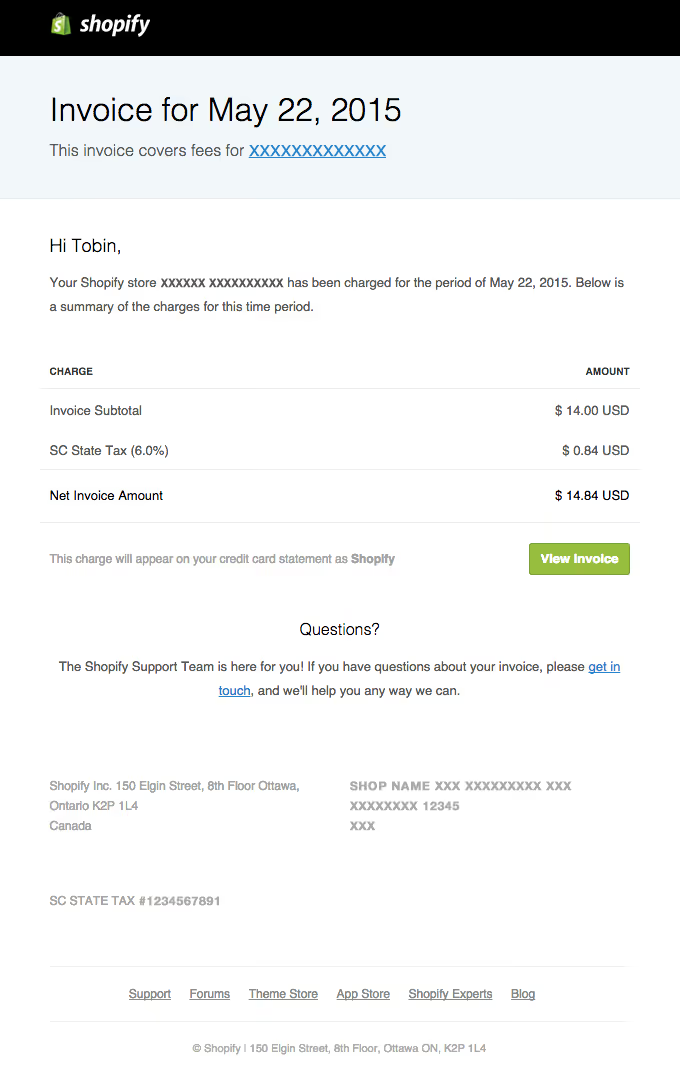
The job of this email is to remove anxiety around big purchases and answer:
- Did the transaction go through?
- Was the amount charged correct?
- Has the payment method been recorded?
If your brand doesn’t fall into the high-AOV or high-consideration category, you do not need a separate confirmation payment email.
In most cases, a well-structured order confirmation email is sufficient to handle both roles.
But if you need to include this within your post-purchase workflows, do not stop at acknowledging the receipt of payment.
Since the intent is high, and customer attention is fresh, you can:
The above don’t push an immediate sale, but they set the stage for future purchases.
Shipping Confirmation Email
When is a shipping confirmation triggered? When the order is fulfilled, i.e., it has left your warehouse and has been handed over to the carrier
At a minimum, this type of purchase-related email should include:
Once these fundamentals are sorted, you can add other elements, like the Dollar Shave Club does:
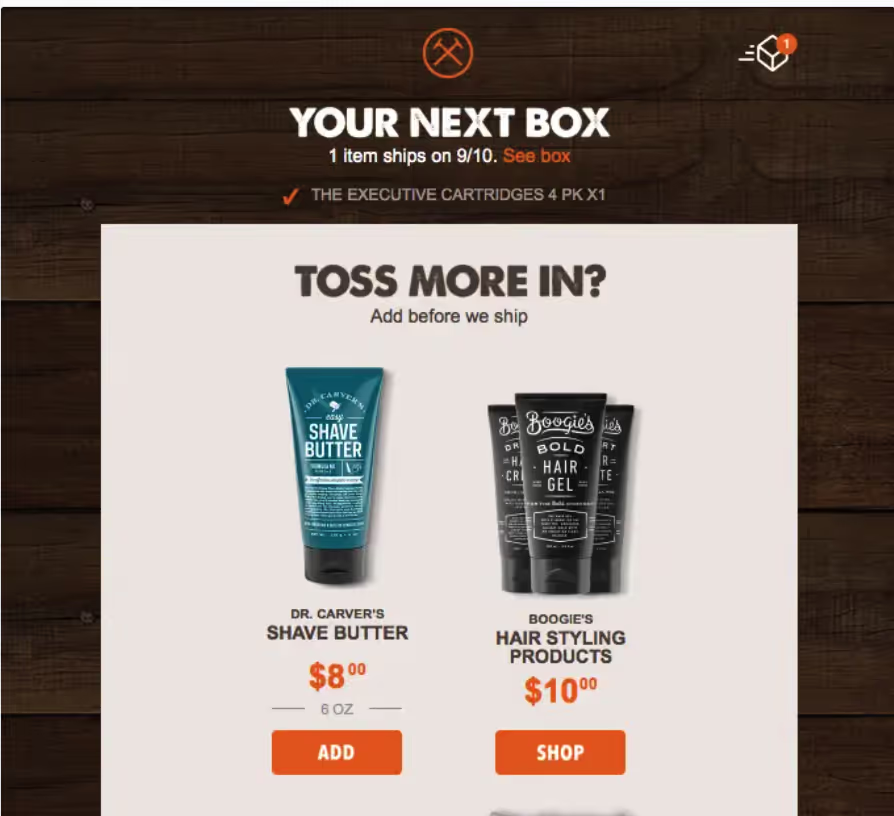
In the example above, the “add before we ship” incentive works because the customer is already in a high-intent buying state. The purchase decision has been made, and payment friction is gone. Adding another item feels easier than starting a new order later.
You can also use that attention window to:
- Educate customers on how to get the most out of the product (usage tips, setup guides)
- Encourage account creation or app download for real-time tracking
If you are including complementary products based on the customer’s browser history, cross-check that these recommendations do not include product categories that they have already purchased.
When you continue to soft-suggest next steps or future purchases in such a high-intent email, you are shaping the post-delivery experience even before the product arrives.
Out-for-Delivery Confirmation Email
When is an out-for-delivery email triggered? When the package has reached the last-mile hub, and it will be delivered soon
These emails are typically enabled via carrier integrations and see engagement due to their time-sensitive nature. Here is an example of the various elements of an out-for-delivery confirmation email:
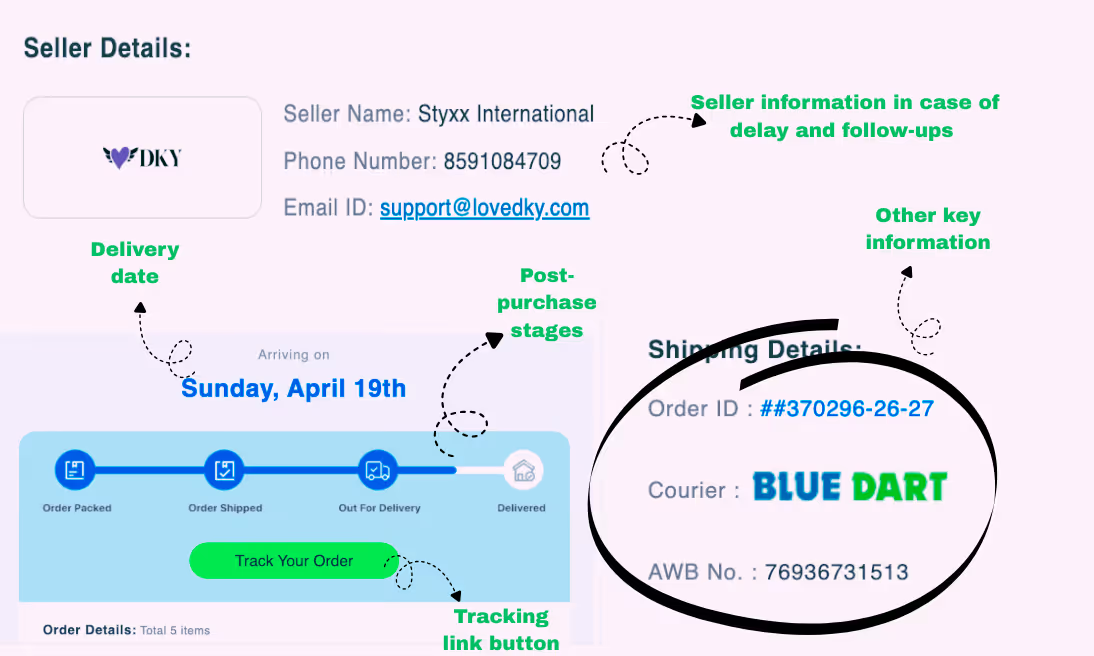
Beyond logistics, this email is a powerful pre-delivery touchpoint.
You can use it to:
- Set expectations for the unboxing experience (what’s included, how to prepare)
- Preempt common issues (ID requirements, availability during delivery time, and handling instructions)
- Prime the customer for post-delivery action, such as leaving a review
You are not asking for a review yet; you are just setting expectations for what happens after delivery is complete and ensuring the delivery experience goes smoothly.
Delivery Confirmation Email
When is a delivery confirmation email triggered? When the carrier marks the package as delivered to the recipient
This email confirms the closure of logistics and initiates the next phase of the customer journey. A delivery confirmation should include:
Once that is covered, you can focus on some high-converting touchpoints.
The first element to include is a review request. Depending on your product, you can also indicate that you will send a review request soon.
Cal Singh, a marketing expert, talks about how incorporating the review request into the delivery confirmation, as opposed to a separate email that was sent 7 days later, brought in positive results:
“The rate of submission of reviews increased by a considerable margin, and the reviews were also more detailed since the experience was still new. The single repositioning removed a whole email in the post-purchase process and enhanced the result it aimed to achieve.”
- Cal Singh, Head of Marketing and Partnerships at Equipment Leasing Canada
Test when review requests make sense for your brand. Triggering a review request immediately works for fast-use or low-consideration products. For others, it is better to delay by a few days.
You can also include complementary products based on the purchase as dynamic product blocks. Another element that can improve your delivery confirmation email is product education.
Here is an example by Forged Flare, an e-commerce brand that sells ornaments:

Including usage tips in the delivery confirmation email helps customers start using the product immediately, rather than waiting for a separate how-to email.
Refund Notification
When is a refund notification triggered? When a returned item is processed, the refund is issued to the chosen payment method
This notification type is a high-risk touchpoint. The customer has already had a broken expectation; how you handle the refund determines whether they return or churn. Include the following:
Avoid vague timelines or overly defensive language.
Once the basics are covered, use the email to:
- Reaffirm your return policy in simple terms
- Offer an easy path to exchange or reorder
- Include alternatives (different size, variant, or product) if relevant
- Softly emphasize the option of store credit rather than the refund amount being returned to the original payment method
The goal is to preserve trust so the customer is willing to buy again.
Account-Related Emails
This category of emails includes messages triggered by actions on a customer’s account in your Shopify store.
Double Opt-In (Account Activation) Email
When is a double opt-in email triggered? When a user submits their email (account creation, newsletter signup, or checkout) and needs to confirm consent for activation
Once verified, the customer can enter your welcome automation.
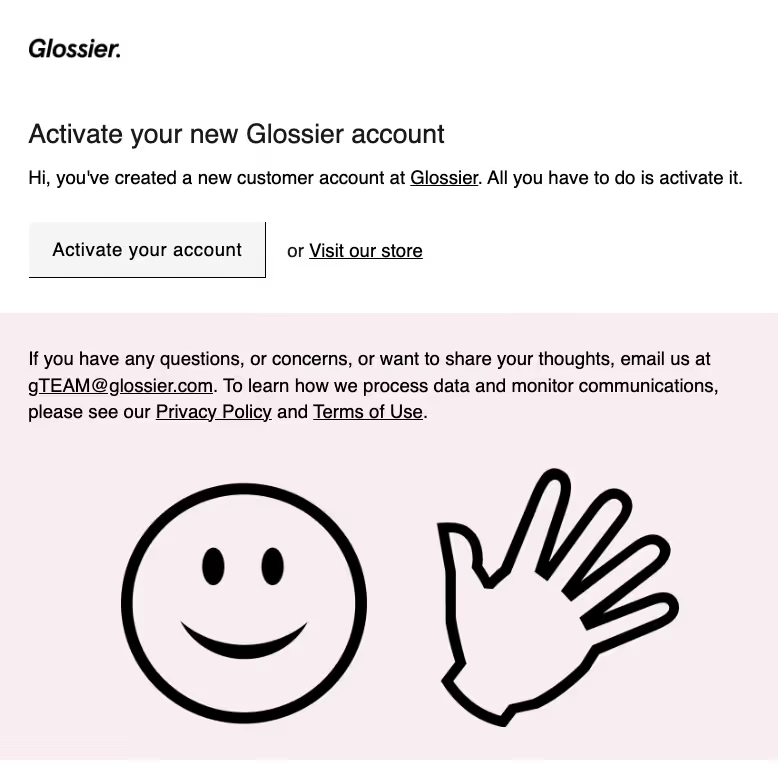
This email exists to verify identity and permission. You can include:
Any ambiguity in the email copy or delay in sending this email will create friction.
While double opt-in is not necessary, skipping this step altogether introduces a different problem: unverified or accidental signups that dilute list quality and impact email deliverability.
Password Reset Email
When is a password reset email triggered? When a customer requests to reset their password
Since this is a security-first email, keep it short and functional. Here is a handy checklist:
Avoid adding any marketing or promotional elements that could pull the customer’s focus. Here is a simple example that (mostly) checks the above boxes:
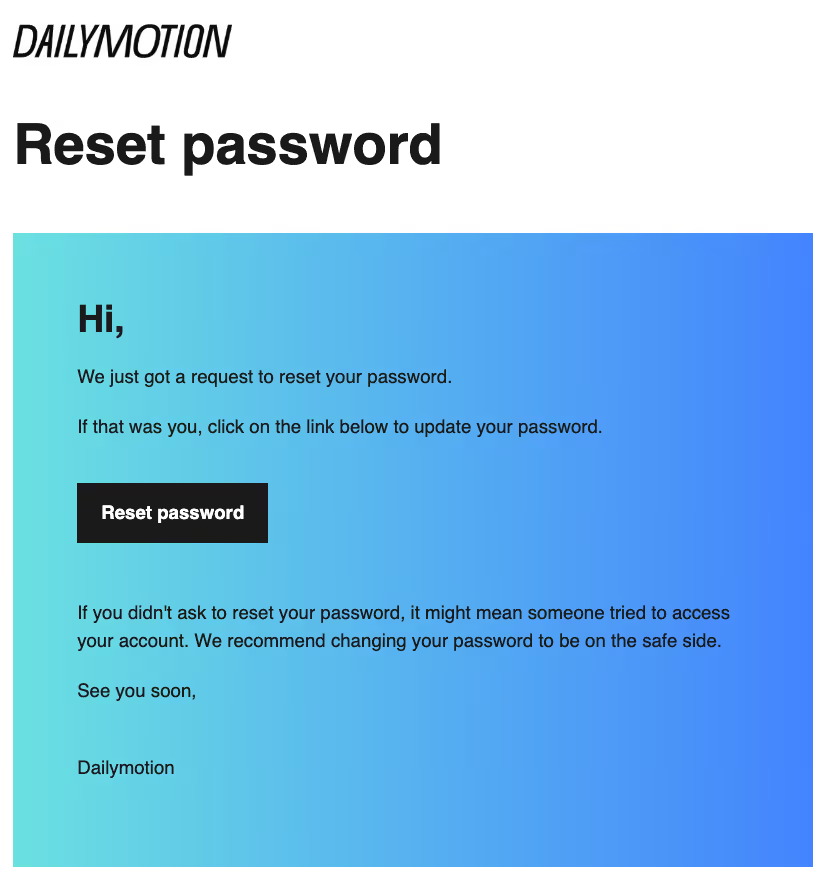
Including a customer support email address and specifying the time frame for resetting the password would make this email more helpful.
Remember, any friction or distraction increases drop-off and support requests, so keep it crisp but include all the necessary details.
Is It Legal To Include Marketing Content in Transactional Emails?
Yes, but the transactional purpose of the email has to remain primary.
The moment the transactional email starts functioning more like a campaign than an update about the customer’s account or delivery, the legal distinction becomes less clear. For example, a shipping confirmation with tracking details immediately visible and a small cross-sell below is generally acceptable.
A shipping confirmation dominated by discount banners, promotional grids, and multiple sales CTAs is much harder to classify as purely transactional.
That distinction matters because transactional emails and marketing emails are treated differently under regulations like CAN-SPAM and regional privacy laws.
The safest approach is to keep the transactional update central to the email and make any marketing content (cross-sells, upsells, etc.) supportive elements that do not overshadow the update.
There is another advantage in ensuring that a transactional email has a main goal that matches the eight categories we discussed above (and that any marketing elements are secondary).
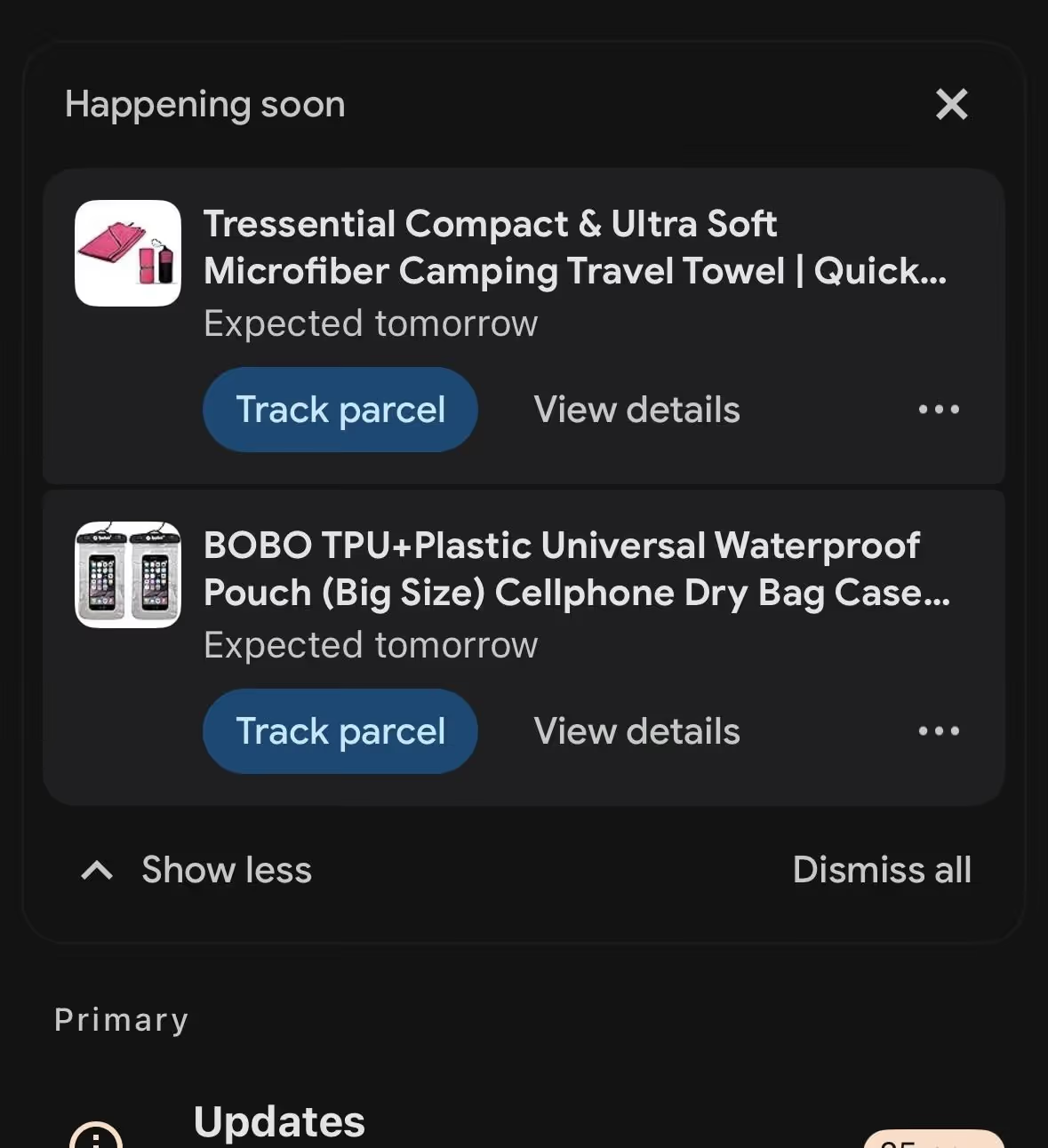
Transactional emails are more likely to receive prominent inbox placement than promotional campaigns because mailbox providers recognize their utility.
How To Set Up Transactional Emails in Shopify (Step by Step)
Shopify users follow these steps to set up their transactional emails on Shopify:
Step 1: Go to Notification Settings
From your Shopify admin, navigate to Settings → Notifications. This is where all transactional emails are managed.
Step 2: Choose the Email Template You Want to Edit
Shopify provides default templates for events such as order confirmations, shipping updates, abandoned checkouts, and customer account emails. Select the one you want to customize.
Step 3: Edit the Email Content
Shopify uses Liquid variables (like customer name, order details, and product names) to populate these emails. You can add the subject line, email body, and personalization elements such as a logo, brand color, and a tracking CTA button.
Pro tip: If you are a Shopify Plus user, you have access to additional checkout data and advanced customization features. With custom attributes and conditional content, you can layer in deeper personalization tied to checkout data. Shopify Plus users can also turn off native notifications and replace them with custom sends via a third-party ESP.
Shopify stores that are comfortable with HTML will be able to adapt the template easily.
Step 4: Preview and Test the Email
Use the preview option or send a test email to ensure the formatting is in place and the links are working correctly. When you send a test email, you can check the layout across devices and confirm that the preview text appears correctly and is not truncated.
Step 5: Save Changes
Once finalized, save the template, and the updated version will automatically apply to future triggered emails.
But this is where most Shopify merchants stop, because the native transactional emails can limit you:
Where Shopify’s Native Transactional Emails Fall Short
Shopify’s built-in transactional emails are designed to do one job well: deliver critical information tied to customer actions, such as post-purchase order confirmations and shipping updates, and miscellaneous account notifications.
And they do that reliably.
But as a store grows, these emails start to fall short because they are not built to drive incremental revenue or deeper engagement. They operate as static, system-triggered notifications with limited flexibility.
At this stage, it might be time to consider external transactional email apps.
Here is where the gaps start to show:
Limitation 1: No Dynamic Product Recommendations
Shopify’s native email templates do not support built-in dynamic product recommendation blocks.
You can manually insert product links or hardcode sections, but there is no native engine that suggests products based on browsing or purchase behavior or updates recommendations in real time.
This limitation can lead to lower revenue, as Oezdemir points out:
“A smartly designed recommendation engine [at EZContacts] allowed us to boost our post-purchase revenue by 23%, giving us an additional $180k per year off one single transactional email.”
For growing stores, this limitation is a missed conversion opportunity.
Limitation 2: No Revenue Attribution Tracking
Shopify’s native transactional emails offer limited visibility into performance beyond the basics of delivery and engagement.
While you can manually add tracking parameters to links, there is no built-in way to attribute downstream revenue to specific transactional emails. You can compare performance across different notification types.
Lastly, the main goal of transactional email is to drive repeat purchases, but with Shopify’s transactional emails, you cannot measure how much repeat purchase behavior is influenced by these touchpoints.
Limitation 3: No Segmentation Support Within Transactional Emails
Shopify’s transactional emails are triggered by specific customer actions and not by customer segmentation.
This limitation means there is no built-in way to send different versions of the same transactional email based on customer segments, such as region-specific cohorts, first-time vs. repeat buyers, or high-AOV vs. low-AOV buyers.
While it is technically possible to introduce conditional logic using Liquid, this approach relies on manually defined rules and becomes difficult to scale and maintain. Oezdemir explains a key consequence of this gap:
“The lack of options to import data from other sources makes it impossible to use full client profiles to provide them with better experiences.”
Without access to richer customer data, you cannot meaningfully tailor emails based on lifecycle stage or adjust cross-sell and upsell content based on browsing behavior. This limits the ability to turn high-engagement transactional emails into personalized touchpoints.
For example, a Shopify store that uses only native transactional emails will send the same order confirmation template to its customers in the US and Europe.
While order-specific details like currency may be reflected in these templates, that’s the extent of the variation you can provide unless you manually implement it.
Limitation 4: No A/B Testing
Shopify does not support native A/B testing for transactional email templates.
You cannot test CTAs, cross-sell placements, subject lines, or layout variations. Every customer receives the same version of the email, which means there is no structured way to improve performance over time based on real data.
Limitation 5: Basic Customization Only
Shopify’s native transactional emails are built to be functional first. They reliably deliver updates, but ultimately, these transactional emails look the same across brands. As Tanwar explains:
“Customization limitations are one of the problems our clients [at Clickworthy] complained about when they were using Shopify's native transactional emails in the past. They couldn't integrate their branding aesthetic.”
Yes, you can edit the subject line and email body content, insert your logo, and adjust colors.
But creating a fully branded transactional experience often requires working around rigid template structures and manually maintaining custom code.
While you can push things further with custom HTML and Liquid, it quickly becomes a scaling problem.
In practice, this means most transactional emails:
- Follow a rigid layout
- Rely on web-safe fonts with no custom typography
- Offer limited control over spacing and visual hierarchy
- Do not include ready-to-use sections for dynamic content.
Your transactional emails look functional but generic.
Limitation 6: No Sequence Logic After the Transactional Email
Shopify’s transactional setup is event-based and self-contained. Once an email is triggered, the flow ends there. There is no native capability to trigger follow-ups based on delivery events or to schedule post-purchase sequences such as review requests, cross-sells, replenishment reminders, or win-back emails.
This limitation means that you cannot build lifecycle journeys that extend beyond the initial notification. To create a personalized post-purchase experience, Shopify stores need to rely on separate automation tools or integrations.
How PushOwl Helps Shopify Brands Improve Transactional Emails
Shopify’s built-in transactional emails are functional. They do the job they are meant to do, i.e., to close the loop on the order, but not much else.
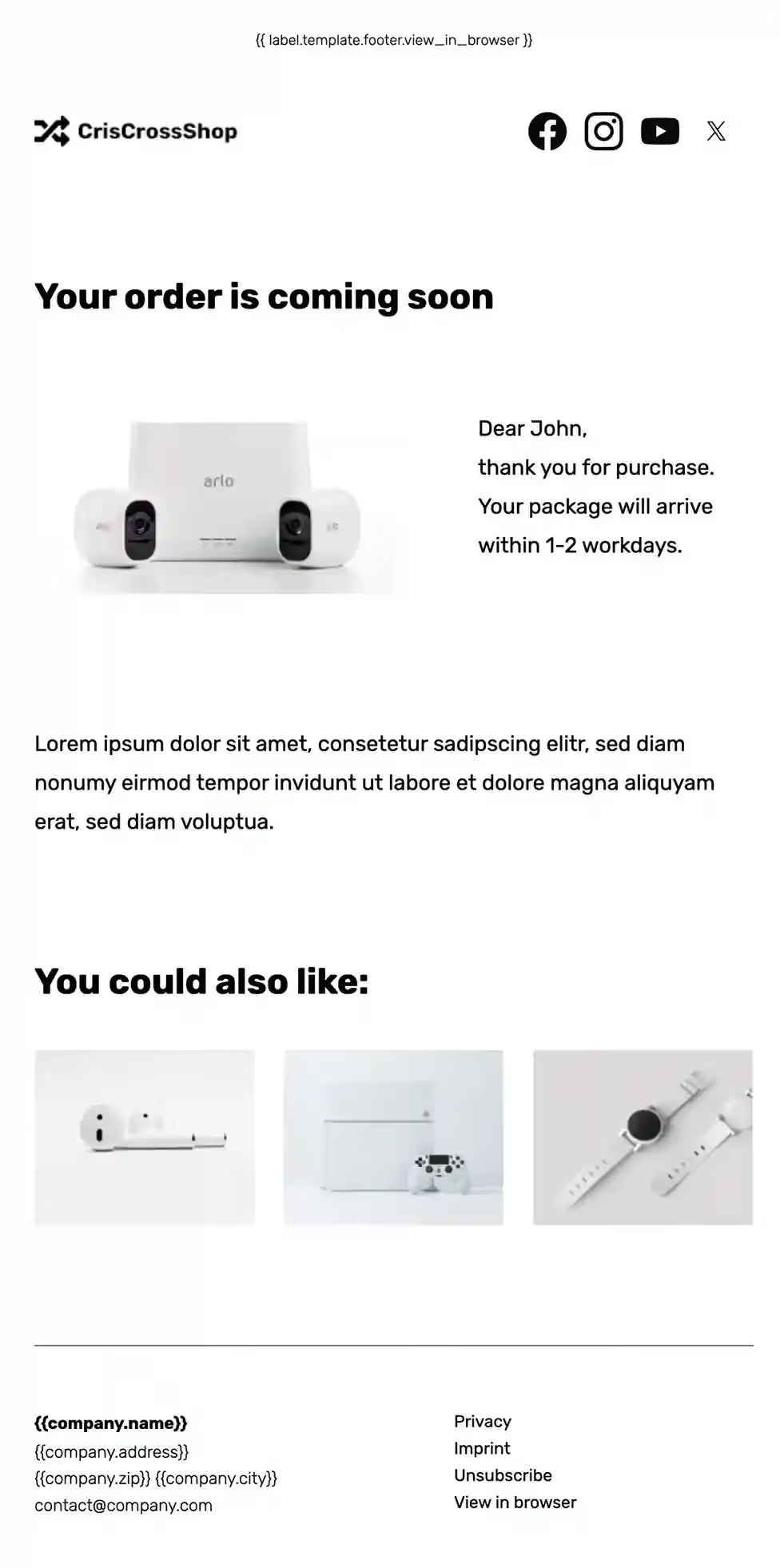
With PushOwl (powered by Brevo), Shopify stores can personalize transactional emails and do much more. Here is an example of one of our free Shopify email templates:
And here is a standard Shopify shipping confirmation email:
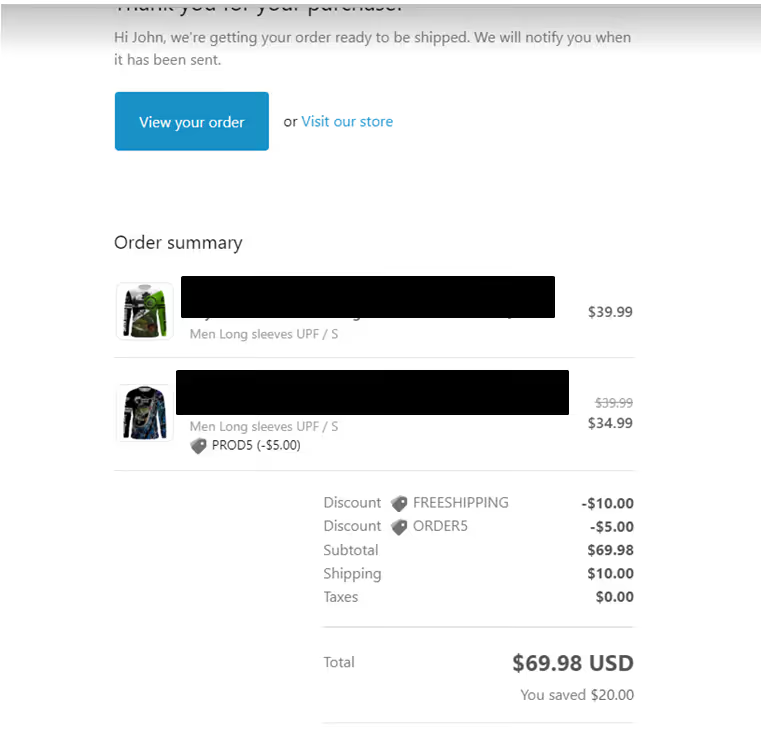
Can you spot the differences?
Here are a few goals Shopify’s native email tool will not be able to achieve (without coding or manual intervention):
Customize Transactional Emails to Match Store Branding
Your transactional emails do not have to look plain or disconnected from the rest of your marketing emails. Once you add your brand assets to the library, you can apply them to all your emails so they match the color, font, and overall brand style of your website.
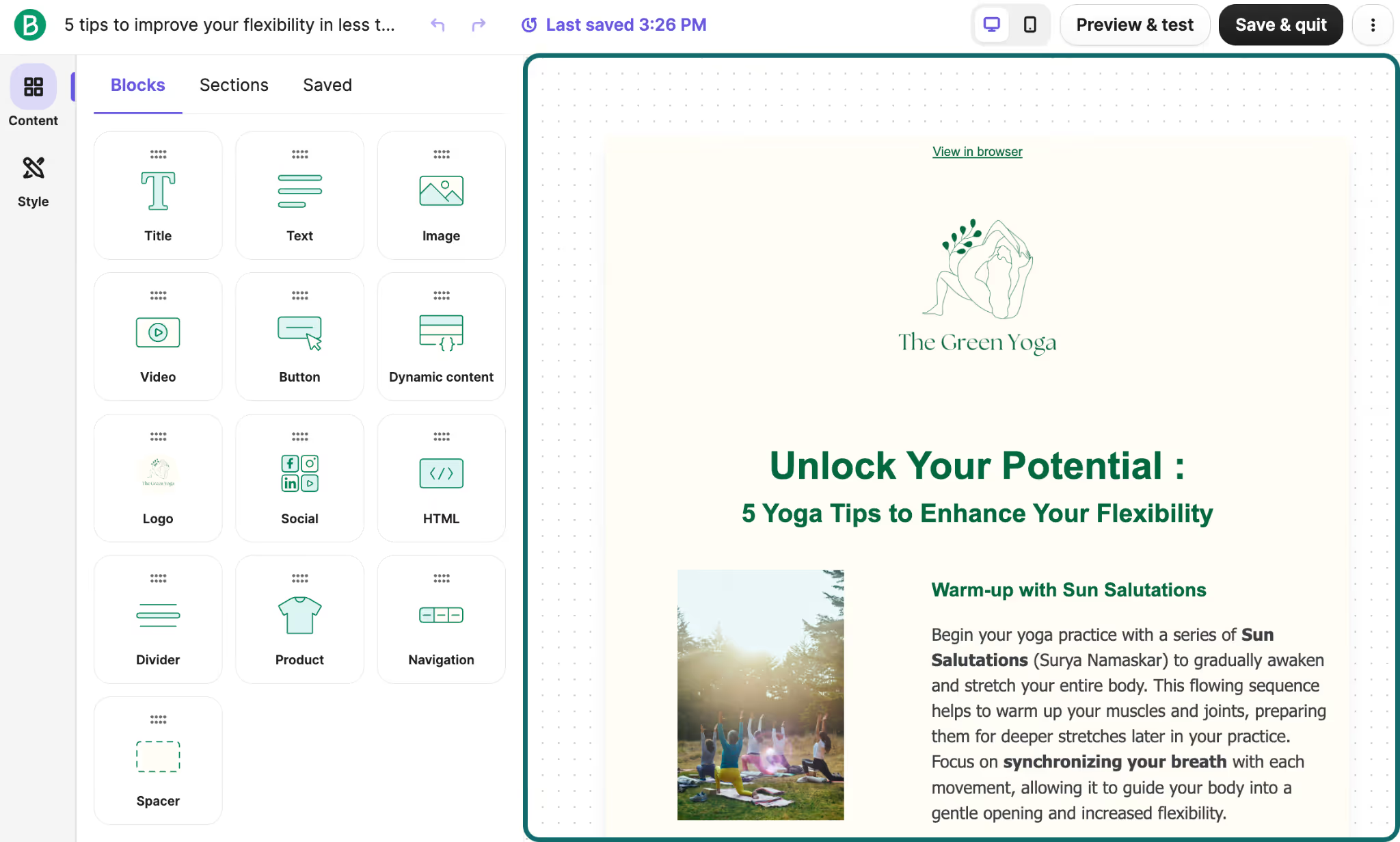
With our drag-and-drop editor, you can design your email template and fill it with content.
Our AI assistant will help you frame the email copy if required. Even small upgrades that create clean layouts and improve brand recall directly impact click-throughs from high-intent emails like order confirmations.
Add Dynamic Product Recommendation Blocks to Transactional Emails
Beyond the email copy, you can add dynamic content to your transactional emails.
Our product feed variables (which create dynamic product blocks) add personalized recommendations for each customer based on a dynamic list of products related to their recent purchases or what they recently viewed.
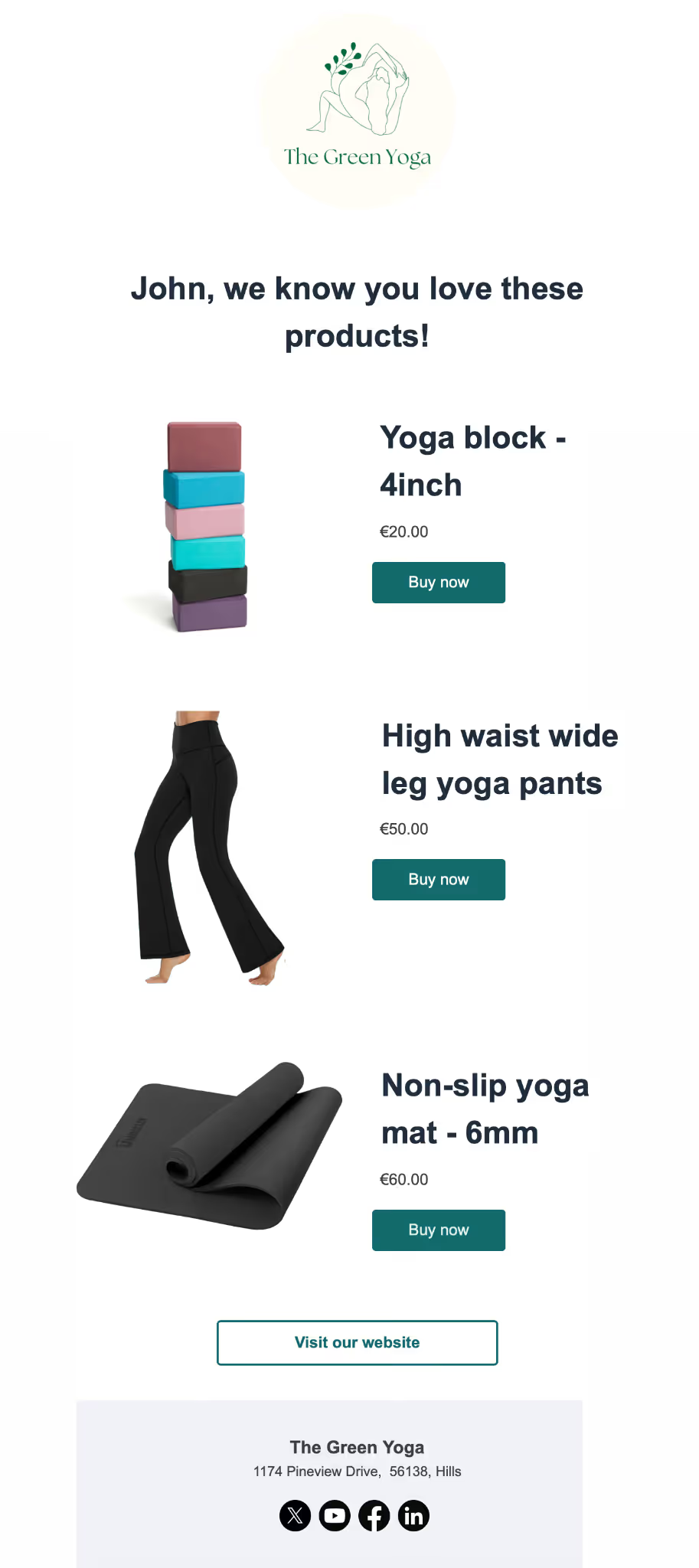
If they haven’t viewed any products since the purchase, you can also add bestsellers to the mix.
Decide how many items you want to show and the extent of details (for example, do you want to display just the recommended product or its price as well?). You can add these product blocks to order confirmations, shipping updates, and delivery notifications.
Trigger Post-Delivery Review and Replenishment Automations
Once the delivery is complete, the post-delivery automation will automatically send the customer a sequence of emails at fixed frequencies.
That could mean product tutorials a day after delivery, a review request on Day 7 after delivery, and a replenishment reminder for repeat-use items after the estimated time to finish the product.
Instead of manually setting them up, these transactional email automation workflows are tied to actual order completion, and in each of these emails, you can add cross-sell recommendations nestled among the delivery updates.
Monitor Revenue Attribution From Transactional Sends
Most brands treat transactional emails as operational, but you can also generate revenue from them.
With our transactional revenue report, you will be able to see how much revenue comes from emails like:
- Order confirmations
- Shipping updates
- Delivery emails
Attribution is tied to e-commerce metrics like clicks and resulting purchases.
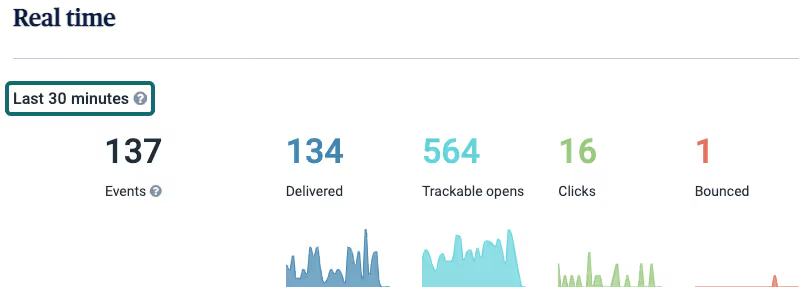
You will be able to clearly see which transactional emails drive conversions and which products are picked up post-purchase. Seeing revenue by email type makes it easier to identify which transactional emails are actually influencing repeat purchases.
Test Subject Lines and Layout Variations
A/B test email subject lines and layout variations across order confirmations and other transactional emails. You will gain a better understanding of which tones and framing work best for subject lines and which layout structures lead to higher CTRs.
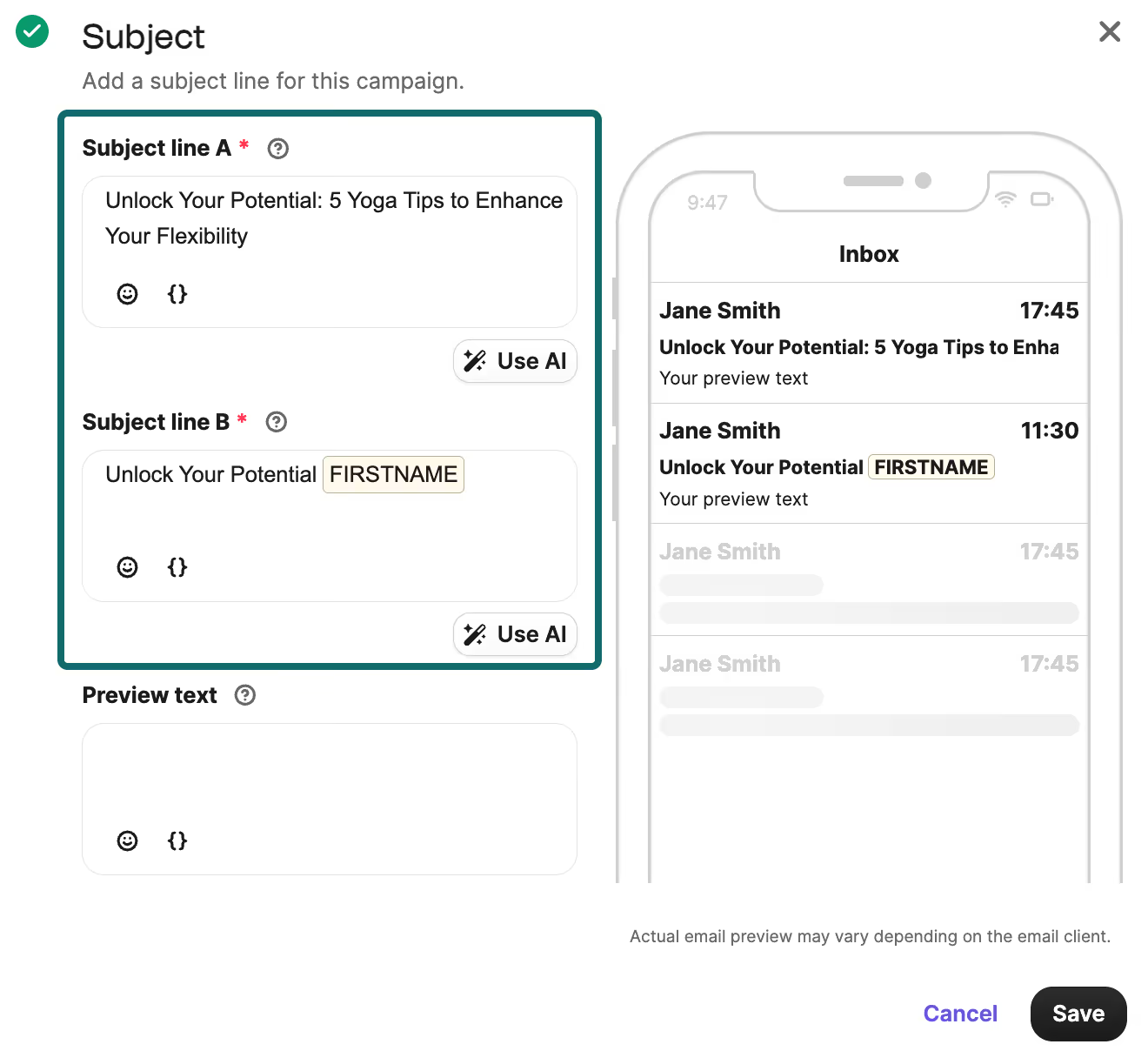
You can also experiment and test variations in content blocks, such as banners vs. product grids.
Transactional Email Best Practices for Shopify Merchants
Transactional emails already have two advantages that most marketing emails do not: customers expect them, and the open rates are unparalleled.
In trying to convert these emails into something more than generic updates, you do not need clever brand moments, just some best practices:
Avoid Confusing Subject Lines
Transactional email subject lines should remove ambiguity. Unlike promotional emails, you do not need wordplay or scroll-stopping phrases. Keeping it simple is the best way to ensure they do not mistake the email for a campaign that they can open later or forget about.
A simple structure:
[Name of Customer], Your order is confirmed/on the way/delivered
Give the precise update you need in the subject line, and the customer is more likely to open it. And then the add-ons in the email body (product recommendation blocks, educational content, etc.) can do their job.
Make the Preview Line Useful
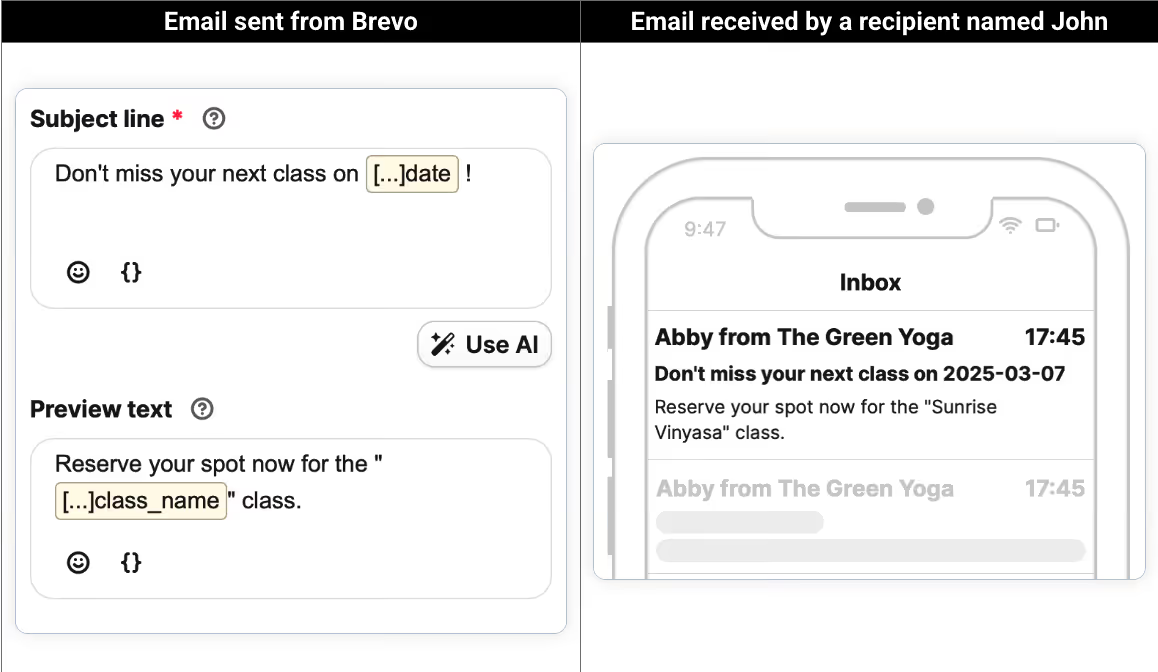
Most email editors, including Shopify’s built-in email tool, will auto-fill the preview line (as a summary of the subject line) or leave it empty by default.
Both are missed opportunities. The preview line sits right next to your subject line in the inbox.
The subject line updates, and the preview line should prompt the customer to take action based on the update. Here is an example of a shipping confirmation subject line and preview:
Subject line: Hi Anne, your order#123 has been shipped
Preview: Track your package on the app!
Now you have done two things:
- Confirmed the shipping update
- Introduced the next step
This small optimization keeps the customer in the loop and also encourages them to take an action without making the email feel promotional.
Stick to One CTA and Do Not Crowd the Email
Every transactional email should focus on a single primary action, whether it is tracking an order, confirming a delivery, writing a review, or resetting a password.
The moment you introduce competing CTAs, you dilute intent and reduce the likelihood that the action will actually be taken.
Do not try to “add more value” by stacking information. You will see emails with:
- Tracking links
- Discount banners
- Product grids
- Loyalty prompts
- …and the actual update
They all compete for attention at the same moment, and that is where performance drops. Tanwar points out some best practices that bring their clients results:
“To retain the core utility of a transactional email, we limit the marketing offers added to the said email. Sure, there will be product recommendations, but we stick to 1 to 3. We also don't put extra requests or calls to action. And certainly no excessive amounts of links.”
If a user has to choose between actions and links, you have already lost the high-intent attention that a transactional email brings.
And this applies beyond CTAs. The email itself should not feel crowded with lengthy paragraphs, multiple images, and links.
Tanwar also suggests increasing the word-to-image ratio to reduce the HTML's complexity. “As a result, the risk of them ending up in the spam folder gets reduced. Moreover, simpler HTML speeds up email loading time, especially on mobile devices,” he explains.
A simple test is: when a customer opens the email, do they see it as a transactional email with some marketing content, or as a marketing email with an update about their purchase?
As Oezdemir puts it:
“The essential function of transactional emails should always remain unchanged: the order number, delivery details, and shipping estimates should stay visible immediately.”
Transactional emails work best when they stay focused on the transaction first and marketing second.
Design Mobile-Friendly Transactional Emails
Most transactional emails are opened on mobile. Which means that if the email is difficult to scan, the customer immediately feels that friction.
And unlike marketing emails, transactional emails are often opened multiple times if the customer needs to use the tracking link or check the delivery date. So the layout has to prioritize usability before aesthetics.
For Shopify merchants, that usually means:
- A clean single-column layout
- Body text that remains readable without zooming in
- Enough spacing between sections and links
- CTA buttons are large enough to tap comfortably
The customer should find the information they came for within seconds, regardless of the device they are using. So test the email on mobile devices before sending it.
Do Not Consolidate Post-Purchase Email Updates
You do not want to spam your customers with incessant updates, but you also want to avoid over-consolidating transactional emails. Doing so would create a different problem: customer uncertainty.
An order confirmation and shipping confirmation may seem related internally, but to the customer, they answer two completely different questions:
Trying to compress such distinct updates into one email makes the timeline fuzzy for the customer. That can lead to more support tickets.
Instead, send distinct emails for each stage of the post-purchase journey. Customers will prefer multiple emails with clear updates rather than a single bundled summary across multiple stages of their journey.
H2: Take Your Transactional Emails to the Next Level With PushOwl
Do not turn your Shopify transactional emails into full promotional campaigns.
All you need to do is layer in some personalization through clean branding, product recommendations, razor-sharp CTAs, and mobile layouts. Small improvements in transactional emails compound over time because they are among the most consistently opened messages your store sends.
And since managing these elements inside Shopify will eventually become restrictive, using a dedicated retention tool becomes worthwhile.
You can use PushOwl to turn plain order updates into branded templates with product recommendations that are part of trigger-based automations. With this sophisticated setup, your customers’ post-purchase journey will be easier to customize and scale.