Mobile exit-intent popups are one of the most underutilized conversion tools for Shopify stores — and that’s because most merchants are still using desktop-only exit-intent logic on their mobile visitors.
When it comes to exit intent popups, they are pretty easy to use and implement on desktop browsers because customer behavior can be tracked through cursor movement. The moment a cursor moves toward the top of the browser, towards the back button, or even the address bar, the popup can be triggered, which is simple and effective.
But since online stores on mobiles work differently, and there is no cursor per say, when people refer to exit intent strategies for mobile, the popup is actually triggered by entirely different actions, which can be pressing the back button, a sudden upward scroll, a period of inactivity, or switching to another app. And most merchants create a mobile popup without realizing which of these signals is responsible for activating it.
Since over 79% of Shopify traffic now comes from mobile devices, if your exit strategy only works on desktop, you are actually capturing at best only about 30% of your exit traffic. That means you are leaving a large number of potential subscribers and customers behind.
In this blog post, we will explain what exit intent on mobile really means. You will learn the four actual signals that indicate a mobile user is about to leave. We will also share 12 real exit intent popup examples and the conversion data you need to decide whether to implement them on your store. If you use PushOwl on Shopify, you can use all four mobile exit signals out of the box.
Quick Answer: Does Exit-Intent Work on Mobile? (Yes — Here's How)
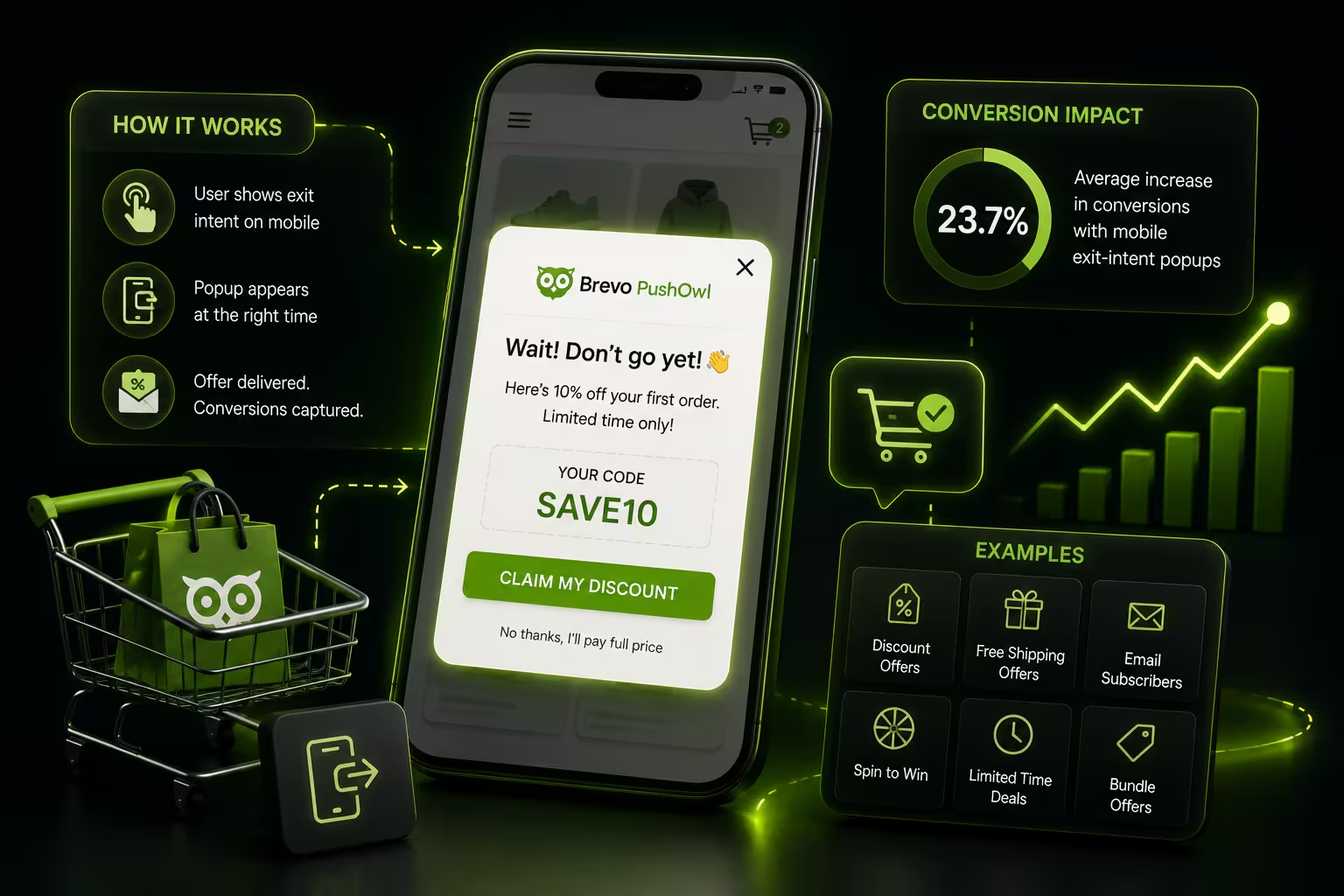
Yes, mobile exit-intent works — but it requires different triggers than desktop. Since mobile devices lack a cursor, exit-intent relies on four proxy signals: back-button press, fast upward scroll, inactivity timer, and tab-switch/blur event. When configured correctly, mobile exit-intent popups achieve an average 23.7% increase in conversions for Shopify stores.
Before we get into the details of how this works, let us take a quick look and understanding of whether exit-intent actually works on mobile devices.
The short answer is yes, but it works differently than it does on desktop.
On the desktop, the exit intent is mainly cursor movement. When the cursor leaves the browser window, the popup triggers. This tracking method does not exist on mobile because touch devices do not use a cursor.
That is why mobile exit intent triggers use different signals. Instead of cursor movement, they rely on four proxy signals to detect when a user is about to leave:
Back-button press: the user here taps the back button or swipes back to the previous/home page
Upward scroll speed: the user scrolls up quickly, usually to go back
Inactivity timer: the user has stopped interacting with the page for a set amount of time
An event of tab-switch: the user switches to another app or browser tab
These signals tell you that the user is likely exiting, so you can then show a popup at that exact moment. When set up correctly, they can catch a large portion of users before they actually leave your store.
So does it work? Yes, when you use the right triggers. Understand that mobile exit-intent is not about copying the desktop method, it is about understanding how mobile users actually behave. Keep in mind that the timing is very short, usually 200 milliseconds between the user's intent to leave and the action itself, so your popup needs to catch that window.
Why Doesn't Desktop Exit-Intent Work on Mobile?
Let us understand how exit intent works on the two differently, and why the desktop approach does not carry over to mobile.
How Does Desktop Exit-Intent Work?
On a desktop, the system is pretty straightforward, where it tracks the mouse cursor. When the cursor moves toward the browser's address bar, back button, or tab bar, the mobile exit intent popup logic that is built for desktop, triggers a popup. Here, the assumption is that the user is about to close the tab or leave the site.
Why Does the Same Logic Fail on Mobile?
Mobile devices do not have a cursor, and users interact through touch, which is tapping, swiping, and scrolling. There is no mouse movement to track, and that is why simply porting your desktop exit-intent setup to mobile does not work. Moreover, the mobile browser interface looks and acts differently. The address bar disappears and reappears depending on the scroll direction, and unlike on desktop, there is no constant tab bar.
What Are the Real Exit Signals on Mobile?
On the browser for iOS Safari, the users typically leave a site by using the swipe-back gesture. But on an Android, they either press the hardware back button or use gesture navigation. By default, a desktop-style exit intent setup for mobile cannot recognize these actions, and thus will fail.
What Does This Mean for Your Shopify Store?
If you use the same exit-intent settings for desktop and mobile, you probably will miss out on the many mobile exits. That is why you need mobile exit intent triggers that are built specifically for touch-based navigation. The next part explains the four signals that are effective on mobile. Learn how PushOwl’s web push notifications work on Shopify to capture mobile visitors before they leave.
What Are the 4 Mobile Exit Signals? (PushOwl Framework)
This is where we will now learn about the four specific signals that actually work on mobile devices. These are the mobile exit intent triggers that replace cursor tracking. Before we get into each signal, remember this: Mobile exit-intent is not about catching intent, but it is about catching the 200ms window between intent and action.
1. The back-button press (BBP)
This is the highest-intent exit signal. When a user presses the back button on Android or performs a swipe-back gesture on iOS, they have decided to leave.
How it is detected: The browser listens for the popstate event, which occurs when a user presses the hardware back button on Android or clicks the back navigation in their browser.
The ideal trigger threshold: This is immediate, within 50ms of detection.
An example use case: A user lands on a product page, spends 40 seconds, then hits back. A popup appears offering free shipping or a discount before they exit.
The caveat: It is not advised to remove the back button, as it can frustrate the user. Remember, in iOS Safari, the swipe-back gesture may not always activate the same browser event. It's important for your popup tool to manage this specifically.
2. Scroll-up velocity
When a user scrolls up quickly on a product page, they are usually looking for the header section or trying to leave, and is usually signalling the exit. On the contrary, here, slow scrolling means engagement.
How it is detected: You need to track the scroll speed and direction using JavaScript.
The ideal trigger threshold: The scroll speed is above 15 pixels per frame in the upward direction.
An example use case: A beauty brand showing a sample bundle offer when a user scrolls up quickly after viewing a product. This usually means they are heading back to search or navigate elsewhere.
The caveat: Here, don’t trigger on every short upward scroll, instead it is better to use velocity, not direction alone. As, keeping it too low can trigger during regular browsing, and by keeping it too high, you may miss genuine exit behavior.
3. Inactivity timer
Sometimes users simply stop interacting. They leave their phone on the table or switch focus. After a set period of no taps or scrolls, you can assume they have lost interest.
How it is detected: For this, you can set a JavaScript timer that resets on every user interaction, like tap, scroll, or click. If there is no interaction happening within a set time window, it can fire the trigger.
The ideal trigger threshold: The 20–30 seconds of inactivity can be considered a commonly used range. Any triggers given at shorter than that tend to interrupt active users.
An example use case: A user opens your store, reads a product description, and then stops interacting, which can be distracted or comparing prices elsewhere. The popup appears with a reminder or an offer.
The caveat: It is best not to use very short timers like 5 seconds. This signal has the lowest exit intent accuracy of the four. Some users are simply reading. Also, use a soft offer here rather than a high-pressure discount.
4. Tab-switch/blur event
Mobile users can usually switch between apps, where they may open a price comparison app, a review site, or a messaging app. When they come back, they may leave immediately.
How it is detected: Here, the Page Visibility API in the browser can detect and identify when the tab or application is no longer in focus, showing that the user has moved to a different app or browser tab.
The ideal trigger threshold: You can activate it after 1–2 seconds of the blur event to avoid any incorrect positives from short notification checks.
An example use case: A user switches from your store to a competitor's site or their messaging app. When they return, the popup is waiting with a reason to stay or complete their purchase.
The caveat: This activates with any app switch, including those that are unintentional. Keep in mind that the offer presented here should be simple, something quick to respond to, such as a one-tap web push opt-in rather than a detailed form.
These four mobile exit intent triggers are most effective when they are matched with the correct page type and offer. Using all four on every page without thought will lead to a poor user experience. The goal here is to implement the right signal at the right time.
What Are the Conversion Stats for Mobile Exit-Intent Popups?
In this section, let us learn about the various exit intent mobile stats that help you decide whether to implement this strategy on your store.
Desktop vs. Mobile: A Clear Difference and Comparison
Let us compare how the exit intent on mobile performs against desktop across various different metrics.
What the Data Shows
The exit-intent popups have an average conversion rate of 3.94%, that is based on data from over one billion popup displays. This data might seem low, but remember, these are visitors who were about to leave. Each conversion represents a lead that would have been completely lost without a popup.
The mobile popups outperform the desktop in terms of in engagement, as well as the click through rate. But desktop still has a slight advantage in the final conversion rate because of longer and more focused browsing sessions.
Conversion rates by industry
The performance here can vary according to the category, let us understand them as per their industry.
- The fashion and apparel can see 78% of visits from mobile, with almost 47% of purchases completed on smartphones. This best shows the importance of mobile exit-intent for fashion retailers, though the traffic is present, conversions need active help.
- In electronics, desktops lead in sales with a much higher average order value than mobile devices. For electronics companies, mobile exit-intent is more useful for list-building or reminders than for directly driving sales.
- For food and CPG brands, the average ecommerce conversion rate is 6.11%, which is the highest across all categories, and is mainly influenced by low-cost, high-frequency buying patterns. Here, the mobile exit-intent popups with a basic discount or free shipping offer generally work well in this context.
Key PushOwl Insight: The important thing to note is that mobile exit-intent is successful, but expectations should fit mobile user behavior. The reduced conversion rates are compensated by the much greater mobile traffic volume.
These are the Best Web Push Apps in 2026 for Shopify
12 Mobile Exit-Intent Popup Examples
To better understand, let us see 12 real exit intent popup examples from different types of brands. Each example shows which mobile exit signal triggered the popup, what offer was used, and why the design works.
Example 1: Fashion brand using back-button press
Brand: Anonymized or US-based women's fashion store
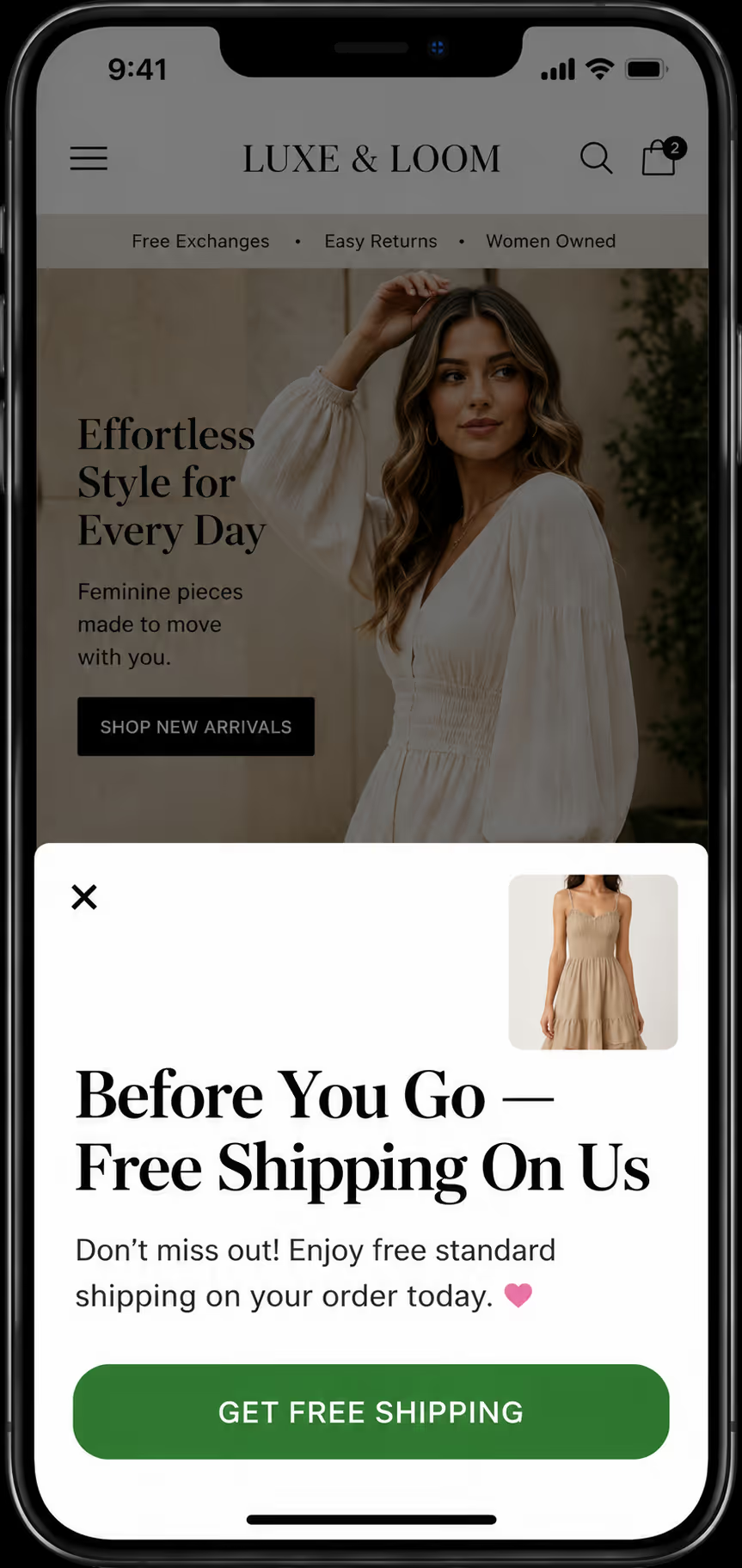
Trigger: Back-button press (BBP)
Offer: Provide free shipping on the current order
Why this works: When a user presses the back button on a product page, they are showing high exit intent. This fashion brand takes advantage of that moment by offering free shipping. The popup uses minimal text and a single CTA button. The design does not take up the whole screen, which keeps the user from feeling confined.
Example 2: Beauty brand using scroll-up velocity
Brand: An anonymized UK-based skincare brand
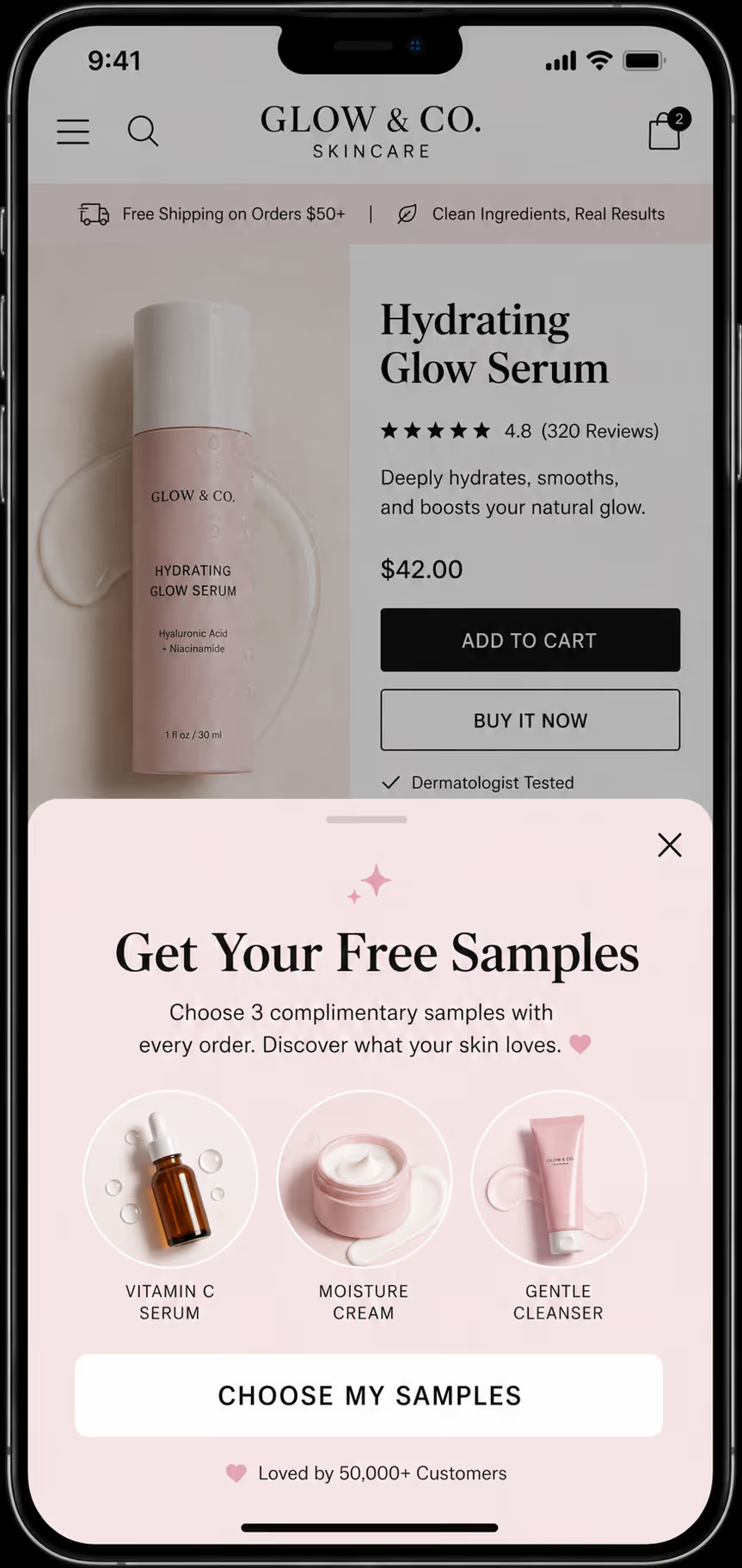
Trigger: A high scroll-up velocity
Offer: Provide sample bundle- 3 products for $10
Why this works: When a user quickly scrolls up on a product page, a bottom-sheet popup appears, presenting a free sample bundle. The popup displays three small product images, a brief line of text, and a Claim Samples button. The speed of scrolling captures users who are still on the page but are about to leave. And here offering a sample bundle requires little commitment and is effective for beauty brands where customers prefer to try before they buy.
Example 3: Food brand using inactivity timer
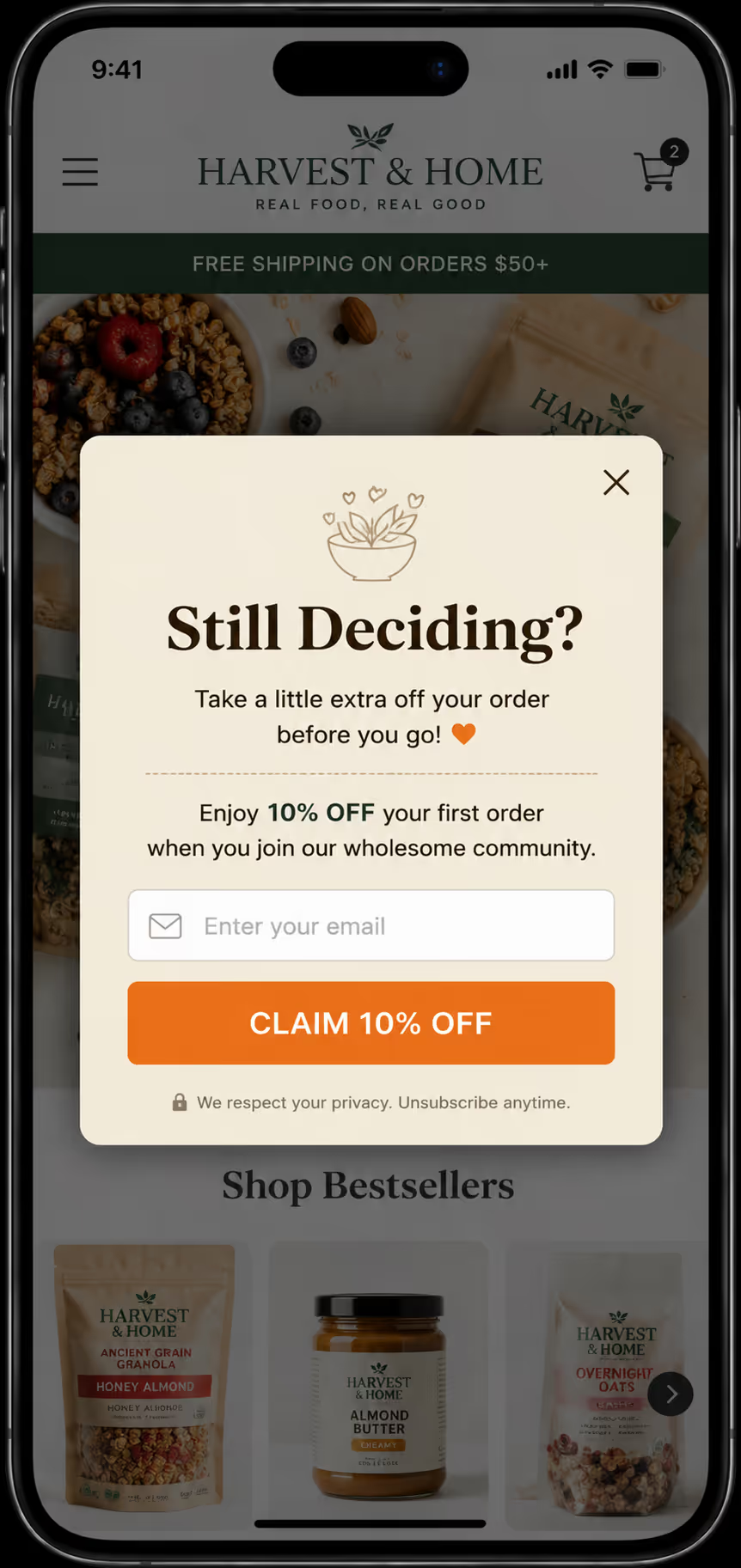
Brand: Anonymous US-based organic food brand
Trigger: An inactivity timer of 25 seconds
Offer: Provide 10% off the first order
Why this works: After 30 seconds of no taps or scrolling, this food brand assumes the user has lost focus or is about to leave. The popup text here should be friendly and direct, like, Still thinking? The discount is modest but effective for first-time orders. Keep in mind that the timer should not be too short, 25 to 35 seconds works best.
Example 4: Electronics brand using tab switch
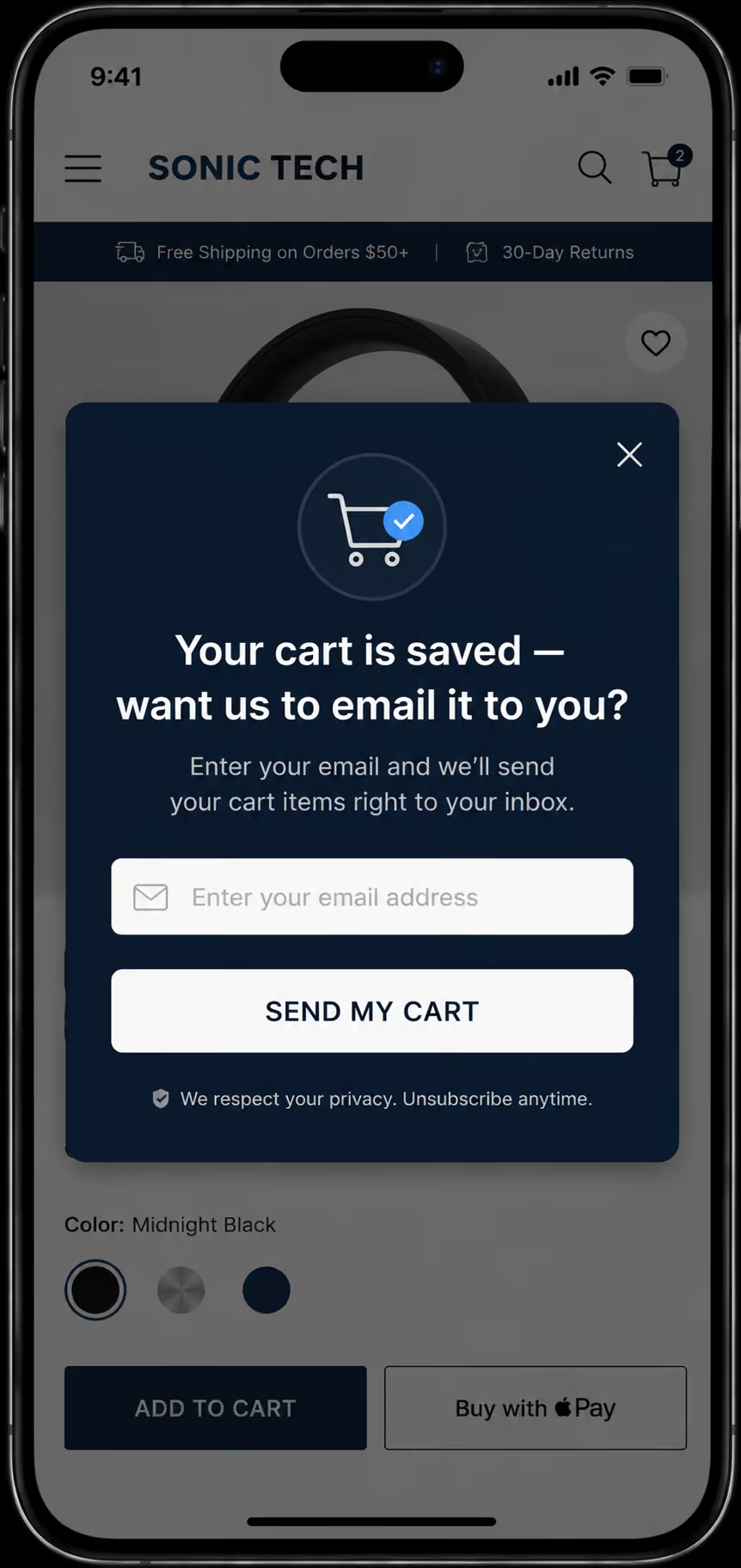
Brand: A global electronics retailer
Trigger: A tab-switch / blur event
Offer: Give a Save your cart reminder, or email cart link
Why this works: When a user switches to another app to compare prices or read reviews, this popup triggers when they come back. The offer is not a discount. It is a simple cart-saving reminder. This works well for high-consideration products like electronics, where users research before buying, and also frequently check for prices on different tabs and apps. This popup recognizes that habit and provides a helpful option instead of a forceful pitch. It also collects an email address easily.
Example 5: Subscription box with email capture exit popup
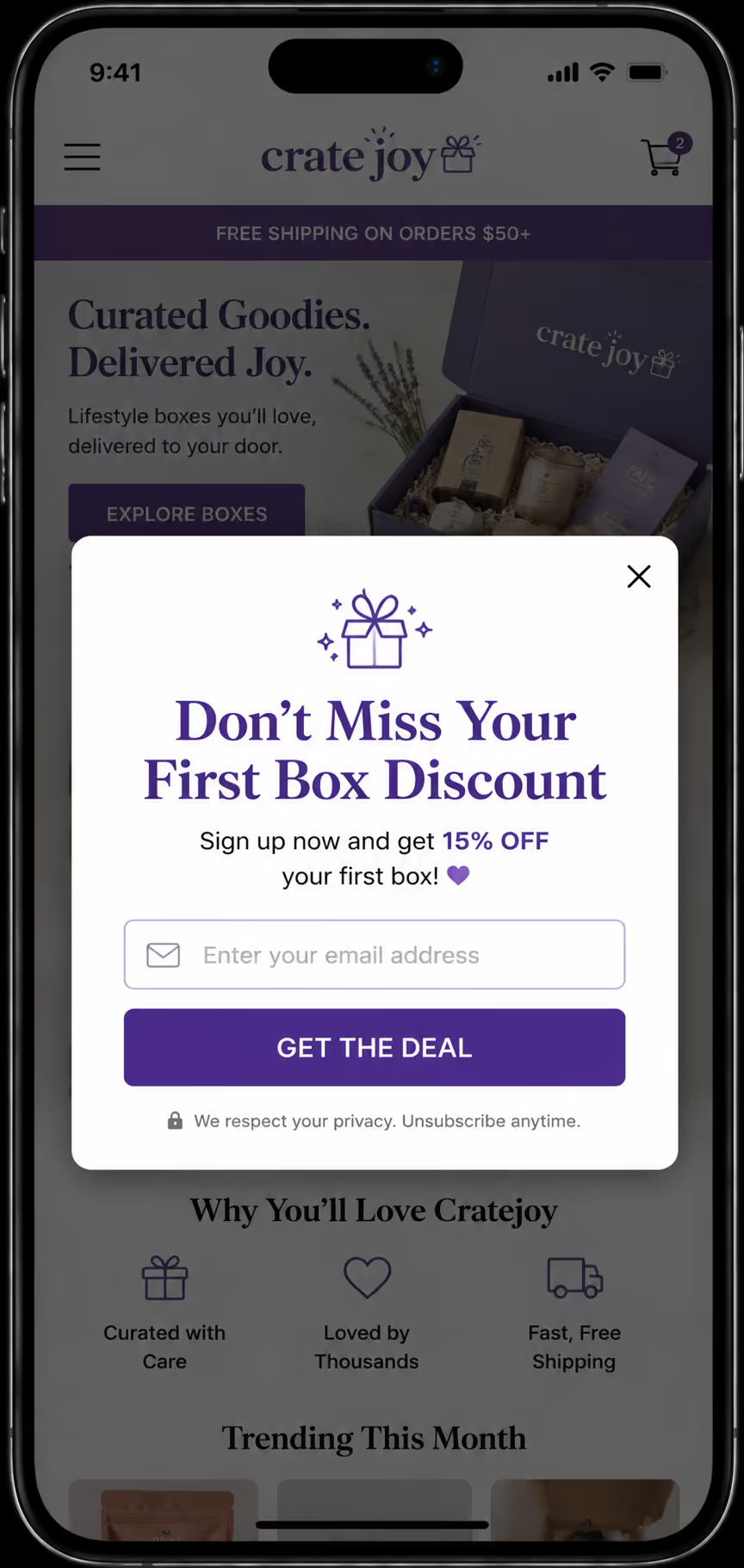
Brand: A UK-based lifestyle subscription box
Trigger: A back-button press or fast scroll-up velocity
Offer: Provide a first box discount in exchange for their email
Why this works: Since subscription brands need recurring customers, this mobile exit intent popup captures email addresses before the user leaves the pricing page, where the offer is clear and valuable. The design uses a single field for email input, which reduces the hesitation in customers. Here, capturing the email means you can follow up with the full offer over time, even if the user doesn't convert immediately.
Example 6: Low average order value brand with spin-to-win exit popup
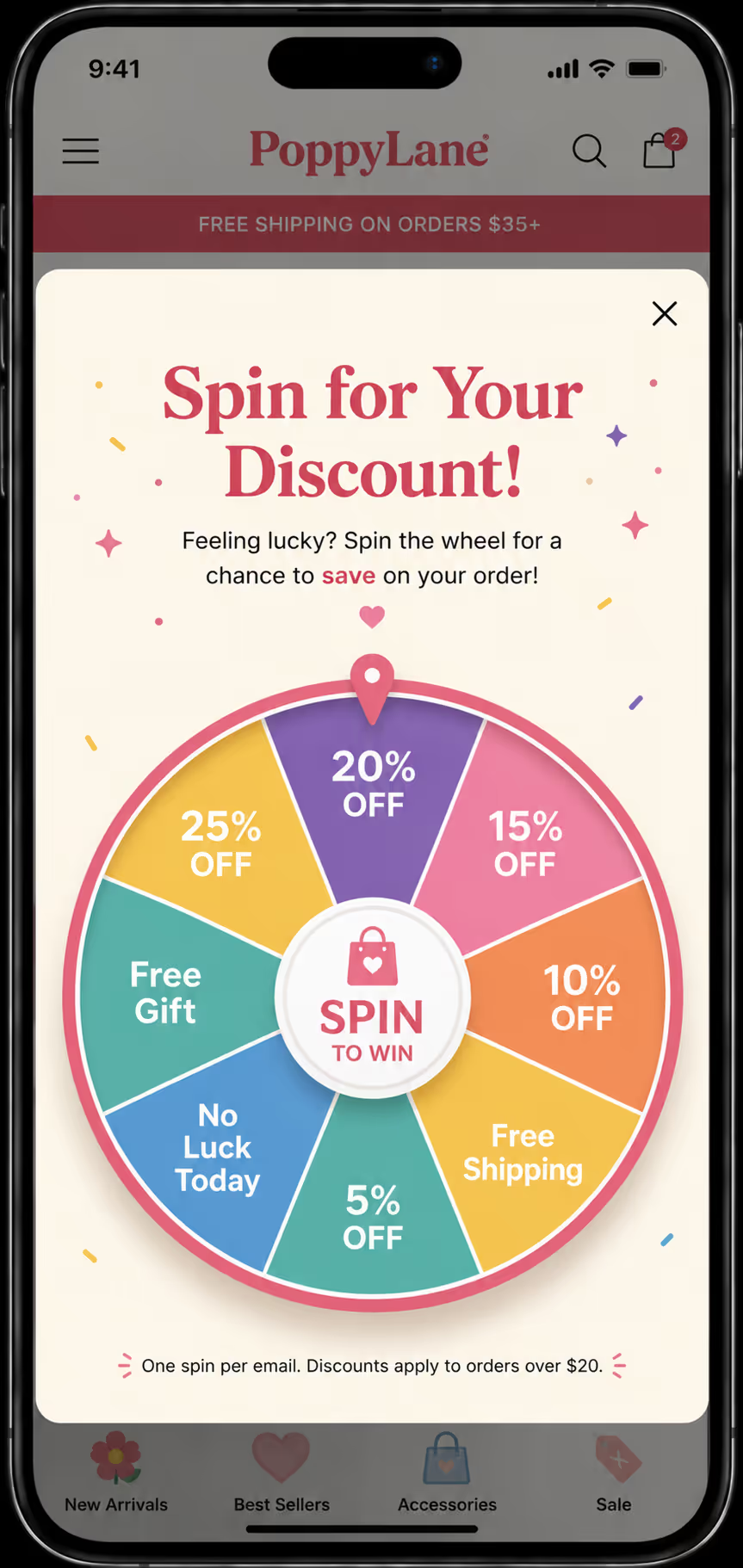
Brand: A US-based accessories brand
Trigger: A back-button press
Offer: Provide a tiered discount via spin-to-win, like 10–20% off
Why this works: Usually, the brands that sell products with a low average order value, such as those under $30, need offers that seem more valuable. The users see a gamified spin wheel pop-up, which adds to the excitement, and the users feel they are getting a special deal, which is triggered by the back-button press, which catches users comparing prices or leaving after adding low-cost items to the cart.
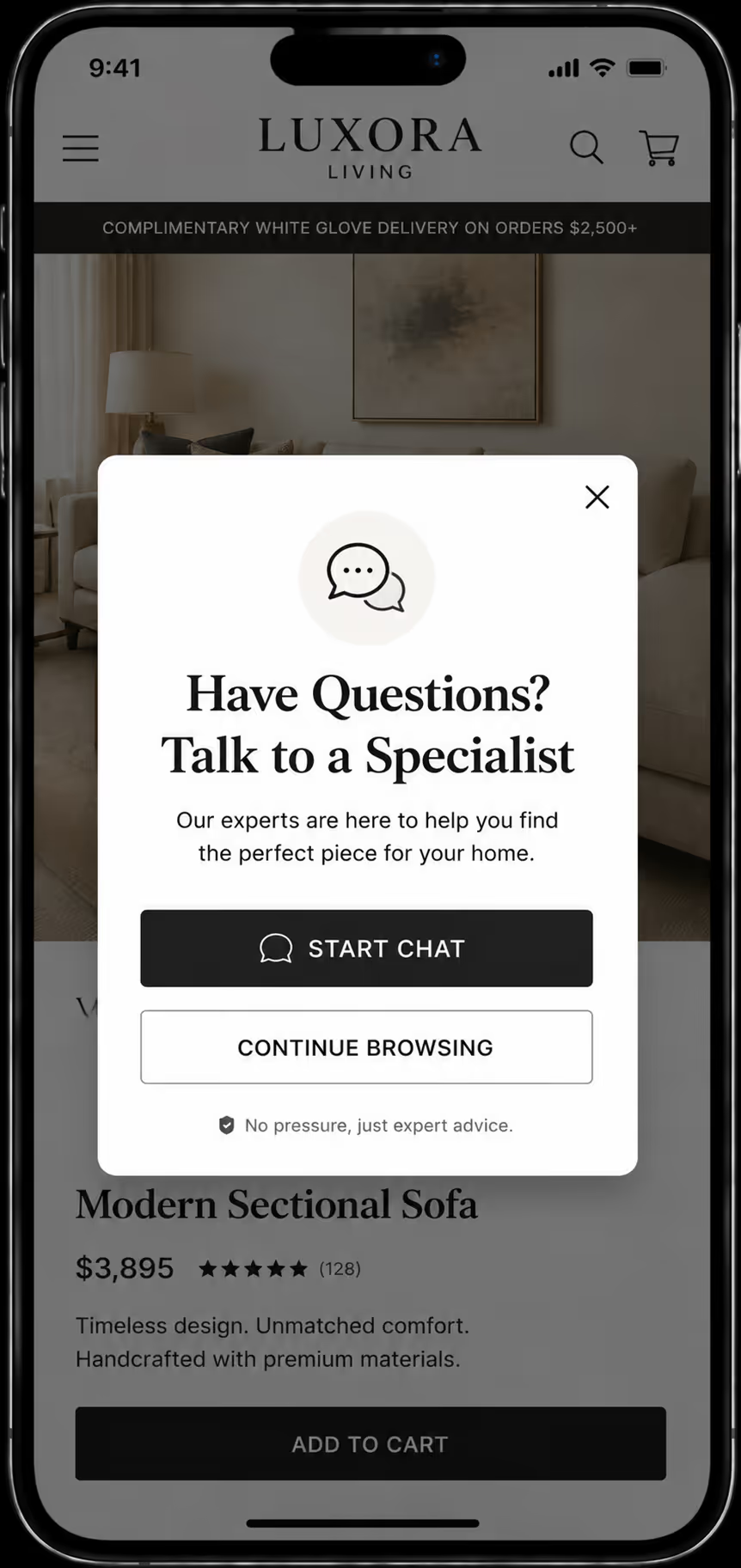
Brand: An Australian luxury homewares brand
Trigger: An inactivity timer of 30 seconds
Offer: Offer to start a live chat instead of a discount
Why this works: The high average order value brands, whose products are over $500, usually don't offer much discounts. The popup invites the user to chat with a product specialist instead, which becomes a strong approach for such high-AOV brands where trust and product knowledge matter more than price or providing a discount to their customers.
Example 8: Jewelry brand with get a reminder popup
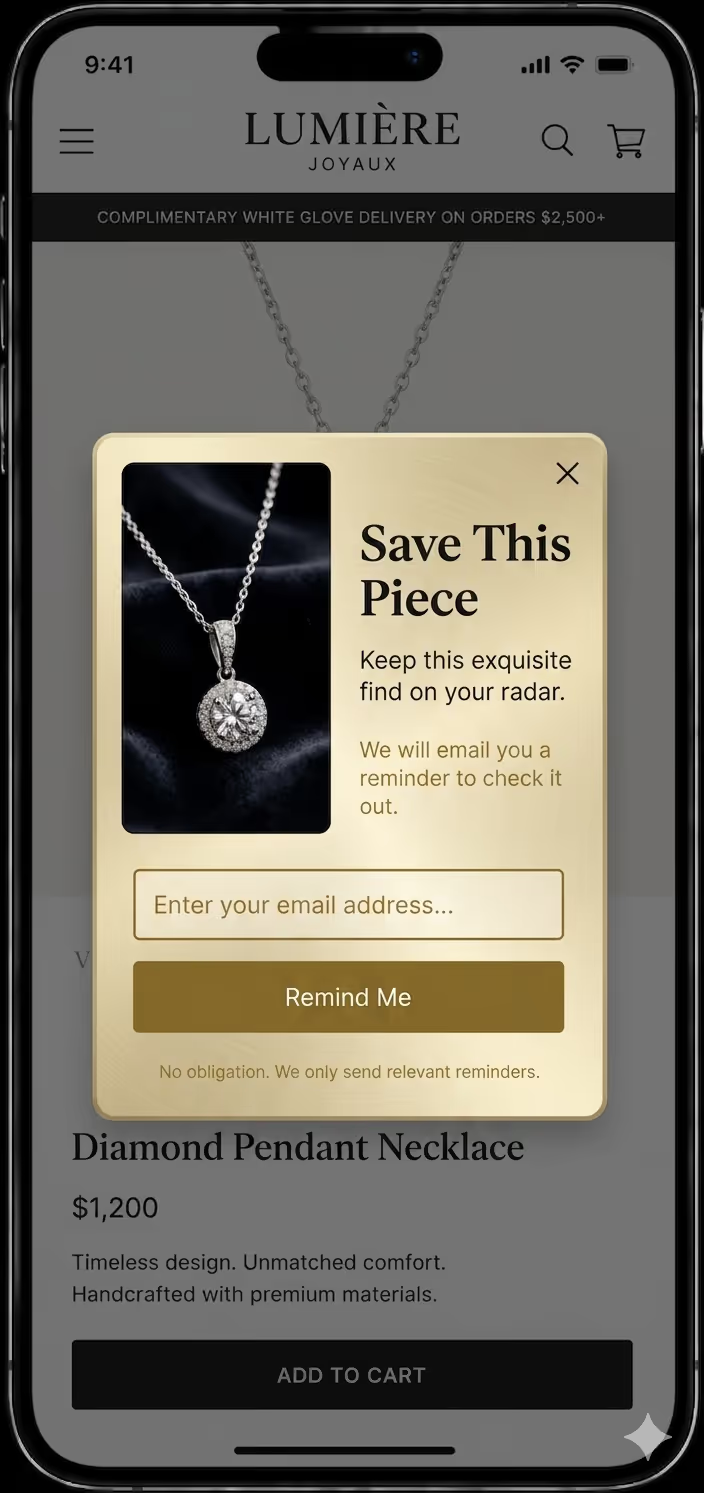
Brand: A US-based fine jewelry brand
Trigger: A sudden or high scroll-up speed
Offer: Provide email opt-in to save and revisit a product, no discount
Why this works: Since jewelry purchases are rarely impulsive, this popup fits the buying behavior, it does not pressure the user but stays in their minds via email. Not every exit needs a discount, this jewelry brand offers a simple reminder service. The user enters their email, and the brand sends a follow-up about the product they viewed. This works well for gift shoppers who are not ready to buy immediately, plus the design is clean and uses soft colors.
Example 9: Apparel brand providing SMS opt-in
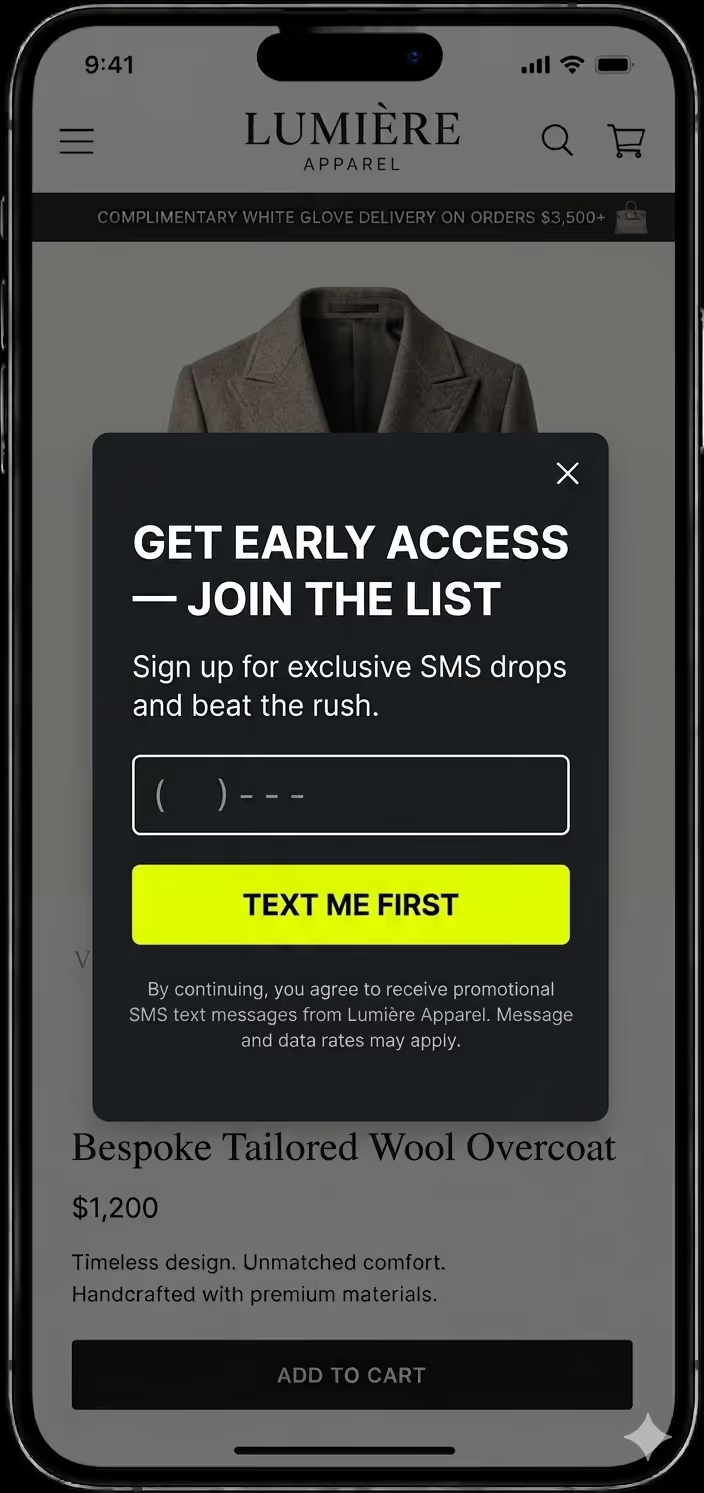
Brand: A UK-based fitness supplements brand
Trigger: A back-button press
Offer: Offer them with a cart expiry reminder with urgency
Why this works: This fitness brand uses urgency instead of discounts. The popup reminds users that their cart items are not reserved. A countdown timer popup appears on back-button press, showing the user's cart items and a 15-minute countdown that is visual only, not functional in the description. This works well for brands that avoid discounting.
Check out these Abandoned Cart SMS Sequences for Shopify
What Should You Avoid With Mobile Exit-Intent Popups?
When it comes to showing the exit intent popup to your users, as the name suggests the intent here is to capture leaving traffic. But doing it the wrong way can hurt your user experience and SEO. It is best to avoid these six common mistakes with exit intent on mobile.
Don’t cover the full screen on landing
Understand that Google has a mobile intrusive penalty, so if you show a full-screen popup immediately when a user lands on your site, Google may lower your search ranking. The exit-intent popups are allowed because they trigger only when the user is about to leave. But make sure your mobile exit intent popup does not cover the entire screen on the first pageview. You can keep it to 75–80% of screen height maximum.
Do not trigger on the first pageview
You need to respect and keep in consideration the user intent on your page. A popup that appears within 5 seconds of landing is not an exit popup, it is an entry popup. That frustrates users and increases the bounce rate, that's why your mobile exit intent triggers should only fire after the user has shown exit behavior, not when they just arrived.
Don't block the back button
This can really frustrate your visitors and users, which can lead to losing trust on your website/brand, and abandoning your site completely. A blocked back button is one of the fastest ways to lose trust, so your exit popup should close easily, and the back button should always work as expected.
Avoid showing the same popup repeatedly
If a user dismisses your popup and sees it again five minutes later, they will lose trust in your store quickly. Set frequency capping rules so the same popup does not appear more than once or twice per session, and not again for at least 24 hours after dismissal. Also, do not show the popup again after the user has already subscribed.
Using the same desktop copy on mobile
Since the activity for exit intent on a desktop is different from that of a mobile, using the copy that does not match what the user is actually doing, can be misleading or confusing. Make sure the copy is properly suited for mobile actions, and is short, direct, and relevant to the action they were taking on that specific page.
Avoid aggressive timers
Don’t use a 3-second inactivity timer, that is not exit intent. It is best to stick to 25–35 seconds minimum for inactivity-based triggers. Also, avoid combining too many triggers on the same page, as this can cause overlapping popups.
Should You Use Mobile Exit-Intent for Email, SMS, or Web Push?
Now that we have understood what and how exit intent popups work, if you are wondering which channel to use for capturing users, here is a simple breakdown. The right choice depends on your goal: email capture, SMS subscriptions, or web push notifications.
Web Push: The Lowest-Friction Mobile Exit-Intent Channel
Web push notifications require just one tap to opt in. There is no form to fill, no email to type, and no phone number to share. The browser handles the permission request natively. This makes web push the easiest opt-in to complete on a small screen, which is exactly why it works well as an exit-intent offer on mobile. If your goal is to maximize opt-in volume, you can choose to start here.
SMS: Highest Intent, More Setup Required
This type usually has the highest intent because users share their phone number, which is a more personal channel. This also shows that the user here is more committed than someone who clicks a browser notification. But remember, SMS opt-in popups require compliance disclosures, which take up screen space on mobile. The design of the popup should consider this while avoiding clutter.
Email: Widest Reach, Best for Content Offers
Since email works across every device and platform without any permission constraints, it is the right channel for content-based offers. You can share style guides, lookbooks, and product comparison tools. If your exit popup is offering something to download or read, email is still the most practical capture method.
A Hybrid Approach: Using Email, SMS, and Web Push Together
You do not have to choose one channel. A hybrid flow works like this:
- First, ask for web push permission, with one tap
- After subscription, now offer an email capture, which can be optional
- Then, for your high-intent users, you can offer SMS as a third step
PushOwl Pro Tip: A single mobile exit intent popup can present all three channels one after the other. PushOwl's popup builder allows this hybrid flow directly in Shopify. This way, you can check and determine which channel works best for your audience.
How Does PushOwl Enable Mobile Exit-Intent on Shopify?
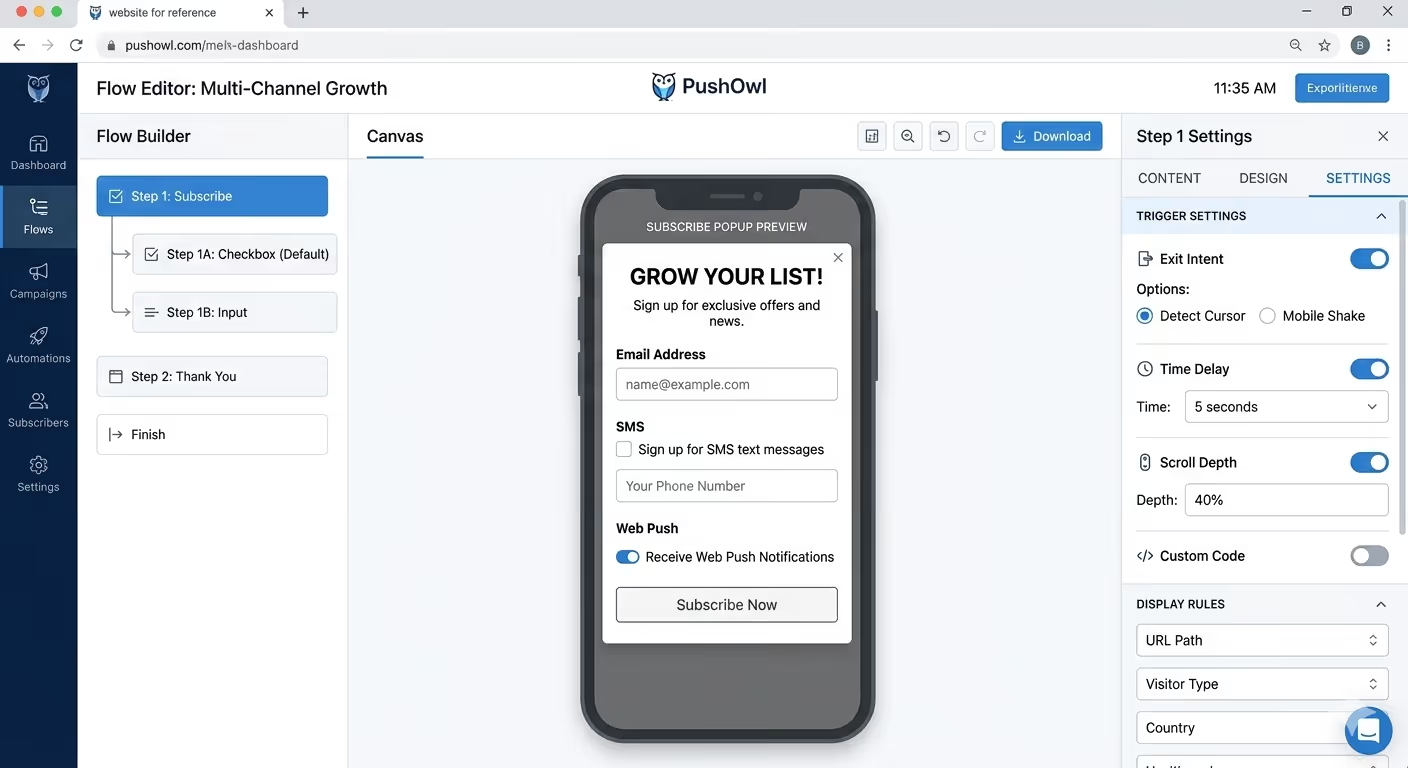
When you use PushOwl, it becomes easy for you to implement exit intent mobile popups without any coding. The app is built specifically for Shopify and includes all the mobile-specific features you need.
1. Mobile-specific exit-intent triggers
PushOwl includes all four mobile exit intent triggers discussed earlier, which are back-button press, scroll-up velocity, inactivity timer, and tab-switch events. You can select which trigger to use for each popup without writing any custom code.
2. Provide a unified opt-in flow for email, SMS, and web push
With PushOwl, you can collect email, SMS, and web push subscribers in a single popup flow. Instead of showing three separate popups, visitors see one seamless experience. You can prioritize channels in any order. For example, ask for web push first, one tap, then offer email as a second step. This hybrid approach can help increase your overall subscription rates.
3. A/B testing for mobile and desktop
You can create different versions of your popup for mobile and desktop users. So here you can test which trigger works better on mobile, as well as different offers. PushOwl's A/B testing shows you real conversion data so you can optimize your mobile exit intent popup over time.
4. Having frequency capping built in
This feature is built in when you use PushOwl by default. You can set how many times a user sees the popup per session. The standard recommendation is 1 to 2 times per session, and PushOwl makes this easy to configure for your store.
5. Provide pre-tested mobile templates
You can make use of ready-to-use popup templates that are pre-tested on mobile devices. These PushOwl templates follow mobile design best practices, like large CTA buttons, visible close buttons, and screen coverage under 80%. You can also customize colors, text, and images using the drag-and-drop editor.
Conclusion
We learnt how important it is to use the right signals for exit intent on mobile. It is best to treat mobile exit-intent as its own strategy and not a copy of what works on desktop. The 12 exit intent popup examples above show that different brands use different triggers based on their audience and offer type.
If you are ready to put this into practice, PushOwl makes it straightforward to build and test mobile-first exit-intent popups on your Shopify store.
Ready to stop losing mobile visitors? Start with PushOwl’s Shopify exit-intent popups — all four mobile exit signals included, no coding required. You may also want to explore our guides on web push notification strategies, SMS segmentation for Shopify, and reducing cart abandonment on mobile.